
Transcript With Timestamps: How to Get One From Any Recording

Sarah Johnson
Writes about field sales, meeting notes and voice-first workflows at ParrotNotes. Every article is reviewed by the ParrotNotes product team before it goes live.
Table of Contents
It's 4:40 PM and Priya's editor has one question about her school bus story: "Where does he say eleven routes?" The interview runs 52 minutes. Without times in her notes, she'd be dragging a slider back and forth until deadline.
With a transcript with timestamps, she searches "eleven", reads [00:14:36], and replays six seconds. (Priya is an illustration, not a real reporter.)
A timestamp gets you from a line of text back to the audio that proves it, and most recordings can give you one without a paid transcription service. Where the times come from depends on where the recording lives:
| Your recording | Quickest route to timestamps | What you get |
|---|---|---|
| Audio or video file on a Mac or Windows PC | Word for the web (Microsoft 365), or the free Whisper tool | Timed sections in Word; an SRT or VTT file from Whisper |
| Phone recording, iPhone or Android | A recorder app that transcribes, then replay from the text | A transcript tied to the audio inside the app |
| Zoom, Teams or Google Meet | The meeting's own transcript | A VTT file (Zoom, Teams) or a Google Doc (Meet) |
| YouTube video | Show transcript under the video | Time-coded lines you can click and copy |
Each route is covered step by step below, after a look at the formats. Recording the interview yourself this week? ParrotNotes records on your iPhone or Android phone, with the other person's permission, and gives you a transcript and a summary when you stop.
What is a transcript with timestamps?
A transcript with timestamps is the written text of a recording with time markers that show when each part was spoken. Speechpad, a transcription company, puts it this way: "Timestamps are markers in the transcription to indicate when the adjacent text was spoken."
The usual form is hours, minutes and seconds in square brackets, counted from the start of the recording. So [00:01:15] means one minute and fifteen seconds in. GoTranscript's transcription guidelines use the same form, [00:00:00], and want it in bold.
Why bother with timestamps in transcription? They let you find a quote, replay the exact seconds before the words go inside quotation marks, and point a reader to 14:36 in place of "about a quarter of the way in". Captions depend on them too: a subtitle file is a transcript where every line has a start and an end time.
Timestamp formats: the same 40 seconds, four ways
The dialogue below is invented for this article, and so are the people. Priya Nair asks a depot manager, Carl Brandt, about cancelled school bus routes. Every version covers the same 40 seconds of audio, so you can see what each style changes.
1. Periodic timestamps (fixed intervals)
A marker lands at a set interval, wherever the speaker happens to be. This sample uses 15 seconds so the pattern shows.
[00:14:30] NAIR: How many routes did the depot cancel in October? BRANDT: Eleven. Nine of them in the first week, [00:14:45] because we were four drivers short. NAIR: And how many drivers are you short today? BRANDT: Two. We hired two in November, [00:15:00] and one starts Monday.
Speechpad sells this style at 15 seconds, 30 seconds, 1 minute or 2 minutes. GoTranscript's interval is every 2 minutes.
2. Speaker-turn timestamps
A marker at every change of speaker. This is the style most interview transcripts use.
[00:14:30] NAIR: How many routes did the depot cancel in October?
[00:14:36] BRANDT: Eleven. Nine of them in the first week, because we were four drivers short.
[00:14:49] NAIR: And how many drivers are you short today?
[00:14:54] BRANDT: Two. We hired two in November, and one starts Monday.
3. Sentence timestamps
A marker at the start of every sentence. It's precise, and it's heavy to read.
[00:14:30] How many routes did the depot cancel in October?
[00:14:36] Eleven.
[00:14:38] Nine of them in the first week, because we were four drivers short.
[00:14:49] And how many drivers are you short today?
[00:14:54] Two.
[00:14:56] We hired two in November, and one starts Monday.
4. Caption cues (VTT and SRT files)
Caption files carry a start and an end time on every line. This is WebVTT, the format Zoom and Teams hand you:
WEBVTT

00:14:30.000 --> 00:14:35.500
<v Priya Nair>How many routes did the depot cancel in October?

00:14:36.000 --> 00:14:48.000
<v Carl Brandt>Eleven. Nine of them in the first week, because we were four drivers short.
The W3C WebVTT specification sets the pattern: a start time, the arrow -->, an end time, with three digits of milliseconds after a full stop. SRT files look much the same, with a comma before the milliseconds and a number above each cue.
Which timestamp style fits which job?
| Your job | Style to use | Why |
|---|---|---|
| News or feature interview | Speaker turn, plus one on every quote | You search by speaker and check quotes fast |
| Long oral history or raw footage log | Periodic, every 1 or 2 minutes | Light on the page, still easy to find a passage |
| Legal-style or word-critical work | Sentence | Every claim can be replayed on its own |
| Podcast page for listeners | Speaker turn, or one per topic | Readers jump to the part they care about |
| Captions, subtitles, podcast apps | VTT or SRT cues | Players need a start and end time on each line |
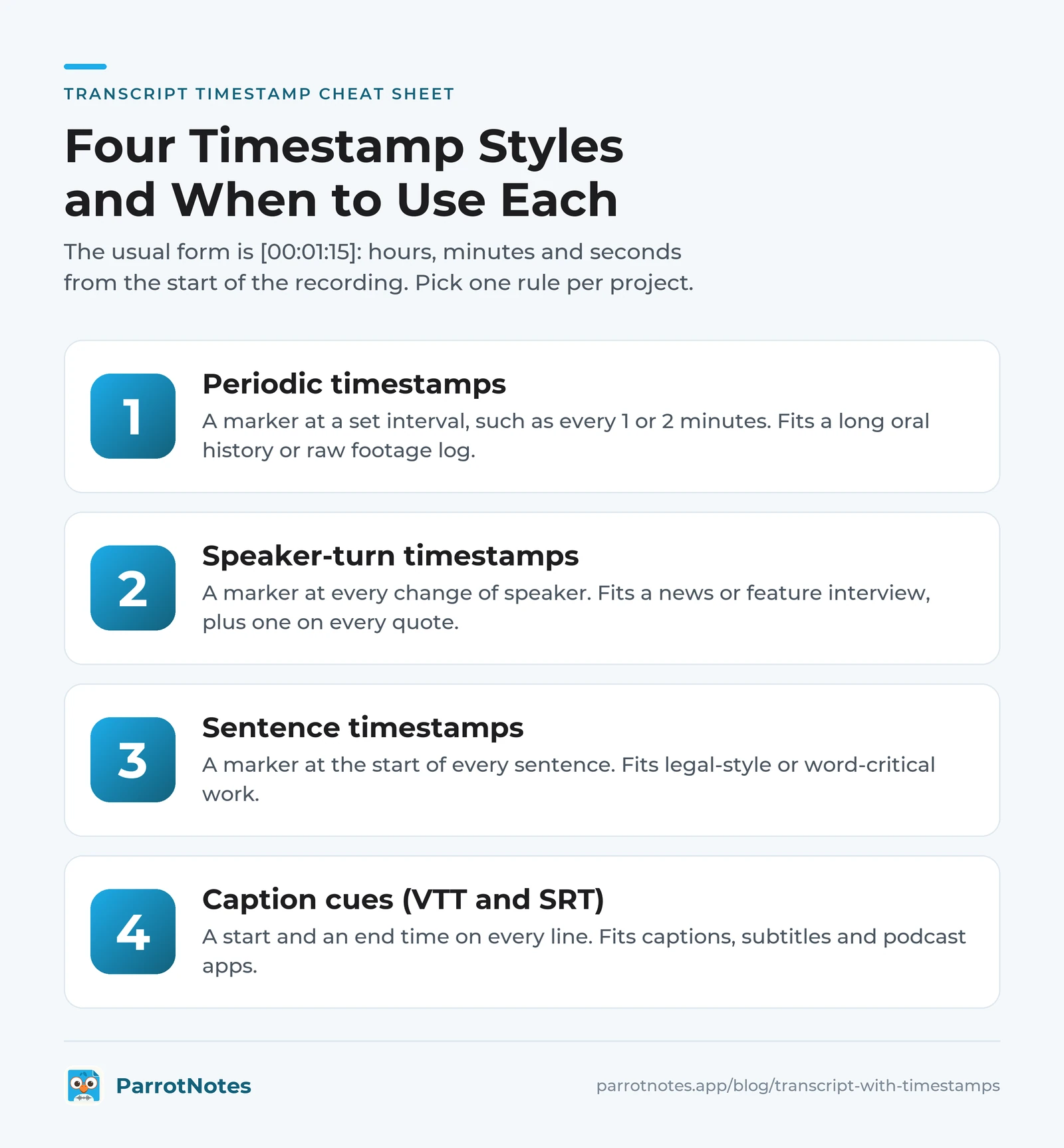
Pick one rule per project and write it in the transcript's header. Our interview transcript examples show full samples with a header block, and the transcription guidelines post compares how Rev, GoTranscript and others set their timestamp rules. Podcasters will find the page and file layouts in the podcast transcript format guide.
How to get a transcript with timestamps from any recording
Product details below come from each vendor's own help pages, read on November 17, 2026. Menus move, so treat the paths as "as of November 2026".
From an audio or video file on a Mac or Windows PC
Word for the web. If you pay for Microsoft 365, Word has a Transcribe feature. Microsoft's Transcribe your recordings page says subscribers can transcribe up to 300 minutes of uploaded audio a month, in .wav, .mp4, .m4a or .mp3 format. The transcript arrives in sections labelled Speaker 1, Speaker 2 and so on, and you can "select the timestamp of any transcript section to play that portion of audio." Our guide to transcribing audio in Word covers which accounts and browsers get the feature.
Whisper, free on your own computer. OpenAI's Whisper is an open-source speech-to-text tool under the MIT License. It runs from the command line on Mac or Windows, and it needs Python and ffmpeg installed first:
pip install -U openai-whisper
whisper interview.mp3 --model turbo --output_format srt
Its output formats are txt, vtt, srt, tsv and json, so the SRT or VTT file is your timestamped transcript. Word-level timestamps exist too, behind a flag the project labels experimental. Not at home in a terminal? Use Word.
Only need the words? Our free audio to text converter takes a file up to 10 minutes and returns a transcript and a short summary. It's plain text with no timestamps, so use it for a short clip you'll time by hand (the method is further down).
From a phone recording on iPhone or Android
Phone recorders tie the text to the audio inside the app, which covers most quote-checking.
- iPhone, Voice Memos. Apple's Voice Memos guide describes viewing, copying and searching a transcript. In the Mac version of the guide, "when you select a term in the transcription, the playhead appears at that location in the audio waveform"
- Google Pixel, Recorder. Google's Recorder help page says a search can "find the exact time the word was spoken"
- Neither page mentions timestamps in the copied text. Paste a transcript into a document and check what arrives before you rely on it
For an interview you'll quote from, ParrotNotes is built for the job: put the phone on the table, ask permission, and press record. Recording carries on with the screen locked. When you stop, the app gives you a transcript and an AI summary, and you can search the text for the word you need. On the Pro plan the transcript carries timestamps and speaker labels.
What the free plan includes: 100 minutes of recording a month, up to 30 minutes per recording, an AI summary on every recording, 3 audio or video imports a month, keyword search, and export as text or markdown. Pro is $19.99 a month, or $14.99 a month billed annually, with 3,000 minutes a month, recordings up to 3 hours, speaker identification and export to docx and PDF. The apps run on iPhone, Android and Mac.
One habit matters more than any app. Ask before you record, and get the "yes" on tape. Recording rules differ by state and country; our overview of one-party consent states explains the basics, and the Reporters Committee for Freedom of the Press keeps a state-by-state recording guide. This is general information, not legal advice.
From a Zoom, Teams or Google Meet recording
If the meeting platform made a transcript, the timestamps already exist. You only have to download them.
| Platform | Where the transcript is | Timestamps | Who can get it |
|---|---|---|---|
| Zoom | Web portal > Recordings & Transcripts > Cloud recordings | Saved in VTT format, "divided into sections, each with a timestamp" | Pro, Business, Education or Enterprise accounts with cloud recording and audio transcript on |
| Microsoft Teams | Meeting chat > Recap > Transcript > Download | The transcript "includes each speaker's name and time stamp"; downloads as .docx or .vtt | Organizers and co-organizers by default |
| Google Meet | The organizer's Google Drive, in the Google Meet folder | Google's page doesn't say; open one of your own files to check | Listed Workspace editions |
Sources: Zoom's audio transcript article, Microsoft's live transcription page and Google's Meet transcripts page, as of November 2026.
A raw VTT file has a time line above every few words. That's fine for a video player, but it's hard on a reader.
Take Hannah, a PhD student with nine Zoom interviews (an illustration). She drops each .vtt into our free VTT to text converter and picks Text with timestamps. The cue numbers go, the lines merge into paragraphs with speaker names, and each paragraph keeps one time stamp. Nine files, no retyping.
Plan limits and setup steps are in our guides to transcribing a Zoom recording, Teams transcription and Google Meet transcription.
From a YouTube video
YouTube's View video transcripts page gives the route: open the video's description and click Show transcript. A panel of time-coded lines opens, and YouTube says you can "click any line of caption text to jump to that part of the video." Select the lines and paste them into a document to keep the times.
It works on any video that has captions. For videos without them, your own channel's caption files, and cleaning up auto-captions, see how to transcribe a YouTube video.
How to add timestamps to a transcript by hand
Sometimes you've got plain text and a recording, and nothing else. Adding stamps by hand is slow for every line and quick for the lines that matter.
- Write your rule first. For example: one stamp at each question, and one on every line you might quote
- Open the audio and the text side by side. Any player that shows elapsed time will do
- Play, pause at each question, and type the time as [hh: mm: ss] at the start of the line
- Stamp every gap. Next to [inaudible] or [crosstalk], add the time so the next listener can jump there
- Spot-check three stamps from the start, middle and end against the audio
The offset catch, with a worked example
Recordings often arrive in pieces. Dev, a podcaster (an illustration), gets his guest interview as two files: part 1 runs 20 minutes, and part 2 starts where part 1 stopped. His player shows 03:12 when the guest gives the line he wants. That isn't the timestamp.
GoTranscript's guidelines spell out the rule for its transcribers: consider the whole file, so someone typing the 20 to 30 minute part starts their stamps at 20, not 00. So Dev adds the offset:
| Time in part 2 | Offset (length of part 1) | Timestamp to write |
|---|---|---|
| 03:12 | + 20:00 | [00:23:12] |
| 41:55 | + 20:00 | [01:01:55] |
Got stamps in your text and need subtitles? The free TXT to SRT converter reads the timestamps in a transcript and builds a timed SRT file from them.
Check the timestamps before you quote
A machine-made transcript is a first draft, and that includes its times. Run these five checks before a line leaves your notes:
- Replay every quote at its timestamp. If the words differ, the audio wins
- One form throughout. [00:14:36] everywhere, never 14.36 in one place and 14m36s in another
- Times count from the start of the full recording, not the start of a clip
- Every [inaudible] has a time next to it
- The header states the rule, such as "timestamps at each speaker turn"
The full method, from recorder setup to the proofreading pass, is in our guide on how to transcribe an interview. For trims, ellipses and attribution, see how to quote an interview.
Get your next transcript with timestamps
A timestamp earns its place the moment someone asks, "Did they really say that?" Meetings on Zoom or Teams already have the times in a VTT file. A file on your computer goes through Word or Whisper, and YouTube needs one click on Show transcript. Whatever the source, keep one rule, one form, and replay every quote.
For the next interview you record yourself, start with the phone already in your pocket. Try ParrotNotes free on your iPhone or Android phone, record with permission, and have the text ready to check before you're back at your desk.
Frequently Asked Questions
What is the correct timestamp format in transcription?
There's no single standard. The most common form is [hh: mm: ss] in square brackets, which transcription companies such as Speechpad and GoTranscript both use. Caption files are stricter: WebVTT writes 00:14:30.000 with a full stop before the milliseconds, and SRT writes 00:14:30,000 with a comma.
How often should a transcript have timestamps?
Interviews you'll quote from usually get one at each speaker turn. Long recordings read better with one every 1 or 2 minutes; GoTranscript's interval option is every 2 minutes. Sentence-level stamps suit word-critical work. Always add one next to anything marked inaudible.
How do I get a YouTube transcript with timestamps?
Open the video's description on YouTube and click Show transcript. A panel opens with time-coded lines, and clicking a line jumps to that part of the video. Select the lines and paste them into a document. It works only on videos that have captions.
Can I turn a Zoom or Teams VTT file into a readable transcript with timestamps?
Yes. A VTT file has a time line above every caption, which is hard to read. A converter such as the free ParrotNotes VTT to text tool can merge the lines into paragraphs, keep the speaker names, and leave one time stamp per paragraph.
Related Posts
Wave AI Note Taker Review: The iPhone and Android App, Plans and Limits
Wave AI Note Taker review from its own pages, checked November 2026: the 30 free minutes, Pro prices, iPhone and Android limits. Try ParrotNotes free.

tl;dv Review: The Meeting Recorder, Its Free Plan and Mobile App
tldv review from tl;dv's own pages, checked November 2026: the meeting bot, the bot-free desktop app, the iPhone and Android app, free limits and prices.
Rilla Voice Review: The In-Person Sales Recorder for Field Teams, Cost and Options
Rilla Voice review from Rilla's own pages, checked November 2026: what the in-person sales recorder does, cost, contract terms, options. Try ParrotNotes free.