
Interview Transcription Example and Format (3 Styles)

Sarah Johnson
Product Manager at ParrotNotes with 5+ years of experience in productivity tools and AI technology.
Table of Contents
- 1.Interview transcription example: one exchange, three styles
- 2.Interview transcription format: the parts of a finished transcript
- 3.Which interview transcription example fits your work?
- 4.Copy-ready interview transcript template
- 5.From recording to a transcript like this
- 6.Make your next interview transcription example your own
It's 10:40 PM. Priya, a freelance reporter, has a 52-minute recording, a 900-word story due at 8:00 AM, and a message from her editor: "Did he really say the repair was never scheduled? Send me the exact wording."
She has a transcript, of sorts. It's one unbroken block of text with no speaker names, no times, and a gap where two people talked at once. Finding the sentence takes her 25 minutes. Proving who said it takes longer.
You already know a transcript saves you from replaying audio. What the top search results rarely show is what a finished one looks like on the page. So this guide starts with an interview transcription example you can copy: one short exchange, written out in three styles, so you can see exactly what changes between them.
After the examples come the parts of the format, who sets the conventions, a blank template, and a 12-point checklist.
One disclosure first. The interview below is invented for illustration. Maya Okafor, the Harbor Ledger, Daniel Reyes, and the Port Alder Water Department don't exist.
Interview transcription example: one exchange, three styles
The scene: a local reporter is asking a water department manager about a main that burst on Carver Street. The three versions cover the same 45 seconds of audio.
Example 1: verbatim transcript
Verbatim keeps everything the recorder heard: fillers, repeated words, false starts, laughter, and the places where speech overlaps or can't be made out.
[00:04:12] OKAFOR: So, um, when did the department first know the main on Carver Street was, was at risk?
[00:04:19] REYES: Uh, so we-- the first inspection report, I think, was, um, March of 2024. And it, you know, it flagged corrosion on about, uh, 40 feet of pipe.
[00:04:31] OKAFOR: Forty feet. And the repair was scheduled for--
[00:04:34] REYES: --[crosstalk] it wasn't scheduled. That's, that's the thing. It went on the list, but, um, there was no money attached to it until this year.
[00:04:45] OKAFOR: Mm-hmm. Who made that call?
[00:04:48] REYES: [laughs] That's above my pay grade. I mean, the budget goes through the [inaudible 00:04:52] committee, and they, uh, they set the priorities. We just, you know, we send them the list.
Typing 45 seconds of speech at this level of detail is slow work. Want to start from a draft? Try ParrotNotes free: record the interview on your phone, with permission, and a transcript and summary are ready when you stop.
Example 2: clean verbatim transcript
Clean verbatim (also called intelligent verbatim) keeps every word that carries meaning and drops the clutter. The ums, the doubled words, and the "you know" are gone. Nothing is reworded, and the gap in the audio is still marked.
OKAFOR: When did the department first know the main on Carver Street was at risk?
REYES: The first inspection report, I think, was March of 2024. It flagged corrosion on about 40 feet of pipe.
OKAFOR: Forty feet. And the repair was scheduled for--
REYES: It wasn't scheduled. That's the thing. It went on the list, but there was no money attached to it until this year.
OKAFOR: Who made that call?
REYES: [laughs] That's above my pay grade. The budget goes through the [inaudible 00:04:52] committee, and they set the priorities. We send them the list.
Notice what stayed. "I think" is still there, because it tells a reader how sure Reyes was about the date. So is the cut-off question, because the interruption is part of the story.
Example 3: finished Q&A transcript with header, timestamps, and notes
This is the version you'd file, send to an editor, or put in an archive. It's clean verbatim in a Q&A layout, with a header block on top, a timestamp on each question, and quote-check notes in double brackets.
INTERVIEW TRANSCRIPT
Interviewee: Daniel Reyes, operations manager, Port Alder Water Department
Interviewer: Maya Okafor, Harbor Ledger
Date and place: September 14, 2026, department office, Port Alder
Recording: reyes-2026-09-14.m4a (38 min), recorded with permission, on the record
Style: clean verbatim. Timestamps at each question. Q = Okafor.
[00:04:12] Q: When did the department first know the main on Carver Street was at risk?
REYES: The first inspection report, I think, was March of 2024. It flagged corrosion on about 40 feet of pipe. [[VERIFY: date and length against the inspection report]]
[00:04:31] Q: Forty feet. And the repair was scheduled for--
REYES: It wasn't scheduled. That's the thing. It went on the list, but there was no money attached to it until this year. [[QUOTE 00:04:34: checked against audio, exact]]
[00:04:45] Q: Who made that call?
REYES: [laughs] That's above my pay grade. The budget goes through the [inaudible 00:04:52] committee, and they set the priorities. We send them the list. [[FOLLOW UP: which committee? Ask Reyes by email]]
[END OF EXCERPT]
If Priya had this version at 10:40 PM, her editor's question would take 30 seconds: search "scheduled", read the line, replay 00:04:34, and send the wording.
What changed between the three examples
Here's the comparison as a table, so you can pick a style before you start.
| Element | Verbatim | Clean verbatim | Finished Q&A |
|---|---|---|---|
| Filler words (um, uh, you know) | Kept | Removed | Removed |
| Repeated words and stutters | Kept | Removed | Removed |
| False starts | Kept, marked with -- | Removed when the speaker corrects course | Same as clean verbatim |
| Laughter and tags | Kept | Kept when they affect meaning | Kept when they affect meaning |
| Timestamps | Every turn | Optional | Every question, plus every gap |
| Header block | Optional | Optional | Yes |
| Quote-check notes | No | No | Yes |
| Reads like | The recording | The conversation | A document you can file |
One rule holds in every interview transcription example above. None of them rewrites what the speaker said. Clean verbatim removes noise. It doesn't fix grammar, swap words, or tidy an awkward sentence into a better quote.
Interview transcription format: the parts of a finished transcript
A finished interview transcript has six parts. Each one answers a question somebody will ask you later.
Header block
The header answers "what is this, and can I trust it?" Put it on top of every transcript, even the rough ones:
- Interviewee's full name and role
- Interviewer's name
- Date and place, or "by phone" or "by video call"
- Recording file name and length
- Whether the conversation was on the record, and that it was recorded with permission
- Transcript style and timestamp rule
Columbia University's Center for Oral History Research opens every session with a similar table. Its Oral History Transcription Style Guide lists the transcriptionist, narrator, interviewer, session number, location, and date.
Speaker labels
Start a new paragraph each time the speaker changes, and label every turn. You have two common choices:
- Surnames in capitals (OKAFOR, REYES) work well for reporting, because you can search for one speaker
- Q and a surname works well for long one-on-one interviews. Columbia's guide labels interviewers with a capital Q followed by a colon and narrators with their surname followed by a colon
For anonymous research interviews, use a code (P07) and keep the key somewhere else. Whatever you choose, use the same label on page 40 as on page 1.
Timestamps
A timestamp ties the text back to the audio. Write it as hours, minutes, and seconds in square brackets, like [00:04:12], so it can't be confused with anything else. Then pick one rule and state it in the header:
- Every speaker turn: best for verbatim work and for short interviews
- Every question: a good default for a 30 to 60 minute interview
- Fixed intervals, such as every 60 seconds: useful for long oral histories
- Always next to anything inaudible, so the next listener can jump straight to it
Tags for what the words can't show
Tags go in square brackets, inline, in plain present-tense words. The Columbia guide marks words that can't be made out as [unclear], and speech lost because people talked over each other as [crosstalk]. Commercial transcription templates tend to write [inaudible] for the same thing. Either works if you stay consistent.
| Tag | Use it when |
|---|---|
| [inaudible 00:04:52] | You can't make out the words after replaying. Add the time |
| [crosstalk] | Two people talk at once and words are lost |
| [phonetic] | You've spelled a name by ear and haven't verified it |
| [laughs], [pause] | The sound changes how the words should be read |
| [INTERRUPTION] | The recording stops or someone walks in |
| [END OF INTERVIEW] | The transcript is complete, not cut off |
The same guide says to use nonverbal tags sparingly and keep them neutral: "laughs", not "giggles" or "smirks".
Filler words and false starts
In clean verbatim, drop pause fillers (uh, um) and reflexive phrases (you know, kind of, sort of). Columbia's guide does the same and calls the result a "nearly verbatim" transcript.
False starts need judgment. If the speaker stumbles and then corrects course, keep the correction. If the false start carries meaning, such as a name they began to say and swallowed, keep it and mark the break. Columbia uses an em dash for that. A double hyphen (--) is a common plain-text alternative, and it's what the examples above use.
Quote-check notes
This last part is a working convention for reporters, not a published standard. While you read the transcript, flag three things in double brackets so they stand out from the ordinary tags:
- [[QUOTE 00:04:34]] on any line you may quote. Replay that moment and confirm the wording before it goes in your story
- [[VERIFY]] on any fact, number, date, or name the speaker gave from memory
- [[FOLLOW UP]] where the audio failed or the answer raised a new question
Strip the notes before you share the transcript outside the newsroom. They're for you and your editor.
Who sets these conventions?
There's no single standard for interview transcription format. Courts, archives, universities, and newsrooms each keep their own rules.
For long-form interviews, a thorough public reference is the Columbia guide linked above. It was revised in 2022, relies on the Chicago Manual of Style, and covers layout, labels, false starts, tags, and fact-checking.
For reporters, the rule that matters most isn't about layout. The Associated Press states in its News Values and Principles: "We do not alter quotations, even to correct grammatical errors or word usage." If a quote is flawed, AP says it may be paraphrased in a way that's completely true to the original. If the meaning is too murky to paraphrase, it shouldn't be used.
That has a practical consequence. A clean verbatim transcript is a reading copy, not the source for a direct quote. Before words go inside quotation marks, replay the timestamp and check them against the audio. Unsure whether an "um" can come out of a printed quote? Ask your editor, because newsroom policies differ.
Which interview transcription example fits your work?
Match the style to what happens to the transcript next. Each interview transcript example above suits a different job.
- News reporters: clean verbatim with a timestamp on every question, plus quote-check notes. You need to find the line fast and prove it
- Podcasters: clean verbatim with speaker names, since listeners and search engines will read it. Timestamps help you cut the episode
- Oral historians: nearly verbatim, following your archive's style guide, with a full header and an [END OF INTERVIEW] marker
- Qualitative researchers: verbatim or clean verbatim, depending on your method. If pauses and hesitation are part of your analysis, keep them. Use participant codes in place of names
Whatever you pick, pick it once per project. Consider Tomás, a graduate student with 14 interviews for an oral history of a closed cannery. He labelled the first five with names, the next six with "INT" and "P", and left timestamps out of the last three. When he began coding themes, he couldn't search by speaker across the set, and he lost a weekend reformatting 200 pages.
A one-page style sheet on day one would have saved that weekend. The template below can be that page.
Copy-ready interview transcript template
This is the interview transcription format from Example 3 as a blank. Copy it into a document, fill in the header, and keep the tag list at the bottom until the transcript is finished.
INTERVIEW TRANSCRIPT

Interviewee: [full name, role, organization]
Interviewer: [full name, outlet or project]
Date, place: [Month DD, YYYY] [city, or "by phone"]
Recording: [file name] ([length] min)
Permission: [recorded with permission; on the record / on background]
Style: [verbatim / clean verbatim]
Timestamps: [every turn / every question / every 60 sec]
Labels: [Q = interviewer; SURNAME = interviewee]
Prepared by: [name], checked against audio [date]

[00:00:00] Q: [First question]

SURNAME: [Answer. New paragraph for each change of speaker.]

[00:00:00] Q: [Next question]

SURNAME: [Answer]

[END OF INTERVIEW]

Tags used: [inaudible 00:00:00] [crosstalk] [phonetic]
[laughs] [pause] [INTERRUPTION]
Notes: [[QUOTE 00:00:00]] [[VERIFY]] [[FOLLOW UP]]
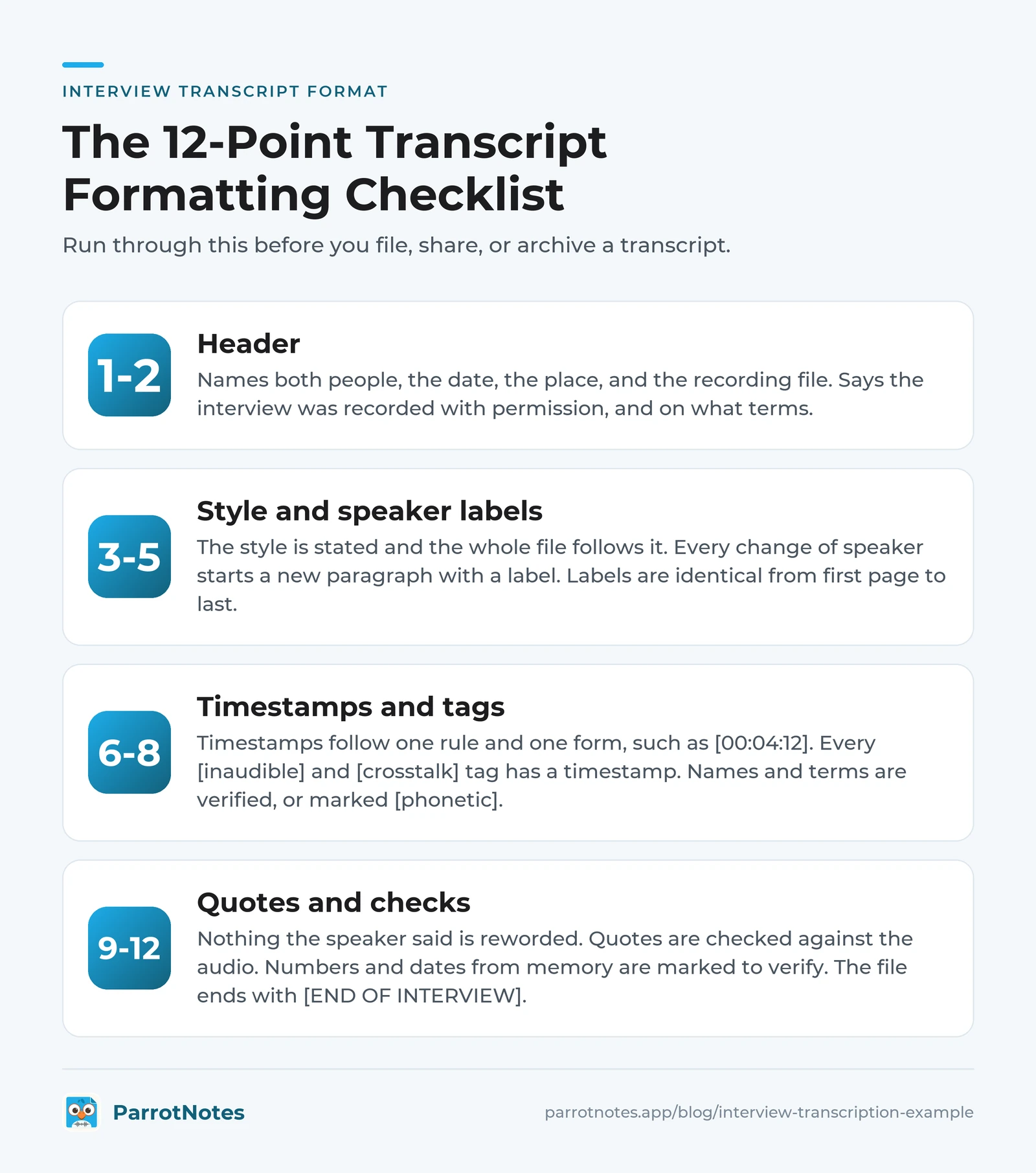
The 12-point formatting checklist
Run through this before you file, share, or archive a transcript.
- The header names both people, the date, the place, and the recording file
- The header says the interview was recorded with permission, and on what terms
- The transcript style is stated, and the whole file follows it
- Every change of speaker starts a new paragraph with a label
- Labels are identical from the first page to the last
- Timestamps follow one rule and one form, such as [00:04:12]
- Every [inaudible] and [crosstalk] tag has a timestamp next to it
- Names and technical terms are verified, or marked [phonetic]
- Nothing the speaker said has been reworded
- Every line you plan to quote is marked and checked against the audio
- Numbers, dates, and claims from memory are marked [[VERIFY]]
- The file ends with [END OF INTERVIEW], and working notes are stripped from any copy you share
From recording to a transcript like this
Ask before you record
Recording law depends on where you and the other person are. Under federal law, 18 U.S.C. § 2511(2)(d), it isn't unlawful to record a conversation you're a party to, or one where a party has given prior consent, unless the purpose is criminal or tortious. State laws can be stricter. In California, for example, all parties to a confidential conversation must consent to being recorded.
The Reporters Committee for Freedom of the Press keeps a state-by-state Reporter's Recording Guide for phone calls and in-person conversations. It says it shouldn't take the place of a lawyer's advice, and neither should this article. Rules vary, and this isn't legal advice.
The simple practice is to ask every time and get the "yes" on the recording. It's fair to the person you're interviewing, and it gives you the permission line for your header.
Get the first draft from your phone
This is where ParrotNotes fits. Put your phone on the table, ask permission, and press record. Recording carries on with the screen locked, and when you stop you get a transcript and an AI summary.
Three habits make that transcript easier to turn into Example 3:
- Say the names out loud at the start. "This is Maya Okafor interviewing Daniel Reyes on September 14." On ParrotNotes Pro, speaker identification works from name cues in the conversation, so a spoken introduction helps, and it doubles as your header
- Search for the quote. Keyword search across your transcripts is on the free plan. Pro adds AI semantic search and AI chat, so you can ask "What did Reyes say about the budget?"
- Export and format. Free exports as text or markdown, and Pro adds docx and PDF. Paste the text under the template header, then add timestamps and notes as you check quotes against the audio
Treat any AI transcript as a first draft, and keep your ear as the last check on every quote. Curious what happens between the microphone and the text? Here's how ParrotNotes turns speech into text.
The free plan covers 100 minutes a month, up to 30 minutes per recording. Pro is $19.99 a month, or $14.99 a month billed annually, with 3,000 minutes a month and recordings up to 3 hours. New to the app? The getting started guide walks through a first recording.
Interviews in another language
Picture Lena, a reporter on a fisheries story. Her best source is a boat owner who's most comfortable in Portuguese. She speaks enough to run the interview, but not enough to transcribe 40 minutes of it by ear.
With ParrotNotes Pro, she can record in any of 99+ languages and set a different language for the transcript, so the Portuguese interview arrives as English text. She marks her quote candidates, then asks a fluent colleague to check those lines against the audio. AP's standard applies here too: quotes from one language to another must be translated faithfully.
Source recordings are sensitive. ParrotNotes encrypts data in transit and at rest and doesn't sell your data or train on it, as the security page sets out.
Got an interview this week? Download ParrotNotes and record it with permission. You'll have text to format before you're back at your desk.
Make your next interview transcription example your own
A transcript earns its keep at the moment somebody asks, "Did they really say that?" The format is what lets you answer in seconds:
- Choose a style first: verbatim for how it was said, clean verbatim for what was said
- Put a header on every transcript, with the permission line
- Label and timestamp by one rule from start to finish
- Check every quote against the recording, and never reword the speaker
Think back to Priya at 10:40 PM. With Example 3 in front of her, the editor's question is one search and one replay, and she's back to writing by 10:42.
Copy the interview transcription example and the template above into your next project. Then download ParrotNotes free, record your next interview with permission, and start from a transcript and not a blank page.
Frequently Asked Questions
What does an interview transcript look like?
An interview transcript is a written record of a recorded conversation. It opens with a header (who spoke, when, where, and the recording file). Each change of speaker starts a new paragraph with a label. Timestamps tie the text to the audio, and bracketed tags such as [inaudible] or [laughs] mark what the words alone can't show.
What is the difference between verbatim and clean verbatim transcription?
Verbatim keeps every sound: ums, repeated words, false starts, and laughter. Clean verbatim, also called intelligent verbatim, removes fillers and stumbles but keeps every meaningful word in the speaker's own phrasing. Neither one rewrites or corrects what was said. Use verbatim when how something was said matters, and clean verbatim for reading and quoting.
Can I fix a source's grammar in a quote?
The Associated Press says no: it doesn't alter quotations, even to correct grammatical errors or word usage. A flawed quote can be paraphrased in a way that's true to the original, outside quotation marks. Newsroom policies differ on small things like removing "um", so check yours, and always verify the quote against the audio.
Do I need permission to record an interview?
Ask every time. Federal law allows recording when one party to the conversation consents, but some states, including California, require everyone's consent for confidential conversations. The Reporters Committee for Freedom of the Press publishes a state-by-state guide. Rules vary, and this isn't legal advice. Getting a clear "yes" on the recording is the safest habit.
Related Posts
Stakeholder Mapping for Complex Sales: Template and Example
Stakeholder mapping for complex sales: a fill-in template, a worked example, and 24 questions that reveal who decides. Copy the template and map your deal.
Sales Tools Every Field Rep Should Carry in 2026
Too many apps and no time between visits? See the sales tools a field rep should carry in 2026, run the four-question carry test, and print the checklist.
Sales Coaching Software: What to Look For
Buying sales coaching software for a field team? Use these 8 criteria, a 100-point scorecard, and 15 demo questions to choose a tool your reps will use.