
How to Transcribe an Interview Properly

Sarah Johnson
Product Manager at ParrotNotes with 5+ years of experience in productivity tools and AI technology.
Table of Contents
- 1.How to transcribe an interview: the five steps
- 2.Step 1: prepare the recording
- 3.Step 2: choose manual or AI transcription
- 4.Step 3: how to properly transcribe an interview with a correction pass
- 5.Step 4: check every quote against the audio
- 6.Step 5: name, store, and back up the interview transcription
- 7.How to transcribe an interview: the copy-ready run sheet
- 8.How to transcribe an interview properly: the short version
At 4:50 PM, Nadia Rahman pasted a quote into her story: "We can rule out layoffs this year." It came straight from the AI transcript of her interview with a packaging company's operations chief. Her editor wanted the audio timestamp before the 6:00 PM deadline, so she replayed it.
He'd said "can't."
One dropped syllable would have printed the opposite of his answer under his name.
If you're working out how to transcribe an interview, you already know software can do the typing. Nadia's AI draft saved her about three hours at the keyboard. What the typing can't give you is a transcript that's safe to quote from. That comes from the steps around it: a recording made with care, a correction pass with the audio playing, a check on every quote, and files you can find again in six months.
This guide walks through that process in five steps. It includes a worked correction example, a quote-check log, and a run sheet you can copy. One disclosure first: Nadia, the other people in the examples, and their quotes are invented for illustration.
How to transcribe an interview: the five steps
Here's the whole process before the detail.
- Prepare the recording. Ask permission, say the names out loud, and set up for clean audio
- Choose manual or AI. For most interviews, that's an AI draft you then correct
- Run the correction pass. Listen to the full recording with the draft open, then fix labels and timestamps
- Check every quote against the audio. Replay each line you plan to use, and log the result
- Name, store, and back up. Keep the recording, the transcript, and the quote log together
This article is about the process. For what the finished document looks like (verbatim or clean verbatim, header block, tags such as [inaudible]), see our interview transcription example in three styles.
Want the first draft waiting when the interview ends? Try ParrotNotes free: record on your phone, with permission, and you get a transcript and an AI summary when you stop.
Step 1: prepare the recording
Most advice on how to transcribe an interview starts at the keyboard. Start earlier. The cheapest hour in transcription is the 10 minutes before you press record.
Ask permission first
Recording law depends on where you and the other person are. Under federal law, 18 U.S.C. § 2511(2)(d), it isn't unlawful to record a conversation you're a party to, or one where a party has given prior consent, unless the purpose is a criminal or tortious act.
States can be stricter. The Reporters Committee for Freedom of the Press says in its introduction to the Reporter's Recording Guide that about 11 states, including California, Florida, Illinois, and Pennsylvania, primarily require all parties to consent.
For a call across state lines, the same guide advises reporters to "err on the side of caution and assume that the stricter state law will apply." It also calls recording the subject's verbal consent a best practice. The state-by-state guide says it shouldn't take the place of a lawyer's advice, and neither should this article.
Rules vary, and this isn't legal advice. Ask permission before recording, every time, and get the "yes" on tape. It's fair to the person you're interviewing.
Set up for clean audio
A speech model and a human typist fail in the same places: distance, noise, and people talking over each other.
- Distance. Put the phone on the table between you, microphone end toward the interviewee, about an arm's length from both of you
- Noise. Pick the quiet corner, not the café counter, and put your own phone on silent
- Names. Open with a spoken slate: "This is Nadia Rahman interviewing Owen Pratt on September 21, 2026." You'll use it for the header, and it helps any tool that labels speakers
- Spellings. Ask the interviewee to spell their name and job title on tape
- A 10-second test. Record, play it back, and check that both voices are clear
Then let the person finish before you ask the next question. A half-second of silence saves a [crosstalk] tag on the page.
If the recording already exists
Sometimes you inherit the tape: a voice memo from last week, or a colleague's file. Make a copy and work from the copy. Then listen to the first two minutes and note who's speaking and how clean the audio is.
Step 2: choose manual or AI transcription
You have two ways to transcribe an interview: type it yourself, or let software draft it and then correct the draft.
What manual transcription costs you
Typing a full interview by ear is slower than most people budget for. Utah State University Libraries' guide to transcribing interviews says to "allow four hours of transcription time for every one hour of audio." Texas Tech University Libraries' oral history guide puts it higher, saying "even the best transcribers work typically at a speed of six hours of typing for every hour of audio recorded."
So a 45-minute interview is three to four and a half hours of typing before you've checked a single quote. Manual still makes sense for a two-minute clip, or for material your newsroom or ethics board says can't leave one computer.
What an AI draft gives you, and what it doesn't
An AI transcript arrives in minutes, which moves your hours from typing to checking. The Utah State guide warns that "automated tools often miss nuances, especially with accents or background noise," and tells researchers to "always manually review and edit the results." Treat every automated transcript as unchecked, however clean it looks.
There are three common ways to get the draft:
- Record in an app that transcribes. With ParrotNotes, you record on your phone, even with the screen locked, and the transcript and summary are ready when you stop. The free plan covers 100 minutes a month, up to 30 minutes per recording. Pro covers 3,000 minutes a month and recordings up to 3 hours
- Import an existing file. ParrotNotes takes audio and video imports: 3 a month on the free plan, unlimited on Pro
- Use Word. If you searched for how to transcribe an interview on Word, Microsoft's Transcribe support page says Microsoft 365 subscribers can transcribe up to 300 minutes of uploaded audio a month. It works in the new Microsoft Edge and Chrome, and accepts .wav, .mp4, .m4a, and .mp3 files (checked on 2026-09-21)
Weighing a phone app against a separate recorder? Our guide to the best AI voice recorder works through the cost of each.
Interviews in another language
If the interview wasn't in the language you write in, get an AI transcription with translation, then have a fluent speaker check your quote candidates. ParrotNotes Pro transcribes 99+ languages and can output the transcript in a different language from the one spoken.
Step 3: how to properly transcribe an interview with a correction pass
This is the step that separates a transcript from a draft. Columbia University's Center for Oral History Research calls it the audit-edit. Its Oral History Transcription Style Guide gives the audit-editor one instruction above all: "Listen to the recording and compare it to the written transcription for fidelity to the recording." It also says to check for "homophone swaps and misheard passages, which often result from low recording quality, hurried speech, or challenging accents."
You don't need an archive's staff for that. You need two passes.
Pass one: listen with the draft open
Play the recording from the start at normal speed, with the draft on screen. Stop and fix each error as you hear it. Don't skip the small talk at the top, because that's where names get introduced.
Pass one can't take less time than the recording, so budget 45 minutes for a 45-minute interview, plus every stop you make. If you can't make out a word after three replays, don't guess. Mark it [inaudible] with the time and move on.
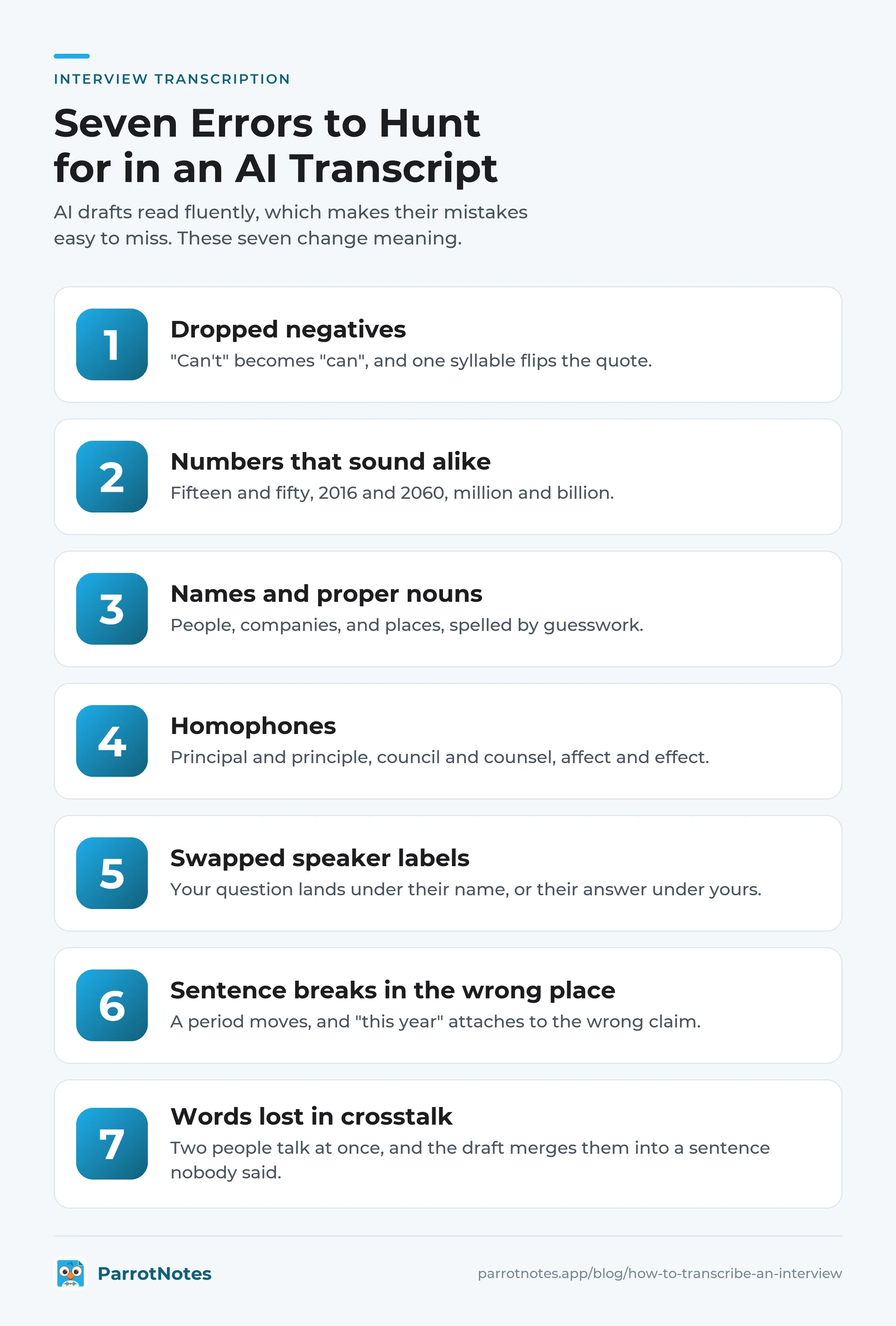
The seven errors to hunt for
AI drafts read fluently, which makes their mistakes easy to miss. These seven change meaning.
- Dropped negatives. "Can't" becomes "can", and one syllable flips the quote
- Numbers that sound alike. Fifteen and fifty, 2016 and 2060, million and billion
- Names and proper nouns. People, companies, and places, spelled by guesswork
- Homophones. Principal and principle, council and counsel, affect and effect
- Swapped speaker labels. Your question lands under their name, or their answer under yours
- Sentence breaks in the wrong place. A period moves, and "this year" attaches to the wrong claim
- Words lost in crosstalk. Two people talk at once, and the draft merges them into a sentence nobody said
Worked example: before, after, and the correction log
Here are 40 seconds of Nadia's interview with Owen Pratt, chief operating officer of Hollis Creek Packaging, as her AI draft delivered them.
Speaker 1: Can you rule out layoffs at the Dayton plant?
Speaker 2: We can rule out layoffs this year. What I can say is we've moved 50 people to second shift, and the new line starts in March.
Speaker 1: Fifteen or fifty?
Speaker 1: Fifteen. One five. Talk to Shawn McClain in HR, she has the exact count.
Speaker 2: And the new line is that the four and a half million? Yes. The board approved it in principal last week.
And here's the same stretch after pass one, with the audio playing.
[00:12:41] RAHMAN: Can you rule out layoffs at the Dayton plant?
[00:12:45] PRATT: We can't rule out layoffs. This year, what I can say is we've moved 15 people to second shift, and the new line starts in March.
[00:12:56] RAHMAN: Fifteen or fifty?
[00:12:58] PRATT: Fifteen. One five. Talk to Siobhan McLean [phonetic] in HR, she has the exact count.
[00:13:06] RAHMAN: And the new line, is that the--
[00:13:08] PRATT: --[crosstalk] four and a half million, yes. The board approved it in principle last week.
Every fix goes in a short log, so an editor can see what changed and why.
| Time | Draft said | Audio says | Error type |
|---|---|---|---|
| 00:12:45 | "We can rule out layoffs this year." | "We can't rule out layoffs." | Dropped negative |
| 00:12:45 | "...this year. What I can say..." | "This year, what I can say..." | Sentence break |
| 00:12:45 | "50 people" | "15 people" (he confirms "one five" at 00:12:58) | Number |
| 00:12:58 | Speaker 1 | Pratt | Speaker label |
| 00:12:58 | "Shawn McClain" | "Siobhan McLean", spelling not yet verified | Name |
| 00:13:06 | One merged sentence under Speaker 2 | Rahman's question, cut off by Pratt's answer | Crosstalk |
| 00:13:08 | "in principal" | "in principle" | Homophone |
Seven corrections in 40 seconds is a deliberately dense example. Look at the two worst errors, though: the negative and the number. Both sentences read perfectly well, and only the audio shows they're wrong.
Pass two: read for sense, names, and numbers
Now read the corrected transcript without the audio. A sentence that doesn't make sense is a sign the ear missed something.
Keep a word list as you go. The Columbia guide recommends one: full, proper spellings for the names and terms that matter to the project. When a spelling can't be verified, it says to mark the word [phonetic]. Then verify it on the company's staff page, or with a one-line email.
Fix speaker labels and place timestamps
Do labels and timestamps last, once the words are right.
- Labels. Work out who "Speaker 1" and "Speaker 2" are from the spoken slate, then find and replace them with surnames. On ParrotNotes Pro, speaker identification works from name cues in the conversation, one more reason to say the names out loud. Spot-check every stretch of crosstalk, because that's where labels swap
- Timestamps. Add one at each question, at every [inaudible] or [crosstalk] tag, and at every line you might quote. Use one form, such as [00:12:41], so you can search for it
The rules for label styles, timestamp intervals, and tags are in the interview transcript format guide, along with a blank template.
Doing this on deadline? Download ParrotNotes and start from a draft, not a blank page. Keyword search is on the free plan, so "layoffs" takes you straight to the passage.
Step 4: check every quote against the audio
Guides on how to transcribe an interview tend to stop at the edit. For a reporter, the next step matters more. A corrected transcript is a reading copy, and words that go inside quotation marks get one more check.
The Associated Press sets that standard in its News Values and Principles: "We do not alter quotations, even to correct grammatical errors or word usage." A flawed quote may be paraphrased in a way that's completely true to the original, and one too murky to paraphrase shouldn't be used. The same section says quotes must not be taken out of context.
That gives you a four-part procedure for each quote candidate:
- Replay the line three times. Once for the words, once for the small words (not, never, only, about), and once for tone
- Listen to the 30 seconds before and after. Was it an answer to your question, a joke, a hypothetical, or a summary of someone else's view?
- Decide. Quote it exactly, paraphrase it faithfully outside quotation marks, or drop it
- Log it. Write down the time, the exact wording, and your decision
Quote-check log template
Copy this into the transcript's folder. One block per quote.
QUOTE-CHECK LOG
Interview: [file name]
Checked by: [name]            Date: [Month DD, YYYY]

Q1   Time: [00:00:00]
     Transcript wording: "[paste the line]"
     Audio wording after 3 replays: "[type what you hear]"
     Exact match: [yes / no, transcript corrected]
     Context checked, 30 sec each side: [yes]
     Prompted by: [your question, in brief]
     Decision: [quote / paraphrase / drop]
     Notes: [tone, laughter, hedges such as "I think"]
If the interview was in another language, AP adds that quotes "must be translated faithfully." Before a translated line goes in quotation marks, have a fluent speaker listen to that timestamp and confirm it.
Finding the candidates is the quick part. Search the transcript for the words you remember. On ParrotNotes Pro, AI semantic search and AI chat let you ask "What did Pratt say about the second shift?" and jump to the passage.
The replay is still up to you. Curious about what happens between the microphone and the text? Here's how ParrotNotes turns speech into text.
Step 5: name, store, and back up the interview transcription
A transcript you can't find is a transcript you don't have, and one without its recording can't prove anything.
Marcus hosts an interview podcast. In June he recorded 70 minutes with a retired ferry captain, kept the only copy on his phone, and traded the phone in nine days later. When the captain's family asked for the recording that autumn, he had a rough transcript, no audio, and two quotes he could no longer check.
Use one file-naming pattern
Put the date first so files sort in order, then the surname, then what the file is.
2026-09-21_pratt-owen_hollis-creek_audio.m4a
2026-09-21_pratt-owen_hollis-creek_draft-ai.txt
2026-09-21_pratt-owen_hollis-creek_transcript-checked.docx
2026-09-21_pratt-owen_hollis-creek_quote-log.txt
Keep the untouched AI draft as well as the checked transcript. If someone later disputes a line, you can show what the software produced, what you corrected, and why.
Keep at least two copies, in two places
The Library of Congress gives plain advice on keeping personal digital audio: "Make at least two copies of your selected audio recordings," and more if you can. It says to store the copies in different locations and to check them at least once a year.
For a working reporter, that means the interview folder lives on your computer and in one other place your newsroom or institution approves. How long you keep recordings is a policy question, so ask your editor or your ethics board.
Source recordings are sensitive, so know where each copy sits and who can open it. If you use ParrotNotes, the security page sets out how it handles your data: encryption in transit and at rest, and no analyzing, selling, or training on your audio or transcripts.
ParrotNotes exports transcripts as text or markdown on the free plan, and Pro adds docx and PDF. Drop the export into the interview folder under the naming pattern above.
How to transcribe an interview: the copy-ready run sheet
Here are the five steps on a single page, as a checklist you can copy.
INTERVIEW TRANSCRIPTION RUN SHEET

BEFORE RECORDING
[ ] Permission asked; the "yes" is on the recording
[ ] Spoken slate: my name, their name, the date
[ ] Name and title spelled on tape
[ ] 10-second test recorded and played back

FIRST DRAFT
[ ] Working from a copy of the audio
[ ] Untouched draft saved as _draft-ai

CORRECTION PASS
[ ] Pass one: full listen at normal speed, draft open
[ ] Checked: negatives, numbers, names, homophones,
    speaker swaps, sentence breaks, crosstalk
[ ] Unclear words marked [inaudible 00:00:00], not guessed
[ ] Correction log: time, draft said, audio says, type
[ ] Pass two: read for sense; spellings verified
    or marked [phonetic]
[ ] Labels replaced; timestamps at questions and quotes

QUOTE CHECK
[ ] Each quote replayed 3 times, with 30 sec of context
[ ] Decision logged: quote / paraphrase / drop

STORAGE
[ ] Files named date_surname_project_type
[ ] Audio, transcript, and quote log in one folder
[ ] Second copy in a second, approved location
How to transcribe an interview properly: the short version
Knowing how to transcribe an interview properly comes down to where you spend your time. Let software do the typing, and put your hours into the parts only you can do:
- Get permission on tape, and say the names out loud
- Treat the AI draft as unchecked until you've heard the audio against it
- Replay every quote three times, check its context, and log your decision
- Keep the audio, the checked transcript, and the quote log together, in two places
Think back to Nadia at 4:50 PM. Her draft wasn't the problem. Skipping the replay would have been. With a quote-check entry for 00:12:45, the right word was in her story by 4:55, and the timestamp was in her editor's inbox.
Your next interview is probably already on the calendar. Download ParrotNotes free, record it with permission, and start Step 3 with a draft in hand. New to the app? The getting started guide walks through a first recording.
Frequently Asked Questions
How long does it take to transcribe an interview?
By hand, plan on four to six hours for each hour of audio: Utah State University Libraries advises four, and Texas Tech University Libraries says even the best transcribers take six. With an AI draft, the typing takes minutes, but budget at least the length of the recording for the correction pass.
Can I use AI to transcribe an interview?
Yes, as a first draft. AI interview transcription is quick, but it can drop a negative, mishear a number, misspell a name, or swap speakers, and those errors look fine on the page. Listen to the whole recording with the draft open, and replay every line you plan to quote.
How do you transcribe an interview in Word?
Word's Transcribe feature takes an uploaded audio file. Microsoft's support page says Microsoft 365 subscribers get up to 300 minutes of uploaded audio a month, in the new Microsoft Edge or Chrome (checked on 2026-09-21). The result is still a draft, so run the same correction pass and quote check.
Do I need permission to record an interview?
Ask every time. Federal law allows recording when one party to the conversation consents, but the Reporters Committee for Freedom of the Press lists about 11 states that primarily require everyone's consent. Rules vary, and this isn't legal advice. Ask permission before recording and get the "yes" on tape.
Related Posts
Sales Engineer: The Role and How to Document Technical Meetings
What a sales engineer does, what the role pays (BLS data), and a technical meeting record that keeps specs, units and promises intact. Copy the template.
Nurse Educator Guide: Record In-Services Staff Can Revisit
A working nurse educator's kit: what to record and what never to, a consent script, a session plan, and a one-page revisit sheet staff will use. Try it free.
Meeting Notes Template: Simple Formats That Work
Copy a meeting notes template that fits your meeting: six simple formats with filled-in examples, a shorthand key and a 10-minute routine for sending notes.