
Sprint Planning Meeting: Agenda and How to Run One

Sarah Johnson
Writes about field sales, meeting notes and voice-first workflows at ParrotNotes. Every article is reviewed by the ParrotNotes product team before it goes live.

Table of Contents
- 1.What is a sprint planning meeting?
- 2.Sprint planning meeting agenda: timings for any sprint length
- 3.What the Scrum Guide requires, and what it doesn't
- 4.Who attends a sprint planning meeting and what to bring
- 5.Work out capacity before anyone picks work
- 6.How to run a sprint planning meeting when it drifts
- 7.Sprint planning meeting template: the one-page plan
- 8.Should you record sprint planning?
- 9.Make your next planning session shorter
Two hours and 40 minutes into sprint planning, Lena's team was still arguing over story points for ticket number nine. Then someone asked the question nobody had raised: "What is this sprint for?" No one could answer in a sentence. They picked tickets until the clock ran out, and by day four the plan had fallen apart. (Lena's team is a composite, not a real team.)
You probably don't need a longer meeting. You need a sprint planning meeting agenda that starts with why, checks real capacity before anyone picks work, and ends with a plan on one page.
This guide gives you a timed agenda for one- to four-week sprints, what the Scrum Guide requires (checked in November 2026), a capacity sum worked through with numbers, lines for when the meeting drifts, and a one-page plan you can copy.
What is a sprint planning meeting?
A sprint planning meeting is the event that starts a sprint: the team agrees why the sprint matters, what it can finish, and how it will do the work. In the words of the 2020 Scrum Guide, "Sprint Planning initiates the Sprint by laying out the work to be performed for the Sprint."
The retrospective meeting closes the sprint before it, so the changes your team agreed there can go straight into this plan.
Sprint planning meeting agenda: timings for any sprint length
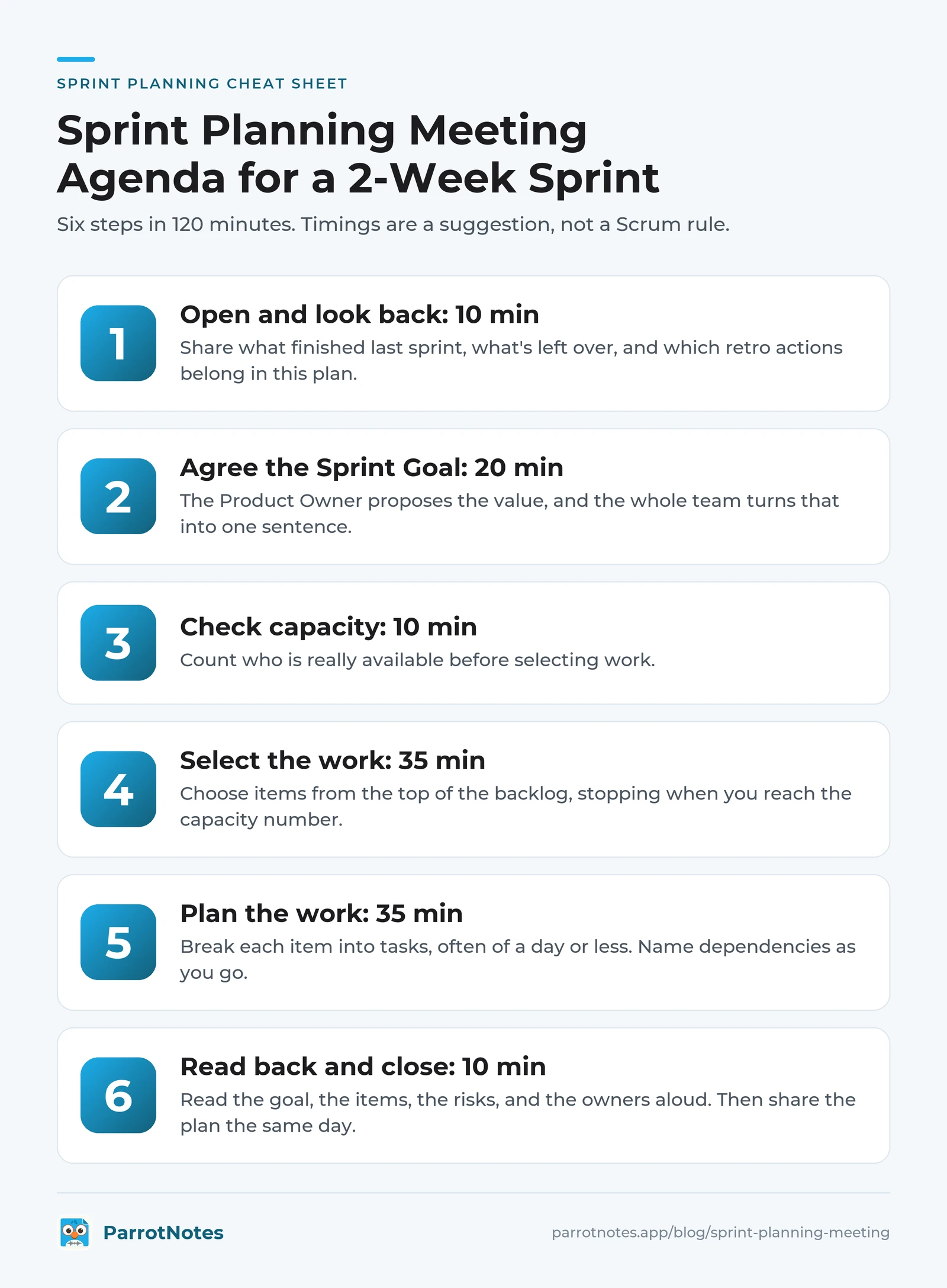
Pick your column and paste the minutes into the invite. These timings are our suggestion, not a Scrum rule, and they use about one hour per sprint week.
| Step | 1-week sprint | 2-week sprint | 3-week sprint | 4-week sprint |
|---|---|---|---|---|
| 1. Open and look back | 5 min | 10 min | 10 min | 15 min |
| 2. Agree the Sprint Goal (why) | 10 min | 20 min | 25 min | 30 min |
| 3. Check capacity | 5 min | 10 min | 10 min | 15 min |
| 4. Select the work (what) | 20 min | 35 min | 60 min | 80 min |
| 5. Plan the work (how) | 15 min | 35 min | 60 min | 80 min |
| 6. Read back and close | 5 min | 10 min | 15 min | 20 min |
| Total | 60 min | 120 min | 180 min | 240 min |
Want the plan without typing through the meeting? Put ParrotNotes on the table and get a summary and action items when you stop recording. Try ParrotNotes free.
1. Open and look back
The Scrum Master states the goal and the end time. Then share three facts: what finished last sprint, what's left over, and which retro actions belong in this plan. Don't reopen the sprint review. This is context only.
2. Agree the Sprint Goal
The Product Owner proposes how the product could gain value this sprint, and the whole team turns that into one sentence. Could a stakeholder read it and know why this sprint matters? "Finish 12 tickets" fails. "Returning customers can pay with a saved card" passes.
3. Check capacity
Count who is really available, using the sum below. Do this before selecting work, or the conversation anchors on the wish list.
4. Select the work
The Developers choose items from the top of the backlog with the Product Owner, stopping when they reach the capacity number. Each item should serve the goal or be a known carry-over. Refine an item only if it's nearly ready. If it needs longer, send it back.
5. Plan the work
The Developers break each item into tasks, often of a day or less. Name dependencies as you go: a sandbox login, a design review, someone in another team.
6. Read back and close
Read the goal, the items, the risks, and the owners aloud. Ask everyone for a confidence score from 1 to 5, and talk about any score of 1 or 2 before you leave. Then share the plan the same day.
For other meetings, our meeting agenda template has five general formats.
What the Scrum Guide requires, and what it doesn't
The guide is short on this event. It sets three topics:
| Topic | Who leads | What you get |
|---|---|---|
| "Why is this Sprint valuable?" | The Product Owner proposes, and the whole Scrum Team defines the goal | The Sprint Goal |
| "What can be Done this Sprint?" | The Developers select, in discussion with the Product Owner | The selected backlog items |
| "How will the chosen work get done?" | The Developers | A plan for delivering them |
Together, those three outputs are the Sprint Backlog. The guide adds one firm deadline: "The Sprint Goal must be finalized prior to the end of Sprint Planning."
Three details catch people out:
- Why is a recent addition. The revision history says the 2020 guide "places emphasis on a third topic, 'Why'," alongside what and how. An agenda that opens with the backlog may predate it.
- Story points aren't in the guide. Neither are velocity or estimates: we searched the text and found none of those words. It says confidence comes from knowing "past performance, their upcoming capacity, and their Definition of Done." Points are a team habit, and you can use something else.
- The commitment is the goal, not the ticket list. "Although the Sprint Goal is a commitment by the Developers, it provides flexibility in terms of the exact work needed to achieve it." So a team can swap tasks mid-sprint and still keep its promise.
The Scrum Guide also sets the upper limit: "Sprint Planning is timeboxed to a maximum of eight hours for a one-month Sprint. For shorter Sprints, the event is usually shorter." It gives no figure for shorter sprints, so Atlassian's two numbers are a useful range. Its Scrum guide advises no more than two hours for each week of the sprint, and its blog recommends a minimum of one hour for each week.
Who attends a sprint planning meeting and what to bring
The whole Scrum Team attends, and the guide says the team "may also invite other people to attend Sprint Planning to provide advice." Invite a guest for one item, not the full session. Seven people for two hours is 14 person-hours, and our meeting cost calculator shows what that costs.
| Role | Job in the room | Bring |
|---|---|---|
| Product Owner | Proposes the value, answers questions about items | An ordered backlog with the top items refined |
| Developers | Select the work, plan how to do it | Known time off, on-call duties, tech risks |
| Scrum Master | Keeps the event "positive, productive, and kept within the timebox" | Last sprint's numbers, retro actions |
The guide says the Product Owner "ensures that attendees are prepared to discuss the most important Product Backlog items." In practice, that means refining the top of the backlog before the meeting, not during it; our backlog refinement guide shows how to run that session.
Work out capacity before anyone picks work
Many agenda guides say "check capacity" and stop there. Here's the sum, using a composite team of five Developers on a two-week sprint.
Step 1: count available person-days.
5 Developers x 10 working days    = 50
Company holiday (1 day x 5)       = -5
Priya on vacation                 = -3
Omar on the support rotation      = -4
Available person-days             = 38
Step 2: find your rate from recent sprints.
| Sprint | Available person-days | Points finished |
|---|---|---|
| 39 | 45 | 34 |
| 40 | 40 | 28 |
| 41 | 44 | 31 |
| Total | 129 | 93 |
93 points divided by 129 person-days is about 0.72 points per person-day.
Step 3: multiply. 38 x 0.72 is about 27 points.
The team's plain average is 31 points, so picking from memory would have overloaded this sprint by four points.
No story points? Run the same sum with finished tickets. No history yet? Pick less than you think you can finish, then start measuring.
How to run a sprint planning meeting when it drifts
Keep these lines ready:
| What's happening | What to say |
|---|---|
| A sizing debate passes five minutes | "Let's take the higher number, note the risk, and move on." |
| Someone adds work that isn't on the list | "Does it serve the Sprint Goal? If not, it goes to the Product Owner for the backlog." |
| An item is too vague to size | "It isn't ready. It goes back to refinement, so let's take the next one." |
| A manager starts assigning tasks | "How we do this is the Developers' call. The guide is clear on that." |
| A good topic takes over | "That's a real issue. It goes in the parking lot, and we'll give it an owner at the end." |
| Time runs out during step 5 | "We'll plan the first few days now, and break down the rest at the Daily Scrum." |
That last line is allowed. The guide says the Sprint Backlog is updated "throughout the Sprint as more is learned," and the daily standup is where the plan gets adjusted.
This agenda also works outside software. Picture a composite marketing team of four on two-week campaign cycles, with the goal "The spring webinar page is live and taking signups." Available days replace story points, and the meeting takes 60 minutes because there's less to break down.
Sprint planning meeting template: the one-page plan
Copy this into your team's doc.
SPRINT PLAN
Team:              Sprint:              Dates:
Facilitator:       Attendees:

1. SPRINT GOAL (one sentence)

2. CAPACITY
   Available person-days:      Forecast:

3. SELECTED ITEMS
   Item | Size | Serves the goal? (yes / carry-over)

4. RISKS AND DEPENDENCIES
   Risk | Owner | Needed by

5. RETRO ACTIONS BROUGHT IN
   Action | Owner

6. LEFT OUT ON PURPOSE
   Item | Why | Who tells stakeholders

7. CONFIDENCE (average 1-5)
Here it is filled in, using the same composite team:
SPRINT PLAN
Team: Checkout squad    Sprint: 42    Dates: Nov 9 to Nov 20
Facilitator: Lena    Attendees: 7

1. SPRINT GOAL
   Returning customers can pay with a saved card.

2. CAPACITY
   Available person-days: 38    Forecast: 27 points

3. SELECTED ITEMS
   Saved card storage | 8 | Yes
   Card picker at checkout | 8 | Yes
   Payment token migration | 5 | Yes
   Declined card error messages | 3 | Yes
   Fix flaky checkout test | 3 | Carry-over
   Total: 27

4. RISKS AND DEPENDENCIES
   Payment sandbox access | Amir | Nov 11
   Legal review of card storage wording | Ana | Nov 12

5. RETRO ACTIONS BROUGHT IN
   Pair on code reviews twice a week | Lin

6. LEFT OUT ON PURPOSE
   Apple Pay | No capacity, doesn't serve the goal | Ana

7. CONFIDENCE: 4.2 / 5
Section 6 does more work than it looks: when sales asks why Apple Pay isn't in the sprint, Ana already has the answer. Move sections 4 and 5 into your action items tracking log so they get checked, and see our meeting cadence guide for fitting planning around your other recurring meetings.
Should you record sprint planning?
Recording lets the facilitator run the room rather than type. Ask first, say what you'll keep and who'll see it, and stop if anyone objects. Consent rules vary by location, and our guide to one-party consent states covers the US basics.
ParrotNotes records on a phone or Mac in the room, with no meeting bot, and gives you a transcript, a summary, and action items to paste into the template. As of November 2026, recordings can run up to 3 hours on Pro ($19.99 a month, or $14.99 a month billed annually), so a two-hour session fits.
The free plan allows 30 minutes per recording and 100 minutes a month, so don't record the full session. Record step 6 instead: a read-back of the goal, items, risks, and owners takes under 10 minutes and gives you the summary. Download ParrotNotes and try it at your next planning session.
Make your next planning session shorter
A good sprint planning meeting agenda gets you three things: a goal in one sentence, a forecast based on real capacity, and a plan the Developers own. To get there:
- Start with why, before anyone opens the backlog
- Do the capacity sum before you select work
- Stop selecting when you reach the number
- Leave with one page, and share it the same day
Lena's team changed the order and added the sum. Their next session opened with the Sprint Goal, took the capacity sum in eight minutes, and finished with five minutes to spare. On day four, when a task ran long, they swapped it out and kept the goal.
Frequently Asked Questions
What is on a sprint planning meeting agenda?
Six steps cover it: open and look back, agree the Sprint Goal, check capacity, select the work, plan the work, and read back and close. The middle steps answer the Scrum Guide's three topics: why, what, and how. For a two-week sprint, budget about two hours.
How long should a sprint planning meeting be?
The Scrum Guide caps it at eight hours for a one-month sprint and says shorter sprints usually take less. Atlassian advises a minimum of one hour and a maximum of two hours per sprint week, so a two-week sprint takes two to four hours.
Who runs the sprint planning meeting?
The Scrum Master usually facilitates and keeps the timebox, the Product Owner proposes the value, and the Developers select and plan the work. The whole Scrum Team attends, and guests can join to provide advice.
What are the three topics of sprint planning?
The 2020 Scrum Guide names them as questions: why is this Sprint valuable, what can be Done this Sprint, and how will the chosen work get done? They produce the Sprint Goal, the selected items, and the plan, which together form the Sprint Backlog.
Do you need story points for sprint planning?
No. The Scrum Guide doesn't mention story points, velocity, or estimates. It asks Developers to use past performance, upcoming capacity, and their Definition of Done. Many teams use points, but counting finished tickets or available days works with the same capacity sum.
Related Posts

Best Talk to Text App for iPhone and Android
The best talk to text app for your phone: Apple Dictation and Siri on iPhone, Gboard and Gemini on Android, with free plans compared and a voice phrase sheet.

How to Use Speech to Text on iPhone
Turn on speech to text on iPhone in 3 steps, dictate in any app, switch languages, turn it off, and record when the mic stops. Checked on iOS 27, Nov 2026.
How to Record Calls on Samsung
Samsung call recording, step by step: record or auto record calls, find the files, get Galaxy AI transcripts, or turn it all off. Checked November 2026.