
Sprint Review: Agenda, Who Attends and How to Run It

Sarah Johnson
Writes about field sales, meeting notes and voice-first workflows at ParrotNotes. Every article is reviewed by the ParrotNotes product team before it goes live.

Table of Contents
- 1.What is a sprint review?
- 2.Sprint review agenda: timings for any sprint length
- 3.What the Scrum Guide says, and what it doesn't
- 4.Who attends a sprint review
- 5.Sprint review vs retrospective: what's the difference?
- 6.How to run a sprint review when it drifts
- 7.Sprint review template: the one-page record
- 8.Should you record the review?
- 9.Make your next review a working session
Lena's team spent Friday morning polishing slides for the sprint review. Eleven people joined, watched 25 minutes of guest checkout screenshots, said "nice work," and left. Three days after release, the support lead mentioned what she'd have said if anyone had asked: guest customers can't find their order afterwards. (Lena's team is a composite, not a real team.)
You've probably sat through that meeting. It feels fine and changes nothing, because the people who know the customer never touched the product.
This guide gives you an agenda timed for one- to four-week sprints, what the Scrum Guide says (checked in November 2026), an invitation to copy, sprint review vs retrospective, and a one-page record of what got decided.
What is a sprint review?
A sprint review is the Scrum event where the team and its key stakeholders look at what got finished, talk about what's changed around the product, and decide what to do next. In the words of the 2020 Scrum Guide, its purpose is "to inspect the outcome of the Sprint and determine future adaptations."
It's the second to last event of the sprint. The retrospective meeting comes after it, and then the next sprint planning meeting picks up whatever the review changed.
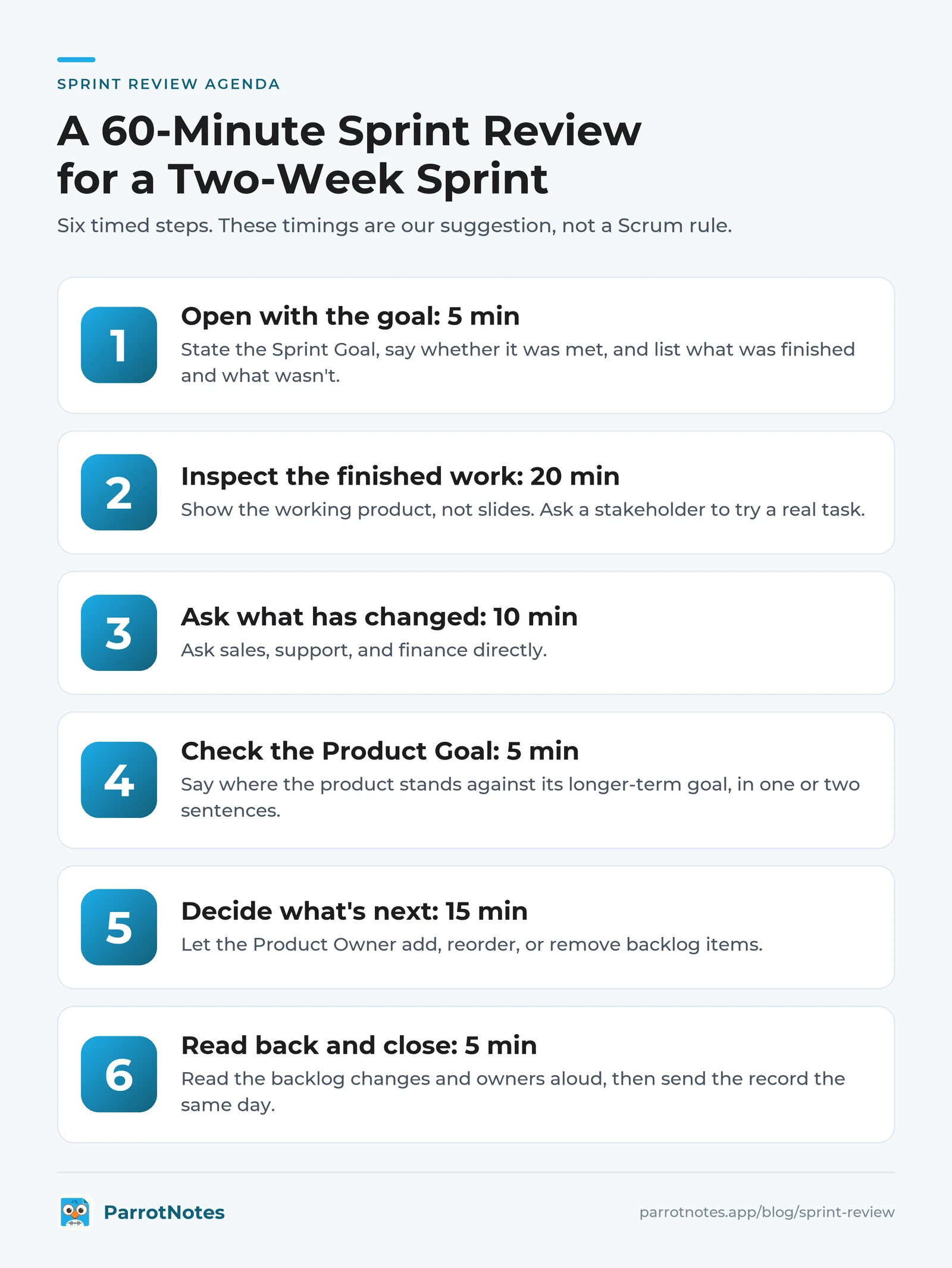
Sprint review agenda: timings for any sprint length
Pick your column and paste the minutes into the invite. These timings are our suggestion, not a Scrum rule, and they use about 30 minutes per sprint week, half the guide's maximum.
| Step | 1-week sprint | 2-week sprint | 3-week sprint | 4-week sprint |
|---|---|---|---|---|
| 1. Open with the goal | 3 min | 5 min | 5 min | 10 min |
| 2. Inspect the finished work | 10 min | 20 min | 35 min | 45 min |
| 3. Ask what has changed | 5 min | 10 min | 15 min | 20 min |
| 4. Check the Product Goal | 3 min | 5 min | 10 min | 10 min |
| 5. Decide what's next | 7 min | 15 min | 20 min | 30 min |
| 6. Read back and close | 2 min | 5 min | 5 min | 5 min |
| Total | 30 min | 60 min | 90 min | 120 min |
Want the decisions written down without a note-taker? Put ParrotNotes on the table and get a summary and action items when you stop recording. Try ParrotNotes free.
1. Open with the goal
The Product Owner states the Sprint Goal, says whether it was met, and lists what was finished and what wasn't. Give the bad news first.
2. Inspect the finished work
Show the working product, not slides. Better still, hand over the keyboard and ask a stakeholder to try a real task while the Developers watch. Share the list of items the night before, so people arrive with questions.
3. Ask what has changed
The guide wants the group to review "what has changed in their environment." So ask sales, support, and finance directly. A new competitor or a budget cut can matter more than anything you built.
4. Check the Product Goal
Say where the product stands against its longer-term goal, in one or two sentences.
5. Decide what's next
This is the step that gets squeezed. Go through what you heard, and let the Product Owner add, reorder, or remove backlog items. You don't need a final plan today, just a backlog that reflects what the room learned. Sizing and splitting the new items is work for the next backlog refinement session.
6. Read back and close
Read the backlog changes and owners aloud, then send the record the same day.
What the Scrum Guide says, and what it doesn't
The guide gives this event one short section, and it's blunt about the most common mistake: "The Sprint Review is a working session and the Scrum Team should avoid limiting it to a presentation."
We searched the guide's text for the words teams usually attach to this meeting:
- "Demo" isn't there. Neither is "feedback." A demo can be part of a review, but the guide's point is collaborating on what to do next.
- "Sign-off" and "approve" aren't there either. "Accept" appears only in phrases about process and product falling outside acceptable limits. The review isn't where the Product Owner accepts the work.
- It isn't a release gate. "The Sprint Review should never be considered a gate to releasing value." You can ship on day three and discuss it here.
- Unfinished work stays out. "If a Product Backlog item does not meet the Definition of Done, it cannot be released or even presented at the Sprint Review. Instead, it returns to the Product Backlog for future consideration." Name it in step 1, and don't show it in step 2.
The timebox is "a maximum of four hours for a one-month Sprint," and the guide only says shorter sprints are "usually shorter." Published advice for shorter sprints varies. As of November 2026, Atlassian recommends "30 minutes to an hour for each iteration," LogRocket uses one hour per sprint week, and Spark Academy budgets 90 minutes for two weeks. Start short, and add time only if step 5 keeps running out.
Who attends a sprint review
The whole Scrum Team attends, along with the key stakeholders. The guide doesn't say who runs it or who sends the invite, but Scrum.org describes "key stakeholders invited by the Product Owner," and that's the usual setup.
| Who | Job in the room | Bring |
|---|---|---|
| Product Owner | Invites stakeholders, states the goal, owns backlog changes | The Sprint Goal, the list of finished items |
| Developers | Show the work and answer questions | A working environment, tested beforehand |
| Scrum Master | Keeps the event "positive, productive, and kept within the timebox" | The agenda and a visible clock |
| Key stakeholders | Try the product, report what's changed | Questions, customer and market news |
Who counts as key? Anyone who can tell you something the team doesn't know, or who'll act on what's decided. Eleven people for an hour is 11 person-hours, and our meeting cost calculator shows what that costs.
Copy this invitation:
Subject: Sprint review, [date], [start] to [end]: try [feature]

Hi [name],

This is a working session, not a presentation.

The goal was: [Sprint Goal, one sentence]
You can try: [2-3 finished items]
We'd like your view on: [one specific question for this person]

Please bring anything that has changed on your side: customers,
competitors, budget, deadlines. I'll send a one-page record the same day.

[Product Owner]
The specific question matters most. "Would your team use this tomorrow?" gives someone a reason to come, and "see our progress" doesn't.
Sprint review vs retrospective: what's the difference?
The sprint review looks at the product with stakeholders. The sprint retrospective looks at how the team worked, without them. Both happen at the end of the sprint, in that order.
| Sprint review | Sprint retrospective | |
|---|---|---|
| Purpose in the guide | "inspect the outcome of the Sprint" | "plan ways to increase quality and effectiveness" |
| Question it answers | Are we building the right thing? | How can we work better? |
| Who attends | Scrum Team and key stakeholders | Scrum Team |
| What you inspect | Finished work, the market, the Product Goal | People, interactions, processes, tools, Definition of Done |
| What you get | An adjusted backlog | A few improvements, with owners |
| Maximum for a one-month sprint | Four hours | Three hours |
A team discussing what went wrong with stakeholders watching can go quiet, so keep the two apart. Here's a quick test for any comment: does it change what we build, or how we work?
| Someone says | Where it goes | Why |
|---|---|---|
| "Customers will want to save more than one card." | Review | Changes what you build |
| "A competitor launched one-tap checkout last week." | Review | The environment changed |
| "Can this ship before the holiday sale?" | Review | A decision about what's next |
| "Apple Pay matters more than we thought." | Review | Backlog order |
| "Code reviews sat for two days again." | Retrospective | How the team works |
| "The sandbox login blocked us twice." | Retrospective | A tool problem |
| "Sales keeps asking Developers for changes mid-sprint." | Retrospective | A process problem |
| "This ticket's nearly done. Can we show it?" | Neither | Not Done, so it returns to the backlog |
Our retrospective template is free if you want a board for the second meeting.
How to run a sprint review when it drifts
Keep these lines ready:
| What's happening | What to say |
|---|---|
| Slides are taking over | "Let's stop there. Joy, could you try it yourself?" |
| Polite silence | "Ravi, what would your customer try first?" |
| Someone redesigns the feature live | "What problem would that solve? I'll write it down as a backlog item." |
| A stakeholder asks for a promise | "We'll plan that in sprint planning. Ana will tell you where it landed by Tuesday." |
| A long debate starts | "It's a real issue. It goes in the parking lot, and we'll give it an owner at the end." |
On that promise line, the guide says "Those wanting to change the Product Backlog can do so by trying to convince the Product Owner." A review is where you make your case, not where you get a date.
This works outside software too. Picture a composite marketing team of four, reviewing a webinar page that went live during the sprint. A sales rep tries the form on her phone, gets stuck on the seventh field, and says so. By the end of the hour, shortening the form tops next sprint's list.
Sprint review template: the one-page record
The guide doesn't ask for minutes, but sprint planning needs these answers. Copy this into your team's doc.
SPRINT REVIEW RECORD
Team:              Sprint:              Date:
Facilitator:       Product Owner:       Stakeholders:

1. SPRINT GOAL (met? yes / partly / no)

2. DONE

3. NOT DONE (back to the backlog)

4. WHAT HAS CHANGED

5. PRODUCT GOAL: where we stand

6. BACKLOG CHANGES
   Item | New, moved or removed | Owner

7. OPEN QUESTIONS
   Question | Who answers | By when
Here it is filled in, using the composite team from our planning guide:
SPRINT REVIEW RECORD
Team: Checkout squad    Sprint: 42    Date: Nov 20
Facilitator: Lena    Product Owner: Ana
Stakeholders: Joy (support), Ravi (sales), Mei (finance)

1. SPRINT GOAL
   Returning customers can pay with a saved card. Met: yes

2. DONE
   Saved card storage, card picker at checkout,
   payment token migration, flaky checkout test fixed

3. NOT DONE
   Declined card error messages

4. WHAT HAS CHANGED
   A competitor launched one-tap checkout.
   Card processing fees rise in January (Mei).

5. PRODUCT GOAL: repeat customers check out in under a minute
   Now 1 min 40 s with a saved card, down from 3 min

6. BACKLOG CHANGES
   Expired card flow | New, ranked 1 | Ana
   Declined card error messages | Moved, ranked 2 | Ana
   Apple Pay | Moved up, ranked 3 | Ana

7. OPEN QUESTIONS
   Does the January fee change card order at checkout? | Mei | Nov 24
Section 6 feeds straight into the next plan. Move the open questions into your action items tracking log, and see our meeting cadence guide for spacing this around your other recurring meetings.
Should you record the review?
Recording lets the Product Owner listen rather than type during steps 3 and 5. Ask first, say what you'll keep and who'll see it, and stop if anyone objects. Consent rules vary by location, and our guide to one-party consent states covers the US basics.
ParrotNotes records on a phone or Mac in the room, with no meeting bot, and gives you a transcript, a summary, and action items to paste into the record. As of November 2026, recordings can run up to 3 hours on Pro ($19.99 a month, or $14.99 a month billed annually).
The free plan allows 30 minutes per recording and 100 minutes a month, so skip the first four steps and record steps 5 and 6. On a two-week sprint, that's about 20 minutes, and it's where the decisions are. Download ParrotNotes and try it at your next review.
Make your next review a working session
A good sprint review gets you an honest account of what's Done, news from outside the team, and a backlog that reflects both. Put the goal and unfinished work up front, hand over the keyboard instead of showing slides, ask each stakeholder one specific question, and send one page the same day.
Lena's team dropped the slides for Sprint 42. Joy from support took the keyboard, tried an expired saved card within four minutes, and hit a dead end. Ana put the fix at the top of the backlog before the hour was up, and this time nobody heard about the problem from a customer first.
Frequently Asked Questions
What happens in a sprint review?
The team states the Sprint Goal, shows what meets the Definition of Done, and asks stakeholders to try it. The group then discusses what has changed and progress toward the Product Goal, and decides what to do next. The Product Backlog may be adjusted as a result.
Who attends a sprint review?
The whole Scrum Team (the Product Owner, the Developers, and the Scrum Master) and key stakeholders. The Scrum Guide doesn't name who invites them, but Scrum.org describes stakeholders invited by the Product Owner, which is the usual setup.
How long should a sprint review be?
The Scrum Guide sets a maximum of four hours for a one-month sprint and says shorter ones usually take less. It gives no other figures. We suggest about 30 minutes per sprint week, so 60 minutes for a two-week sprint, and more if decisions keep getting squeezed.
What is the difference between a sprint review and a retrospective?
The review inspects the product with stakeholders and ends in an adjusted backlog. The retrospective inspects how the team worked, usually with the Scrum Team only, and ends in a few improvements. The review comes first, and the retrospective concludes the sprint.
Is a sprint review the same as a demo?
No. The word "demo" doesn't appear in the 2020 Scrum Guide, which calls this event a working session and warns against limiting it to a presentation. Showing the product is usually part of it, but the point is deciding what to do next.
Related Posts

Best Talk to Text App for iPhone and Android
The best talk to text app for your phone: Apple Dictation and Siri on iPhone, Gboard and Gemini on Android, with free plans compared and a voice phrase sheet.
How to Use Speech to Text on iPhone
Turn on speech to text on iPhone in 3 steps, dictate in any app, switch languages, turn it off, and record when the mic stops. Checked on iOS 27, Nov 2026.
How to Record Calls on Samsung
Samsung call recording, step by step: record or auto record calls, find the files, get Galaxy AI transcripts, or turn it all off. Checked November 2026.