
iPhone Dictation Not Working? Fixes That Actually Work

Sarah Johnson
Writes about field sales, meeting notes and voice-first workflows at ParrotNotes. Every article is reviewed by the ParrotNotes product team before it goes live.
Table of Contents
- 1.iPhone dictation not working? Find your symptom first
- 2.If the iPhone dictation mic is missing
- 3.Mic showing, but iPhone dictation not working
- 4.If iPhone dictation stops or gets the words wrong
- 5.Last resorts, in this order
- 6.The two-minute iPhone dictation check
- 7.When the keyboard mic is the wrong tool
- 8.Get your iPhone dictation working again
Leah has six minutes in the parking lot before her next client. She opens a reply to this morning's client and goes to dictate the recap. The microphone key isn't there. Notes? Same keyboard, no mic. By the time she's thumbed out half the recap, she's late. (Leah is a composite, not a real client.)
If your iPhone dictation is not working, you're probably not facing a broken phone. In most cases one setting changed, a different keyboard took over, or the mic is blocked. The trick is knowing which one, so you don't spend 20 minutes on fixes that don't apply.
This guide starts with your symptom. A table points each symptom to its likely cause and the exact setting, then the fixes follow in the order that costs the least time. Every menu path comes from Apple's iOS 27 iPhone User Guide, checked on October 24, 2026. Older iOS versions may name things slightly differently.
If you dictate long notes that need to turn into an email or a task list, try ParrotNotes free as a backup while you fix the keyboard mic.
iPhone dictation not working? Find your symptom first
Match what you see to the row, then jump to that fix.
| What you see | Most likely cause | Where to fix it (iOS 27) |
|---|---|---|
| No microphone key on the keyboard | Dictation is switched off | Settings > General > Keyboard > Enable Dictation |
| Mic key gone after installing a keyboard app | A third-party keyboard is active | Touch and hold the globe key, choose the Apple keyboard |
| Mic key gone after setting up accessibility features | Voice Control is on, which replaces Dictation | Settings > Accessibility > Voice Control |
| Mic key missing on a family or work phone | Screen Time or a management profile limits it | Settings > Screen Time > Content & Privacy Restrictions, or Settings > General > VPN & Device Management |
| Mic is there, but nothing types | The microphone is blocked or busy | Remove the case, test in Voice Memos, look for the orange dot |
| Words come out in the wrong language | The active keyboard's language is wrong | Settings > General > Keyboard > Keyboards |
| Dictation stops by itself mid-thought | 30 seconds of silence ends it | Keep talking, or record instead (see below) |
| "Change ... to" and "delete" commands are ignored | Edit commands only work in U.S. English on iPhone 12 or later (not SE) | Settings > General > Keyboard > Keyboards |
Still stuck after the matching fix? Go to the last resorts section, in order.
If the iPhone dictation mic is missing
A missing mic key has four usual causes. You can check all of them in about a minute.
1. Turn Enable Dictation back on
Open Settings > General > Keyboard and turn on Enable Dictation. If a prompt appears, tap Enable Dictation. That's the switch Apple's Dictate text guide points to whenever the mic doesn't show. If it's already on, turn it off, wait a few seconds, and turn it back on.
2. Switch back to the Apple keyboard
Keyboard apps such as Gboard or SwiftKey replace Apple's keyboard, and with it Apple's mic key. To switch, touch and hold the globe key on the keyboard, then pick your Apple language keyboard. To clean up the list, go to Settings > General > Keyboard > Keyboards, swipe left on a keyboard, and tap Delete.
3. Check whether Voice Control is on
This one surprises people. Apple's Voice Control guide says that when Voice Control is on, standard iOS Dictation isn't available. You dictate through Voice Control instead. When it's on, Apple shows a Voice Control icon in the status bar. Turn it off in Settings > Accessibility > Voice Control, or ask Siri to turn it off.
4. Check Screen Time and work-phone restrictions
Go to Settings > Screen Time > Content & Privacy Restrictions. In iOS 27, Siri has its own entry there (Don't Allow Siri through Siri AI (Beta)); older versions put the switch under Allowed Apps. Apple doesn't name the exact switch that hides Dictation, so the quickest test is to turn restrictions off for a minute and look for the mic.
On a company phone, IT may manage features through a profile, listed under Settings > General > VPN & Device Management. Don't remove it; ask IT whether dictation is restricted.
Mic showing, but iPhone dictation not working
The mic key shows, you tap it, and nothing appears, or only a few words land. Now the problem is sound, language, or another app.
Test the microphone the way Apple does
Apple's article If the microphones on your iPhone aren't working lists the checks:
- Remove screen protectors, films, and cases, and clear any debris from the openings.
- Open Voice Memos, record yourself speaking at the bottom of the phone, and play it back. Your voice should be clear.
- Record a short video in the Camera app with each camera while speaking at the top of the phone.
If your voice sounds muffled in Voice Memos, dictation was never the problem; that's a hardware question for Apple. Disconnect any Bluetooth headset for the test, so you know which mic is listening.
Look for another app holding the mic
An orange dot at the top of the screen means an app is using the microphone right now. A call app, a voice recorder, or a meeting app left running can get in the way. Close it and try again.
Match the keyboard to the language you speak
Dictation listens in the language of the keyboard you have open. Apple notes that when you use a keyboard for another language, you can dictate in that language too. Switch keyboards with the globe key. To add one, go to Settings > General > Keyboard > Keyboards > Add New Keyboard.
Omar, an executive assistant, had last used his Arabic keyboard. His dictated English reminder came out as garbled Arabic. One press on the globe key fixed it. (Omar is also a composite.)
Check your connection for less common languages
Apple says Dictation is processed on the iPhone in many languages, with no internet connection needed. That's "many", not all. If dictation stalls only when you're out of signal, your language may need a connection. Try again on Wi-Fi to confirm.
If iPhone dictation stops or gets the words wrong
It stops after 30 seconds of silence
This isn't a fault. Apple's guide says dictation stops when you tap the mic, say "Stop dictation", or stay silent for 30 seconds. If you pause to check a number or think, the mic switches off and the rest of your thought goes nowhere.
Rafael, a property manager, dictates move-out notes room by room. Every time he stopped to photograph a wall, he lost the next sentence. He now records each walk-through as one voice memo instead, and the 30-second limit doesn't apply. (Rafael is a composite.)
For anything longer than a quick reply, record first and transcribe after. Our guides to voice notes on iPhone and how to transcribe a voice memo show how. ParrotNotes records with pauses and the screen locked, then gives you a transcript, a summary, and your action items. Download ParrotNotes free if your notes run long.
The words come out wrong
Check the basics: speak toward the bottom of the phone, cut background noise, and use the right keyboard language. On iPhone 17 Pro, iPhone 17 Pro Max, iPhone Air, or later, Apple Intelligence in iOS 27 uses an on-device model to improve spelling, punctuation, and capitalization in English. Older models don't get that boost.
Names and jargon trip up keyboard dictation the most. You can spell a word aloud ("Steven S-T-E-P-H-E-N"). If you dictate the same client names every day, Voice Control's Vocabulary setting lets you teach it new words, but remember it replaces keyboard Dictation while it's on.
Edit commands don't work
Per Apple's dictation commands page, "change ... to", "insert ... before", "select" and "delete" work only in U.S. English on iPhone 12 and later, except iPhone SE. On a UK English keyboard or an older phone, punctuation and "new paragraph" still work, but editing by voice won't.
Last resorts, in this order
If your symptom's fix didn't help, work down this list.
- Restart the iPhone. Turn it off and on again.
- Force restart. Press and quickly release volume up, press and quickly release volume down, then press and hold the side button until the Apple logo appears. Apple's force restart steps cover what to do if it won't restart.
- Update iOS. Go to Settings > General > Software Update. If dictation broke right after an update, check whether a newer one is already waiting.
- Reset All Settings. Settings > General > Transfer or Reset iPhone > Reset > Reset All Settings. Apple says no data or media is deleted, but your network settings, keyboard dictionary, location and privacy settings, and Apple Pay cards are reset. Don't tap Erase All Content and Settings; that wipes the phone.
- Get service. If Voice Memos also sounds unclear, contact Apple Support about the microphones.
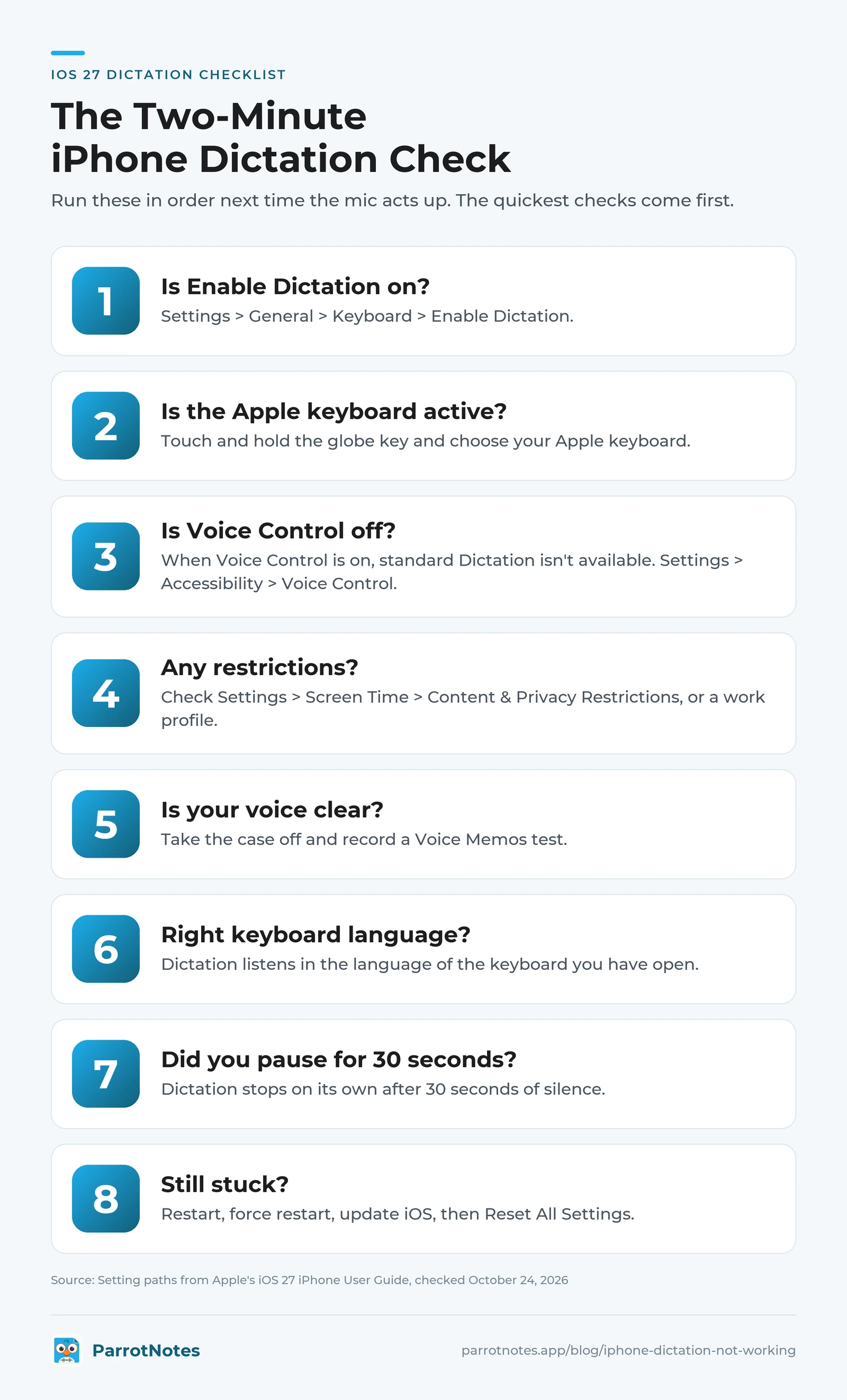
The two-minute iPhone dictation check
Run this in order next time the mic acts up. The quickest checks come first.
- Is Enable Dictation on? (Settings > General > Keyboard)
- Is the Apple keyboard active? (touch and hold the globe key)
- Is Voice Control off? (Settings > Accessibility > Voice Control)
- Are Screen Time restrictions or a work profile blocking it?
- Does your voice sound clear in a Voice Memos test, with the case off?
- Is the keyboard language the language you're speaking?
- Did you pause for 30 seconds?
- Still stuck: restart, force restart, update, then Reset All Settings.
When the keyboard mic is the wrong tool
Some "not working" moments are really the wrong tool: long notes with pauses, recaps that must become an email, or speaking one language and writing in another. For those, see which dictation app for iPhone fits each job, the cross-platform best dictation app roundup, or how to dictate an email. No app at hand? The free online dictation tool works in Safari.
Leah's fix took ten seconds: her phone had switched to a keyboard app she'd tried once. Now she records client recaps in ParrotNotes as she walks to the car, and the follow-up email is drafted before she starts the engine.
Get your iPhone dictation working again
- Mic key missing: Enable Dictation, the Apple keyboard, Voice Control, restrictions.
- Mic there but no text: the case, the Voice Memos test, the keyboard language.
- Stops or mistakes: the 30-second stop, and edit commands in U.S. English only.
- Nothing helps: restart, update, Reset All Settings, Apple Support.
Fix the setting first, then use the right tool for long notes. Try ParrotNotes free and your next recap is written before you leave the parking lot.
Frequently Asked Questions
Why did the dictation microphone disappear from my iPhone keyboard?
Usually Enable Dictation was switched off, a third-party keyboard is active, or Voice Control is on. Check Settings > General > Keyboard, touch and hold the globe key to pick the Apple keyboard, and turn off Voice Control in Settings > Accessibility. Screen Time or a work profile can also hide it.
Why does iPhone dictation stop after a few seconds?
Apple's Dictation stops automatically after 30 seconds of silence, or when you tap the mic or say "Stop dictation". If you pause to think, it ends. For long notes, record in Voice Memos or ParrotNotes and transcribe afterwards.
Why is my iPhone dictation so bad?
Common causes are a covered or dusty microphone, background noise, and the wrong keyboard language. In iOS 27, Apple Intelligence improves English dictation on iPhone 17 Pro, iPhone 17 Pro Max, iPhone Air, or later. For names, spell them aloud or use Voice Control's Vocabulary.
Why isn't dictation working on my iPad?
Start with the same check. Apple's iPad guide uses the same switch: Settings > General > Keyboard > Enable Dictation. Then switch back to the Apple keyboard and make sure Voice Control is off. With an external keyboard attached, Apple has a separate guide for dictating.
Related Posts
What Is a Submittal in Construction? A Guide for Product Reps
What is a submittal in construction? The types, the review process and stamps, plus a worked product-rep package and a pre-send checklist. Try ParrotNotes free.
Transcription Guidelines: Rules for Accurate, Consistent Transcripts
Transcription guidelines from Rev, GoTranscript and two universities compared rule by rule, plus a one-page house style you can copy. Try ParrotNotes free.

Tactical Empathy in Sales: Chris Voss Techniques for Real Calls
Tactical empathy for sales calls: Chris Voss's mirrors, labels and calibrated questions, a buyer-line phrasebook and a worked call. Try ParrotNotes free.