
Podcast Transcription: How to Get a Clean Transcript of an Interview Show

Sarah Johnson
Writes about field sales, meeting notes and voice-first workflows at ParrotNotes. Every article is reviewed by the ParrotNotes product team before it goes live.
Table of Contents
- 1.What podcast transcription is (and what a podcast transcript should contain)
- 2.Why transcribe a podcast episode
- 3.What a podcast transcript needs
- 4.Podcast transcription workflow: from recording to published transcript
- 5.Podcast transcript template (with a filled-in excerpt)
- 6.Episode-page checklist for publishing a transcript
- 7.Where to put a podcast transcript
- 8.Make the transcript part of the episode
It's Tuesday night. The 52-minute episode is edited, the cover art is done, and the guest has already emailed asking for "that bit where I talked about the river crossing" so she can share it.
A listener replied to last week's post asking whether there's a transcript. There isn't. There never is, because by the time the audio is finished, you're out of evenings.
If you run an interview show, you already know a transcript would help. It's the job that keeps sliding to next week.
This guide is about podcast transcription for shows with a host and guests. It covers why the transcript is worth making, what a podcast transcript needs that a plain interview transcript doesn't, the workflow from audio file to published page, and where the finished text should live. You'll also get a copy-ready transcript template, filled in with a short example, and a 12-point checklist for the episode page.
What podcast transcription is (and what a podcast transcript should contain)
Podcast transcription is the process of turning an episode's audio into a written record that listeners can read, search and quote. A finished podcast transcript labels each speaker, carries timestamps or chapter markers, marks the intro, ad reads and outro, and is published alongside the episode on its page or in the show's RSS feed.
That last part is what separates it from the transcript a reporter makes for their own notes. A reporter's transcript is a working document; it can be messy as long as the quotes are right. A podcast transcript is a public document. Strangers read it, search engines index it, screen readers speak it aloud, and your guest will check what you made them say.
An interview show also has more going on than a single conversation. There's a cold open, a sponsor read in the middle, two or three voices that overlap, and maybe a listener question segment. Each of those needs a decision in the transcript, and this guide makes those decisions for you.
Why transcribe a podcast episode
Four reasons, in the order most producers come to them.
Accessibility
Audio-only content shuts out anyone who can't hear it well. The Web Content Accessibility Guidelines (WCAG) treat this as a baseline requirement. Success Criterion 1.2.1, a Level A criterion in WCAG 2.2, says that for prerecorded audio-only media, "an alternative for time-based media is provided that presents equivalent information." The W3C's own example of a good alternative is a transcript that "identifies who is speaking as well as noting other significant sounds that are part of the recording, such as applause, laughter, questions from the audience."
Whether a law requires this depends on who you are. In the United States, the Department of Justice's ADA Title II web rule, published in April 2024, requires state and local governments to meet WCAG 2.1 Level AA for their websites and apps. The deadlines fall in 2027 and 2028. A public university or city podcast falls under that; a two-person indie show generally doesn't.
Rules vary by country and by who publishes the show, and none of this is legal advice. The practical view is simpler: a transcript is the cheapest accessibility fix you can ship.
The episode page and search
Search engines can't listen. A 6,000-word transcript on the episode page gives them the words your guest used, the places and products named, and the questions your host asked. It's the difference between an episode page that says "Episode 41: Tomas on the Atlas Mountains" and one that contains everything Tomas said about the Atlas Mountains.
There's a bigger audience out there than most producers think. Edison Research's Infinite Dial 2026 found that 58% of Americans aged 12 and over, an estimated 167 million people, listened to a podcast in the last month. Some of them find shows by searching for a topic, not a title.
Show notes, quotes and promotion
Every piece of promotion for an episode comes out of the transcript: the summary in the show notes, the pull quote for the social post, the three lines you send the guest to share, the chapters in the app. Without one you write those from memory, and memory rounds off the good sentences.
Guests and fact-checking
Guests ask for the transcript more often than listeners do. They want to check a figure or find the story they told, and a timestamped transcript saves a week of "around the 30-minute mark, I think" emails. It also lets you check names, numbers and claims before the episode is out, which is where the transcript correction pass from our interview guide earns its keep.
If you record interviews on your phone, ParrotNotes gives you the first draft the moment you stop, with a summary and the key points pulled out. You can try ParrotNotes free on your next episode.
What a podcast transcript needs
An interview transcript can be verbatim or clean verbatim, with or without timestamps, depending on who it's for. A podcast transcript is more fixed. Here's what to include, and the decision to make for each.
Speaker labels for host and guests
Use names, not "Host" and "Guest". Readers land on the page from search without knowing who's who, and a guest's name in the label is what makes their quote findable. Put the full name and role once in the header, then use the first name or surname consistently in the labels.
If your tool identifies speakers for you, still check the first minute and every point where a new voice arrives. Speaker identification (a Pro feature in ParrotNotes) infers who's talking from cues in the conversation, such as names being used, so an introduction like "I'm here with Tomas Reyes" helps it, and helps your readers too.
Timestamps and chapter markers
Two kinds of time marks, two jobs. Timestamps on speaker turns, or at least every two or three minutes, let a reader jump to the audio. Chapter markers are section headings with a time, and they're what podcast apps turn into a tappable list.
Spotify won't sync an uploaded transcript to playback without timestamps, and Apple Podcasts only accepts VTT or SRT files, which are timestamped by design. One more reason to keep them in.
Intros, ads and outros
Transcribe the intro and outro in full; they're part of the episode and often contain the show's name and the guest's credentials. Ad reads are a judgement call. Include them if the sponsor is paying for the words, and mark them plainly so a reader can skip. If the ad is a dynamically inserted spot that changes by region, it isn't part of the fixed episode, so leave a marker and move on.
Filler, crosstalk and laughter
Clean verbatim is the right default for a show: drop the "um"s and false starts, keep the meaning and the rhythm. Keep laughter and pauses where they carry meaning, in square brackets. When two people talk at once, give each their own line rather than trying to interleave them.
Names, brands and numbers
These are the words automatic transcription gets wrong most often, and the ones readers search for. Keep a running list per episode (guest's name, the places, the products, the figures) and check each one against the audio before you publish.
Podcast transcription workflow: from recording to published transcript
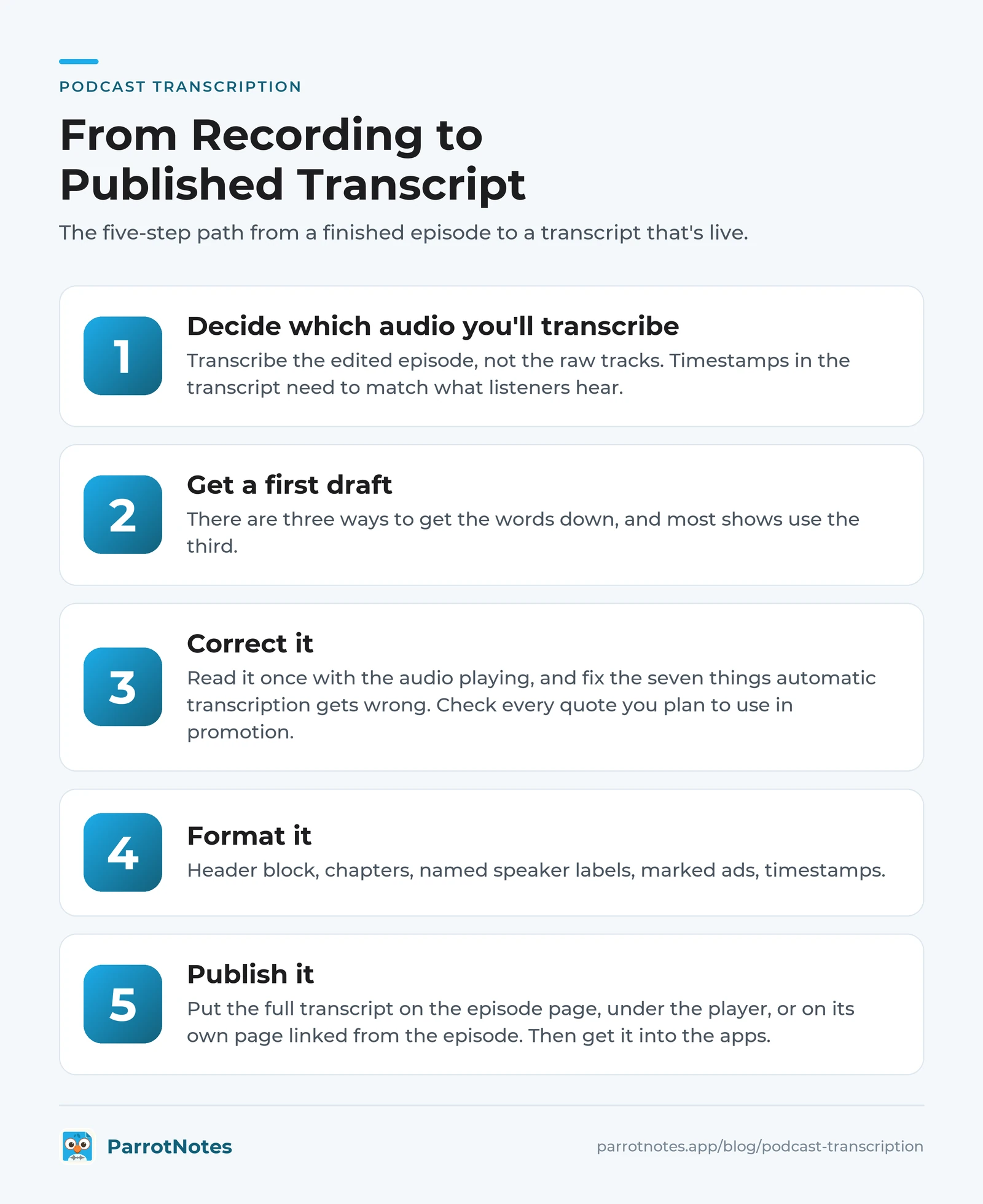
Here's the five-step path from a finished episode to a transcript that's live. It works for a remote interview recorded on a laptop, an in-person interview recorded on a phone, or an episode file exported from your editor.
Step 1: Decide which audio you'll transcribe
Transcribe the edited episode, not the raw tracks. Timestamps in the transcript need to match what listeners hear, and the raw recording still has the two minutes of "can you hear me now" at the top. Export the final MP3 or WAV once the edit is locked, and give it the same file name as the episode.
The exception is when you want the transcript early, for a guest check or to write show notes while the edit is still open. Then transcribe the raw interview first and redo the timestamps from the final export.
Step 2: Get a first draft
There are three ways to get the words down, and most shows use the third.
| Method | What it costs | How long it takes | Best for |
|---|---|---|---|
| Manual transcription | Your evening | Several times the episode's running time | Short episodes, or when you want every word by ear |
| Podcast transcription services (human) | Rev lists human transcription at $1.99 a minute (prices checked on 2026-09-22 at rev.com/pricing): about $103 for a 52-minute episode | Rev quotes delivery in 12 hours or less | Difficult audio, or shows that need a finished file with no correction pass |
| AI podcast transcription | A flat app subscription or a free plan | Minutes for the draft, plus your correction pass | Weekly interview shows, which is where most land |
With ParrotNotes, the phone route works two ways. Record the interview in the app when you're in the room with your guest, and the transcript appears as soon as you stop. Or import the edited episode file.
The free plan includes three audio or video file imports a month, so free podcast transcription for a weekly show is realistic. Pro lifts imports to unlimited, with recordings up to 3 hours long, and identifies speakers. If your guest answers in Spanish or German, multilingual transcription on Pro gives you a transcript in the language you publish in.
Picture Priya, who hosts a fictional weekly interview show called Field Notes. Her Thursday routine used to be a two-hour transcription session with the audio at three-quarter speed.
Now she imports the edited episode on Thursday morning and reads the AI draft with the audio on her walk. She fixes the dozen names and figures it got wrong, and the transcript is on the episode page by lunch. That's an illustration, not a case study, but it's the shape of the routine this guide is built for.
Step 3: Correct it
An AI draft is a draft. Read it once with the audio playing, and fix the seven things automatic transcription gets wrong: names, numbers, homophones, dropped negatives, speaker swaps, technical terms and anything mumbled. Our guide to how to transcribe an interview walks through that correction pass with a worked example and a quote-check log. This article won't repeat it.
For a podcast, add one more pass: check every quote you plan to use in promotion against the audio, because those are the lines that travel.
Step 4: Format it
Now turn the corrected text into the podcast layout: header block, chapters, named speaker labels, marked ads, timestamps. The template in the next section is that layout. Export it as text or markdown (both plans) for your website, or as docx or PDF (Pro) if you send transcripts to guests or a producer. If you also want it inside the podcast apps, save a second copy as VTT or SRT with timestamps.
Step 5: Publish it
Put the full transcript on the episode page, under the player, or on its own page linked from the episode. Then get it into the apps:
- Apple Podcasts generates transcripts automatically for episodes in English, Danish, Dutch, Finnish, French, German, Italian, Norwegian, Portuguese, Spanish and Swedish. If you'd rather use your own, supply a VTT or SRT file through your RSS feed or, for subscriber episodes, in Apple Podcasts Connect. Apple's page warns that "all transcripts are subject to quality standards. Files that do not meet standards will not be displayed." Episodes over 10 hours may not be transcribed.
- Spotify shows auto-generated transcripts on some shows and lets you upload your own as a VTT or SRT file up to 5 MB. Spotify's instruction is blunt: "Include timestamps, otherwise your transcript won't sync during playback." You can turn transcripts on or off per episode or for the whole show, and if you switch auto-generation on it replaces the file you uploaded.
- Your RSS feed carries the transcript to every other app through the
podcast:transcripttag. It takes aurland atype(text/plain, text/html, text/vtt, application/json or application/x-subrip), plus an optionallanguage. You can include several tags for several formats, and most hosts add it for you when you upload the file.
Ready to try the phone route? Download ParrotNotes free: 100 minutes of recording a month, three file imports, and an AI summary on every recording.
Podcast transcript template (with a filled-in excerpt)
Copy the skeleton, then fill it from your corrected transcript. The example below it uses a fictional show and fictional people, to show what each part looks like when it's done.
The template
[SHOW NAME] - Episode [NUMBER]: [EPISODE TITLE]
Published: [DATE]  |  Running time: [MM:SS]
Host: [Full name], [role]
Guest: [Full name], [role or one-line bio]
Recorded: [date and place or "remote"]
Transcript: clean verbatim, lightly edited for readability. Timestamps match the published episode.

CHAPTERS
00:00  Cold open
00:45  Intro
02:10  [Chapter title]
[MM:SS]  [Chapter title]
[MM:SS]  Sponsor: [Name]
[MM:SS]  [Chapter title]
[MM:SS]  Listener questions
[MM:SS]  Outro

---

[00:00] COLD OPEN
[Guest first name]: [The clip that opens the show.]

[00:45] INTRO
[Host first name]: [Show name, host name, who the guest is and why they're here.]

[02:10] [CHAPTER TITLE]
[Host]: [Question.]
[Guest]: [Answer.]
[Host]: [Follow-up.]

[MM:SS] SPONSOR: [NAME]
[Host]: [Ad read, or: "This episode is supported by [Name]. Ad read omitted."]

[MM:SS] [CHAPTER TITLE]
...

[MM:SS] OUTRO
[Host]: [Thanks, where to find the guest, next episode.]

---
Names, places and figures in this transcript were checked against the audio on [date].
Podcast transcript example, filled in
FIELD NOTES - Episode 41: Tomas Reyes on Photographing the Atlas Mountains
Published: September 18, 2026  |  Running time: 52:14
Host: Priya Nair, producer and host of Field Notes
Guest: Tomas Reyes, wildlife photographer and author of "High Ground"
Recorded: September 9, 2026, remote
Transcript: clean verbatim, lightly edited for readability. Timestamps match the published episode.

CHAPTERS
00:00  Cold open
00:45  Intro
02:10  How a photographer chooses a mountain range
11:30  The river crossing
19:05  Sponsor: Lantern Coffee
20:20  Working with local guides
34:50  Gear that survived and gear that didn't
44:10  Listener questions
50:30  Outro

---

[00:00] COLD OPEN
Tomas: The water was maybe waist deep. I had the camera above my head and I remember thinking, if I drop this, the whole trip is a story I tell instead of a book I publish.

[00:45] INTRO
Priya: Welcome to Field Notes. I'm Priya Nair. My guest today is Tomas Reyes, a wildlife photographer whose new book, "High Ground," covers four seasons in the Atlas Mountains. Tomas, welcome.
Tomas: Thanks for having me, Priya.

[11:30] THE RIVER CROSSING
Priya: You said the crossing was the moment you nearly went home. What happened?
Tomas: It was the third week. The snowmelt came early that year, so the river we'd crossed on the way in was about twice as wide on the way out. [laughs] My guide, Hamid, looked at it and said, "Tomorrow." I said, "We don't have a tomorrow, the light's gone by Friday."
Priya: And who won?
Tomas: Hamid. Which is the lesson, honestly. We went at dawn, and the level had dropped about 30 centimetres.

[19:05] SPONSOR: LANTERN COFFEE
Priya: This episode is supported by Lantern Coffee. Ad read omitted from the transcript.

[20:20] WORKING WITH LOCAL GUIDES
Priya: Let's talk about Hamid, because he comes up a lot in the book.
...

---
Names, places and figures in this transcript were checked against the audio on September 17, 2026.
Notice what the example does: the guest's name and book are in the header so they're findable, the chapter times match the ones you'd give the podcast apps, the laugh is kept because it changes how you read the line, and the ad is marked but not reproduced. That's the whole podcast-specific layer on top of a clean verbatim transcript.
Episode-page checklist for publishing a transcript
Run this before you hit publish. Twelve points, two minutes.
- Full transcript on the episode page or on a page linked from it, not only inside a podcast app
- Header carries the show, episode number, title, date, running time, host and guest names
- Every speaker label is a real name, used the same way throughout
- Chapter list at the top, with times that match the published audio
- Timestamps at least every few minutes, in the same format throughout
- Intro and outro transcribed in full
- Ad reads marked, either reproduced or noted as omitted
- Guest's name, book, company and any URLs spelled the way they spell them
- Every number and place name checked against the audio
- Quotes you plan to use in promotion checked word for word
- A one-line note on the transcript style (clean verbatim) and the check date
- VTT or SRT version, with timestamps, uploaded to your host so Apple Podcasts and Spotify can sync it
Consider Marcus, a fictional producer who runs a two-host business show with a guest every other week. He skipped point 8 for months. His transcripts had the guest's company right and the guest's surname wrong about one time in five. The AI draft guessed the spelling and nobody checked.
The fix was a 30-second habit: he asks every guest to spell their name on the recording, and it goes on his per-episode check list before anything else.
Where to put a podcast transcript
Where the transcript lives decides who finds it. Most shows should do the first two and let their hosting platform handle the third.
- On the episode page, under the player. The default: where a reader looks first, and what a search engine indexes with the episode.
- As an excerpt in the show notes. The three or four best exchanges, with timestamps, above a link to the full transcript. This is the version that gets shared.
- In the feed as VTT or SRT. What the apps read. Apple Podcasts and Spotify accept a timestamped VTT or SRT file, and the
podcast:transcripttag carries it to other apps. - On a dedicated transcript page. For when the episode page is already long, or you want one clean URL to send a guest.
Keep the source file too. Store the corrected transcript with the episode's audio, named to match. When the guest emails in March asking for the river-crossing quote, you can search for "river" and send it in a minute. If you recorded in ParrotNotes, that search is built in, and how your recordings are protected is set out on our security page.
Make the transcript part of the episode
Podcast transcription isn't a bonus task for the weeks you have spare time. It's the version of the episode that people who can't listen can still read. It's the text search engines can index, the source of every quote you'll promote, and the record your guest will thank you for.
The workflow is five steps: transcribe the edited episode, get an AI draft, correct it against the audio, format it with the template above, and publish it on the page and in the feed. The checklist keeps the last step honest.
Start with next week's episode. Record the interview in ParrotNotes, or import the edited file, and the podcast transcription draft is waiting before the coffee's cold. Download ParrotNotes free and give your show the transcript it's been missing.
Frequently Asked Questions
How long does podcast transcription take?
An AI podcast transcription tool returns a draft of a 50-minute episode in minutes. The correction pass is where the time goes. Plan on roughly the running time of the episode to read the draft with the audio and fix names, numbers and speaker labels. Manual transcription from scratch takes several times the running time, and a human service such as Rev quotes delivery in 12 hours or less.
Does Spotify transcribe podcasts automatically?
Spotify shows auto-generated transcripts on some shows, viewable in the Now Playing view and on episode pages in the mobile app. As a creator you can turn them on or off per episode or for the whole show, or upload your own VTT or SRT file, up to 5 MB, with timestamps so it syncs during playback.
Do I still need a transcript if Apple Podcasts makes one?
Apple's automatic transcript lives inside the Apple Podcasts app in the languages Apple supports. It doesn't appear on your website, in other apps, or in search results for your episode page, and Apple applies its own quality standards to what's displayed. Publishing your own transcript covers every listener, every app and every search engine.
Should a podcast transcript be verbatim or clean verbatim?
Clean verbatim for almost every show: keep every meaningful word, drop the filler and false starts, and keep laughter or pauses that change the meaning. Full verbatim suits research and legal uses, not a public episode page. Our interview transcription examples show the same exchange in both styles.
Can I transcribe a podcast recorded in another language?
Yes. Apple Podcasts auto-generates transcripts in 11 languages, and tools such as ParrotNotes transcribe 99+ languages, with translation on Pro so a Spanish interview can be published as an English transcript. Have a fluent reader check names and idioms before it goes live.
Related Posts
Voice Notes on iPhone: Everything You Can Do With Them
Voice notes on iPhone can do more than record. Learn to capture, tidy, transcribe, sync, and share them, and which iPhone voice tool fits each job. Try it free.
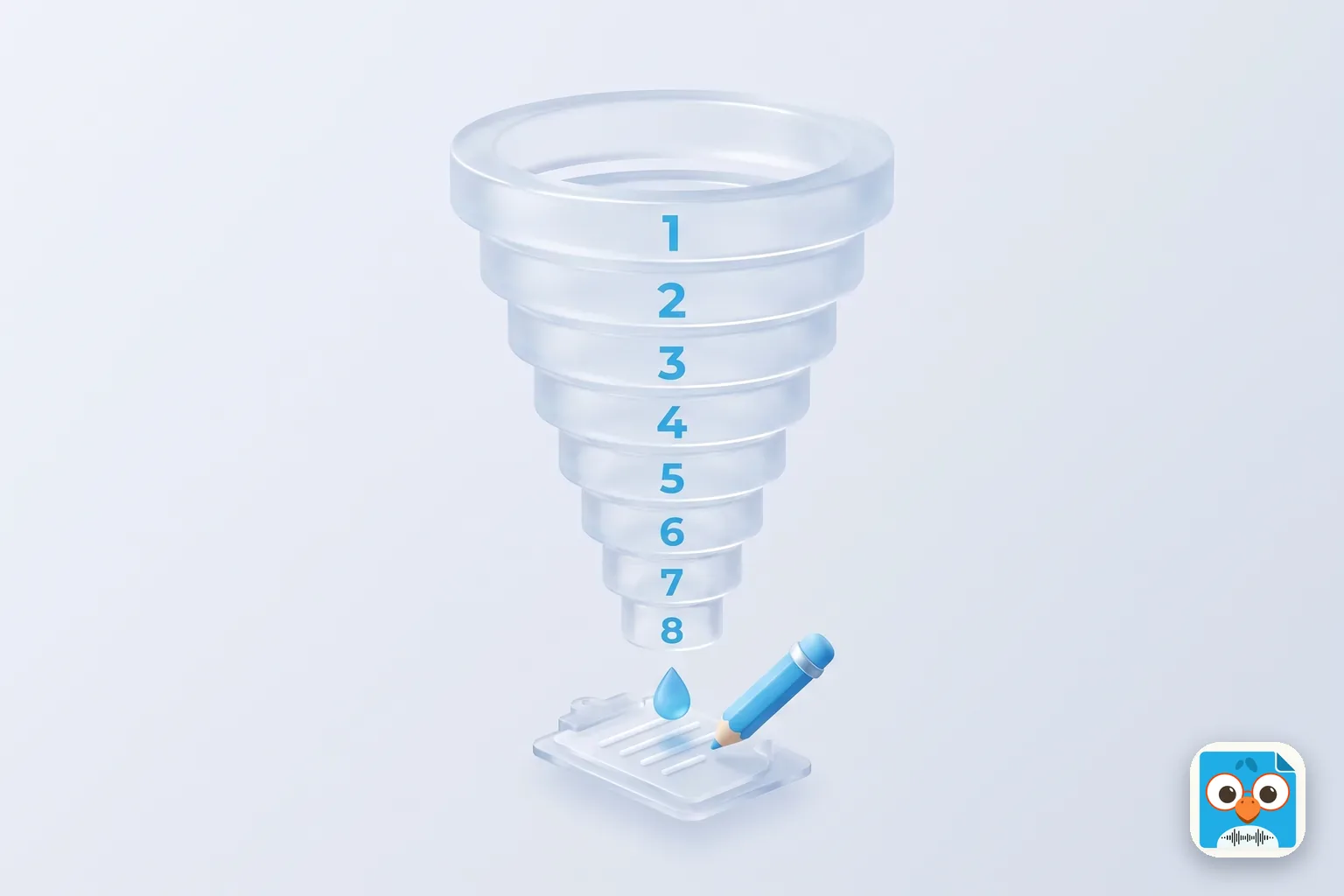
Sandler Pain Funnel Questions (With a Note-Taking Template)
The 8 Sandler pain funnel questions as Sandler publishes them, what to write down at each one, a note-taking template and a worked call. Copy it free.
Sales Meeting Agenda: Templates for Weekly Team Meetings
Running a weekly sales meeting that produces nothing? Copy four sales meeting agenda templates for field teams, plus a rep prep card and a record-ready run.