
Meeting Notes Template: Simple Formats That Work

Sarah Johnson
Product Manager at ParrotNotes with 5+ years of experience in productivity tools and AI technology.
Table of Contents
- 1.Which meeting notes template fits your meeting?
- 2.Meeting notes template 1: the one-page default
- 3.Meeting notes template 2: quick notes in three lists
- 4.Template 3: notes against the agenda
- 5.Template 4: the running notes doc for recurring meetings
- 6.Template 5: client and vendor meeting notes
- 7.Template 6: your own notes as an attendee
- 8.Meeting notes or meeting minutes: which do you need?
- 9.How to take meeting notes people will read
- 10.Let a recording fill in your meeting notes template
- 11.Copy a meeting notes template before your next meeting
Picture Nadia, a team lead at a 35-person property management firm. On Tuesday she ran the weekly project sync, kept time, answered questions, and took the notes. On Thursday, someone asks who's calling the elevator contractor.
Nadia opens her notebook. The page says "elevator, quote??, Sam?" with an arrow pointing at nothing. Two people remember the meeting differently, so the topic goes back on next week's list.
You already know you should write things down. What's harder is knowing what to write while you're also running the room. A good meeting notes template settles that before anyone sits down. It tells you which five things to catch, and it gives you permission to skip the rest.
This guide gives you six simple formats, each with a filled-in example you can copy. After the templates, you'll find a shorthand key for writing fast, a 10-minute routine for sending notes, and a way to let a recording fill in the template for you.
Which meeting notes template fits your meeting?
Pick the format by your situation in the room, not by what the calendar calls the meeting. Here's the short version.
| Your situation | Use this format | Time to tidy up |
|---|---|---|
| You run the meeting and take the notes | 1. One-page default | 10 min |
| A 15 to 30-minute huddle or check-in | 2. Quick notes in three lists | 3 min |
| The meeting has a written agenda | 3. Notes against the agenda | 10 min |
| The same group meets every week or month | 4. Running notes doc | 5 min |
| A client, vendor, or partner is in the room | 5. Client and vendor notes | 10 min |
| You attend, and someone else runs it | 6. Attendee's own notes | 2 min |
Each one is a free meeting notes template in plain text. Paste it into Word, Google Docs, Notion, an email, or the notes app on your phone. Nothing here needs a download or a sign-up.
What should meeting notes include? Five things: the date and who attended, the topics covered, each decision written as a full sentence, each action item with one owner and a due date, and the questions still open. Everything else is optional. If your notes hold those five, people can act on them without asking you what happened.
Those five sound obvious, yet they're the part that goes missing. Atlassian's Workplace Woes survey of 5,000 knowledge workers found that 54% "frequently leave meetings without a clear idea of next steps or who owns which task." In the same survey, 77% said they're frequently in meetings that end in a decision to schedule a follow-up meeting.
That's Nadia's Thursday, measured.
Want those five building blocks captured while you stay in the conversation? You can try ParrotNotes free. Put your phone on the table, record the meeting with everyone's permission, and get a transcript, an AI summary, and action items afterwards.
Meeting notes template 1: the one-page default
Use this when you're not sure which format you need. It fits a 30 to 60-minute team meeting, and it holds all five building blocks on one page.
MEETING NOTES
Meeting:
Date and time:
Attendees:
Absent:
Note-taker:

TOPICS (2 or 3 lines each: what matters, not who said what)
1.
2.
3.

DECISIONS (one full sentence each)
-
-

ACTION ITEMS
Task | Owner | Due date
     |       |
     |       |

OPEN QUESTIONS (and who's finding the answer)
-

NEXT MEETING (date, and anything to prepare):
Three rules make it work. Write each decision as a sentence someone could read cold in three weeks. Give each action item one owner, never "the team." And keep the topics section short, because nobody rereads a play-by-play.
Here's the sample Nadia could have sent after Tuesday's sync.
| Section | Nadia's notes |
|---|---|
| Meeting | Weekly project sync, Tuesday, October 6, 10:00 to 10:40 |
| Attendees | Nadia, Sam, Ines, Leo. Absent: Carmen |
| Topic 1 | Elevator at 14 Birch Street: two quotes in, $18,400 and $21,900. The cheaper one has a 9-week lead time |
| Topic 2 | Lobby repaint: tenants want it finished before November 20 |
| Decision | We'll take the $21,900 elevator quote, because its 4-week lead time meets the tenants' deadline |
| Action | Sam calls the elevator contractor to confirm the start date. Due Thursday, October 8 |
| Action | Ines sends tenants the lobby repaint schedule. Due Friday, October 9 |
| Open question | Does the repaint need board approval above $5,000? Leo is checking by Wednesday |
| Next meeting | Tuesday, October 13. Leo brings the approval answer |
That's under 150 words, and Thursday's question is answered at a glance.
Meeting notes template 2: quick notes in three lists
A 20-minute huddle doesn't need a page. It needs three lists, and you can fill them in on your phone while people are still standing up.
QUICK NOTES: [meeting], [date]
Who was there:

DECIDED
-

TO DO (task, owner, due date)
-

STILL OPEN
-
This is the meeting notes format to use when the alternative is no notes at all. It skips the discussion completely. If a point didn't end in a decision, a task, or an open question, it doesn't go in.
Here are sample meeting notes from a Monday front-desk huddle.
QUICK NOTES: Front-desk huddle, Monday, October 12
Who was there: Dee, Tomas, Yuki

DECIDED
- Visitor badges move to the new printer from Wednesday, October 14.

TO DO
- Tomas orders 500 badge sleeves. Due Tuesday.
- Yuki updates the sign-in instructions at both desks. Due Wednesday morning.

STILL OPEN
- Who covers the desk during the fire drill on October 22? Dee asks HR.
Post it in the team chat before you're back at your desk.
Template 3: notes against the agenda
If the meeting has a written agenda, don't start from a blank page. Copy the agenda items into the first column of a table, and take your notes beside them.
MEETING NOTES: [meeting], [date]
Attendees:

Agenda item | Key points (2 lines max) | Outcome | Owner and due date
1.          |                          |         |
2.          |                          |         |
3.          |                          |         |

Parking lot (raised, not discussed):
Decisions in one place (copy them from the Outcome column):
The Outcome column earns its keep. Every agenda item has to end as one of four things: decided, action assigned, carried over, or dropped. If you can't fill in the column, the item isn't finished, and you can say so before the room moves on.
This format works best when the agenda items are questions, because the outcome is then the answer. Our meeting agenda template guide has five agenda formats built that way.
Here's the table filled in for the monthly team meeting of a 12-person accounting practice.
| Agenda item | Key points | Outcome | Owner and due date |
|---|---|---|---|
| 1. Do we move the payroll cutoff to the 25th? | Two clients pay staff on the 28th. The 25th leaves three working days | Decided: the cutoff moves to the 25th from November | Ravi tells clients by October 16 |
| 2. How do we cover reception in December? | Four people are away the week of December 21 | Carried over: we need the leave calendar first | Helen shares the calendar by October 14 |
| 3. Which scanner do we buy? | Both cost under $600. IT prefers the model with a 3-year warranty | Decided: the 3-year warranty model | Helen orders it by October 9 |
Template 4: the running notes doc for recurring meetings
Weekly team meetings, project check-ins, and one-on-ones share a problem. Each set of notes lives in a different file, so nobody checks whether last week's actions happened.
The fix is one document per recurring meeting, with the newest date on top. Open actions carry forward until someone closes them.
[MEETING NAME]: RUNNING NOTES
Standing attendees:

OPEN ACTIONS (carried forward until done)
Task | Owner | Due | Status
     |       |     |

=== [Newest date] ===
Done since last time:
Discussed (3 to 5 bullets):
Decided:
New actions (add them to OPEN ACTIONS above):

=== [Previous date] ===
Done since last time:
Discussed:
Decided:
New actions:
One rule makes it work. The meeting opens with the OPEN ACTIONS table, not with new business. An action leaves the table only when its owner says "done" out loud.
Picture Grace, the office manager at a 50-person engineering consultancy. Her Wednesday operations meeting used to produce a fresh document every week, which meant 40 files by October. "Renew the water cooler contract" appeared in March, May, and August, each time as a brand-new action.
She moved the meeting to a running doc. The contract sat at the top of OPEN ACTIONS with Grace's own name beside it, and she renewed it within eight days. Now, scrolling down the doc answers "when did we decide that?" in seconds.
Template 5: client and vendor meeting notes
When someone from outside your company is in the room, your notes have a second job. They're the record of who promised what. Split the promises by side, so nothing hides in a paragraph.
CLIENT / VENDOR MEETING NOTES
Meeting with:
Date and place:
Their side:
Our side:
Purpose (one sentence):

WHAT THEY TOLD US (facts, numbers, dates, concerns)
-

WHAT WE PROMISED THEM (task, owner, due date)
-

WHAT THEY PROMISED US (task, their owner, due date)
-

AGREED (decisions both sides said yes to)
-

NOT AGREED YET
-

NEXT CONTACT (who, how, when):
Picture Omar, the facilities coordinator at a 120-person insurance office, meeting his cleaning vendor on a Thursday afternoon. The vendor's account manager offers a 6% discount for a 24-month term. She promises a revised quote "early next week," and she mentions that the night crew needs badge access from Monday, November 2.
Omar's notes put each of those in its own box. "What they promised us: revised quote with the 6% discount, from Janelle, by Tuesday, October 13." "What we promised them: badge access for four crew members, Omar, by October 30."
On Wednesday, no quote has arrived. Omar doesn't have to wonder whether he misheard. He forwards the notes with one line: "Janelle, checking on the revised quote from Thursday's meeting."
Send this version to the other side the same day. A shared record beats a private one, and it gives them the chance to correct you while the meeting is fresh.
Meeting a client or vendor this week? Download ParrotNotes free and record the conversation from your phone, with their permission. The summary and action items put both sides' promises in writing, and you stay in the conversation.
Template 6: your own notes as an attendee
You won't always be the note-taker. When someone else runs the meeting, you don't need a record of everything. You need a record of what changes your week.
MY NOTES: [meeting], [date]

WHAT AFFECTS MY WORK
-

WHAT I OWE (task, to whom, by when)
-

WHAT I'M WAITING ON (from whom, by when)
-

QUESTIONS I STILL HAVE
-
Four headings, two minutes. "What I'm waiting on" is the list people forget, and it saves you when a dependency hasn't shown up two weeks later.
Compare your "What I owe" list with the official notes when they arrive. If a task with your name on it is missing from either one, fix that today.
Meeting notes or meeting minutes: which do you need?
Meeting notes are an informal working record for the people who were in the room. Meeting minutes are the official record of a formal body, such as a board, a committee, or a council. Notes have no required format. Minutes follow your bylaws, and the body approves them at its next meeting.
The content differs too. The official Robert's Rules of Order FAQ puts it in one line: "Minutes are a record of what was done at a meeting, not a record of what was said." Minutes record motions and votes. Working notes can hold context, reasons, and open questions, because their job is to help a team act.
So the test is simple. If a body votes and someone might inspect the record later, you need minutes, and minutes have their own rules. For a team meeting or a vendor catch-up, the six formats above are the right tool.
How to take meeting notes people will read
A template tells you where things go. These three habits decide whether anyone opens the notes.
Write outcomes, not dialogue
Don't transcribe. For each topic, wait until the discussion lands, then write where it landed. "Sam thinks the quote is high, Leo disagrees" is dialogue. "We'll take the $21,900 quote because of the 4-week lead time" is an outcome.
When a topic ends without a clear outcome, ask the room: "What am I writing down for this one?" It's the most useful question a note-taker has. Ask it, and a vague chat turns into a decision on the spot.
Use a shorthand key
You can't write full sentences at the speed people talk. So mark each line as you go, and tidy up afterwards. Seven marks cover almost everything.
| Mark | Meaning | Example |
|---|---|---|
| D: | Decision | D: cutoff moves to 25th from Nov |
| A: | Action item | A: Ravi, tell clients, Oct 16 |
| ? | Open question | ? board approval above $5k |
| ! | Risk or deadline | ! tenants need lobby by Nov 20 |
| PL | Parking lot, for another meeting | PL website refresh |
| @name | Who owns it | @Helen leave calendar |
| >> | Carried to the next meeting | >> reception cover |
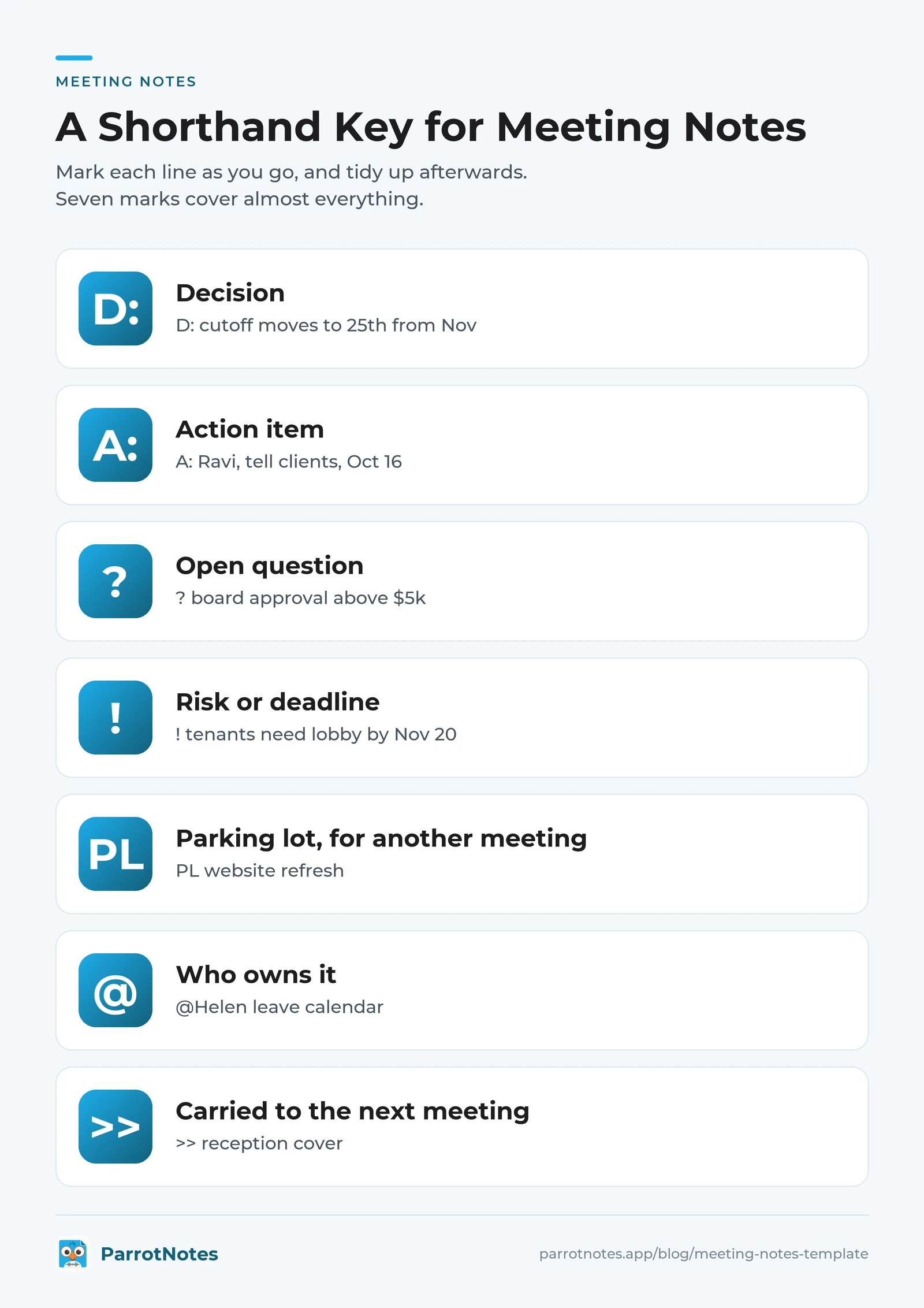
When you tidy up, every D: line moves to Decisions, every A: line moves to the action table, and every question-mark line moves to Open questions. You've already done the sorting.
Tidy and send within the hour
In Microsoft's 2023 Work Trend Index survey of 31,000 workers, 56% said it's hard to summarize what happens in a meeting. It gets harder with every hour you wait. Here's a 10-minute routine for straight after the meeting.
- Minutes 0 to 3: move your marked lines into the template, and turn each decision into a full sentence.
- Minutes 3 to 6: check that every action item has one owner and a real date. "ASAP" and "next week" aren't dates.
- Minutes 6 to 8: cut the topics section down to what an absent colleague would need.
- Minutes 8 to 10: send it, with the decisions and actions in the body of the message, not hidden in an attachment.
Here's a message you can paste.
Subject: Notes: [meeting], [date]: [number] decisions, [number] actions

Hi all,

Notes from today are below. Reply by [day] if anything looks wrong.
After that, these stand as our record.

DECISIONS
1.

ACTIONS
- [Owner]: [task], due [date]

OPEN QUESTIONS
-

Next meeting: [date]
The "reply by" line matters. It turns one person's version into the team's agreed record, with no formal approval step.
Let a recording fill in your meeting notes template
Here's the catch with every meeting notes template: someone still has to fill it in. In a conference room, that someone is you, and you're also chairing, presenting, or answering questions.
A recording takes the capture job off your hands. The template becomes a checklist you fill in afterwards, not a form you race through while people talk.
Before you record, tell the room and ask permission. Recording rules vary by state and country, and this article isn't legal advice. You can always pause the recorder for a sensitive item.
Then put a phone running ParrotNotes in the middle of the table. Recording carries on with the screen off, so the phone can sit face down. Afterwards you get a transcript, an AI summary, and a list of action items, and each one maps onto the template:
- Topics: take them from the AI summary, and trim each one to two or three lines
- Decisions: check the summary, then search the transcript for the exact wording
- Action items: start from the extracted list, then confirm each owner and date
- Open questions: search the transcript for "find out," "check," and "get back to"
- The notes message: ParrotNotes can draft a follow-up email from what was said, so you start from a draft
Two habits make the recording far more useful. State each decision as a full sentence, and say the owner and the date together. The record-ready checklist in our meeting agenda guide has the full list. Our post on how to never miss action items covers sales calls, but the same habit works in any conference room.
Picture Nadia's next Tuesday sync. Her phone sits face down by the water jug. She asks "What am I writing down for this one?" twice, and both answers land in the recording. Back at her desk, she pastes the one-page template, fills it in from the summary and the action list, and sends the notes before 11:00.
The free plan includes 100 minutes of recording a month, up to 30 minutes per recording, with an AI summary on every recording. That's enough for a 20-minute huddle every week. ParrotNotes Pro records up to 3 hours at a time, with 3,000 minutes a month. Pro costs $19.99 a month, or $14.99 a month billed annually.
Pro also adds AI chat, so you can ask a recording "What did we decide about the elevator quote?" It includes speaker identification, plus transcription in 99+ languages with translation.
If your meetings cover sensitive topics, read how we protect your data first. New to the app? The guide to getting started with ParrotNotes walks through a first recording.
Copy a meeting notes template before your next meeting
The right meeting notes template is the one you'll fill in every time. Here's the short version:
- Choose the format by your situation: one-page default, three lists, agenda table, running doc, client and vendor, or attendee
- Catch five things: who and when, topics, decisions, action items, and open questions
- Write each decision as a full sentence, and give each action one owner and a real date
- Mark lines with the shorthand key, then tidy and send within the hour
- Add a "reply by" day, so your notes become the team's record
Think back to Nadia's notebook, with its arrow pointing at nothing. With the one-page format, Thursday's question has an answer: Sam is calling the contractor, and it was due today.
Your next meeting is already on the calendar. Copy the meeting notes template that fits, and paste it into your notes app now. Then download ParrotNotes free, so the next template you open comes back with its blanks filled in.
Frequently Asked Questions
What should a meeting notes template include?
A meeting notes template should include five things: the date and attendees, the topics covered, each decision as a full sentence, each action item with one owner and a due date, and any open questions. Add the next meeting date if there is one. Leave out the word-for-word discussion, because nobody rereads it.
What's the difference between meeting notes and meeting minutes?
Meeting notes are an informal working record that helps a team remember and act. Meeting minutes are the official record of a formal body, such as a board or committee. Minutes follow the body's bylaws, record motions and votes, and get approved at the next meeting. Notes have no required format, so a simple template is enough.
How do you take meeting notes while running the meeting?
Use a shorthand key, and write outcomes only: "D:" for decisions, "A:" for actions, nothing for the discussion. At the end of each topic, ask "What am I writing down for this one?" Read the decisions and actions back in the last five minutes. Or record the meeting with permission, and fill in the template afterwards.
Can an app take meeting notes for you in a conference room?
Yes, if everyone in the room agrees to be recorded. Ask first, because recording rules vary by location. ParrotNotes records from a phone on the table, with no meeting bot, then gives you a transcript, an AI summary, and action items. You still check owners and dates, but you aren't writing while people talk.
Related Posts
Sales Engineer: The Role and How to Document Technical Meetings
What a sales engineer does, what the role pays (BLS data), and a technical meeting record that keeps specs, units and promises intact. Copy the template.
Nurse Educator Guide: Record In-Services Staff Can Revisit
A working nurse educator's kit: what to record and what never to, a consent script, a session plan, and a one-page revisit sheet staff will use. Try it free.

MEDDPICC Explained: What Each Letter Means on a Real Deal
MEDDPICC explained on one worked deal: what each of the eight letters means, what to ask, and a note template for what to write down after every meeting.