
How to Record a Podcast on iPhone: Apps, Mics and Settings

Sarah Johnson
Writes about field sales, meeting notes and voice-first workflows at ParrotNotes. Every article is reviewed by the ParrotNotes product team before it goes live.
Table of Contents
- 1.How to record a podcast on iPhone: pick the setup for your show
- 2.How to record a podcast on iPhone with Voice Memos
- 3.How to record a podcast on iPhone with GarageBand
- 4.Podcast recording apps for iPhone and their free plans
- 5.Microphones for iPhone podcasting: Lightning vs USB-C
- 6.How to record a remote guest on iPhone
- 7.Podcast settings checklist for iPhone
- 8.After recording: edit, publish and get a transcript
- 9.Conclusion: recording a podcast on iPhone
Maya had the guest, the questions and a free Saturday morning. What she didn't have was a studio. So she set her iPhone on a stack of books between two coffee cups, opened Voice Memos and pressed record. Forty minutes later she had an episode, and a kitchen fridge humming under every word. (Maya is an illustration, not a real customer.)
Her phone was never the problem. You can record a podcast on any recent iPhone. The difference between "phone recording" and "podcast" is a few settings, the right app for your format, and, if the show matters to you, a microphone that fits your port.
Here's how to record a podcast on iPhone, short version:
- Solo show or two people in one room: Voice Memos, free and already on your phone.
- Music, intro and several tracks: GarageBand, Apple's free app.
- A guest somewhere else: Riverside, whose free plan includes 2 hours of multitrack recording.
Below: each option, the mic for your iPhone, the settings to change first, and what to do with the file. If you also want a transcript and show notes from each episode, ParrotNotes records and transcribes on iPhone and Android; more on that near the end.
How to record a podcast on iPhone: pick the setup for your show
Start with your format; the app and the mic follow from it. Free plans below were checked on each vendor's site in November 2026.
| Your show | iPhone app | Mic route | What it costs to start |
|---|---|---|---|
| Solo, talking to the listener | Voice Memos | Built-in mic, or one USB-C or Lightning mic | Free |
| Two people in one room | Voice Memos (one phone in the middle) or GarageBand with a two-input interface | Two mics into an audio interface for separate tracks | Free apps; an interface costs extra |
| A remote guest | Riverside, or two phones each running Voice Memos | Each person's own mic and headphones | Riverside Free: 2 hours of multitrack recording, one time |
| An edited show with music and an intro | GarageBand or Ferrite | Any mic the app accepts | GarageBand is free; Ferrite is free with limits |
Most first episodes fit in the first row. Don't buy anything until you've recorded a test.
How to record a podcast on iPhone with Voice Memos
Voice Memos is the fastest way to record a podcast on iPhone for free. It records one track, which is fine for a solo show or two people sitting close together.
- Open Voice Memos (it's in the Utilities folder if you can't see it).
- Put the phone 15 to 30 cm (6 to 12 inches) from the speaker's mouth, bottom edge facing them.
- Tap the red Record button.
- Tap Pause if you need a break, then Resume to continue the same recording.
- Tap Stop when you're done. The recording saves on its own.
Our guide to recording audio on iPhone covers sharing, trimming and where files are saved.
Voice Memos settings for a podcast
Change these before your first episode, not after.
- Recording Mode. Go to Settings > Apps > Voice Memos > Recording Mode. Apple's Voice Memos guide lists Mono, Stereo and, on some models, Spatial Audio. For one voice, choose Mono. For a stereo mic, choose Stereo. Spatial Audio is built for immersive playback, not for a voice show.
- Audio Quality. In the same Settings page, choose Lossless if you'll edit the audio later. It takes more space (see the storage table below).
- Mic mode. Open Control Center while recording and tap Voice Memos at the top. Voice Isolation filters background sound; Wide Spectrum keeps it. Apple says Voice Isolation prioritizes your voice, so for two people, test both. Our guide to Voice Isolation on iPhone explains the difference.
- Silent mode. Apple notes that Silent mode mutes the start and stop tones, so the beep doesn't open your episode.
One limit: Voice Memos has no gain control. Apple's only advice is to move the mic closer or farther away.
How to record a podcast on iPhone with GarageBand
GarageBand is free from Apple, and it's the better choice when you want an intro, music or more than one track. It also has one trap that catches almost every spoken-word recorder.
Fix the 8-bar limit first. Apple's song sections guide says, "By default, the first section of a new song is 8 bars long." Record a podcast into that and it stops after a few seconds. Open the Settings app, tap GarageBand (under Apps on recent iOS versions) and turn on Automatic Recording Length. Then the section matches the length of your recording.
Then record:
- Open GarageBand, start a new song and choose the Audio Recorder.
- Speak at your normal volume and drag the In level slider until the meter stays out of the red.
- Tap Record in the control bar and talk.
- Tap Play to stop.
Apple's Audio Recorder guide adds three useful controls. With an external mic or headset connected, the Monitor button lets you hear yourself. Noise Gate (in Input Settings) cuts low hum between sentences. And with a two-input interface, the Channel button picks Input 1, Input 2 or Stereo, so each host can get a track.
Podcast recording apps for iPhone and their free plans
Here's what each app offered on its vendor's pages on November 18, 2026.
| App | Runs on | Free plan | Paid |
|---|---|---|---|
| Riverside | iPhone, iPad, web | 2 hours of multitrack recording (one time), unlimited single-track recording and editing, 44.1 kHz audio, Riverside watermark | Pro $29/month, or $24/month billed annually |
| Ferrite Recording Studio (Wooji Juice) | iPhone, iPad | Free download with limited project length; takes only 1-2 input channels from an interface | Ferrite 3 Pro $29.99 one-time in-app purchase (US); projects up to 24 hours, up to 8 channels |
| Descript | Mac and Windows (no official iPhone app listed) | 60 media minutes a month, 720p video export with watermark | Paid plans from $16 per person per month (lowest price on its pricing page) |
| Spotify for Creators | iPhone, Android, web | No longer records or edits | n/a |
Two notes. Spotify's support page says recording and editing tools left its web and mobile app on July 9 (2024), and it now points creators to Riverside; you can still upload finished episodes. And several App Store apps use "Descript" in their names but aren't sold by Descript, so check the developer name before you install.
Sources: Riverside's pricing page and Wooji Juice's Ferrite support page.
Microphones for iPhone podcasting: Lightning vs USB-C
A mic does more for your show than any app. Check your port first: iPhone 15 and later have USB-C, and iPhone 14 and earlier have Lightning. Apple's USB-C page for iPhone lists microphones among the devices the port connects to.
- iPhone 15 and later (USB-C): a USB-C mic plugs straight in.
- iPhone 14 and earlier (Lightning): use a Lightning mic, or Apple's Lightning to USB Camera Adapter for a USB mic or interface.
- Clip-on mics with a 3.5 mm plug: need Apple's headphone jack adapter and a TRRS plug.
- Two hosts, two mics: use an audio interface with two inputs, then record in GarageBand or Ferrite Pro for separate tracks.
On iOS 26 or later, pick the mic in Control Center: tap your app's button at the top, then Input. Our external microphone for iPhone guide covers adapters, power problems and Bluetooth. Before a long session, run the free microphone test to check the mic is picking you up.
Wear headphones, even cheap wired earbuds. On a call, they stop the guest's voice leaking into your mic.
How to record a remote guest on iPhone
Ravi hosts a monthly interview show from Pune; his co-host Ana lives in Lisbon. (Both are illustrations.) Their first remote episode was a FaceTime call he recorded on a second phone on speaker. It sounded like a phone call, because it was one. They switched to recording each side separately, and the next episode sounded like they shared a room.
There are three ways to do that on iPhone:
- Riverside. The host starts a studio in the iPhone app and shares a link; the guest joins from their phone or a computer. Riverside says it records each participant locally, so a weak connection doesn't spoil the audio. The free plan's 2 multitrack hours cover a few episodes.
- A double-ender with two phones. Talk over any call app with headphones on, while each person records themselves in Voice Memos. Clap once at the start, then line the two files up in GarageBand or Ferrite using the clap. It costs nothing and sounds like the best mics you each have.
- FaceTime audio Call Recording. Fine for a quick one-to-one chat. It works only on FaceTime audio with one other person, both of you hear a notice, and it isn't available in some regions, including the EU. Our guide to recording a FaceTime call has the steps. Expect call quality.
Ask before you record. Every guest should know they're being recorded and where it will be published. Some US states require everyone's consent; see our overview of one-party and two-party consent states. That's general information, not legal advice. Our podcast interview questions guide has a run sheet that starts with the guest's consent on tape.
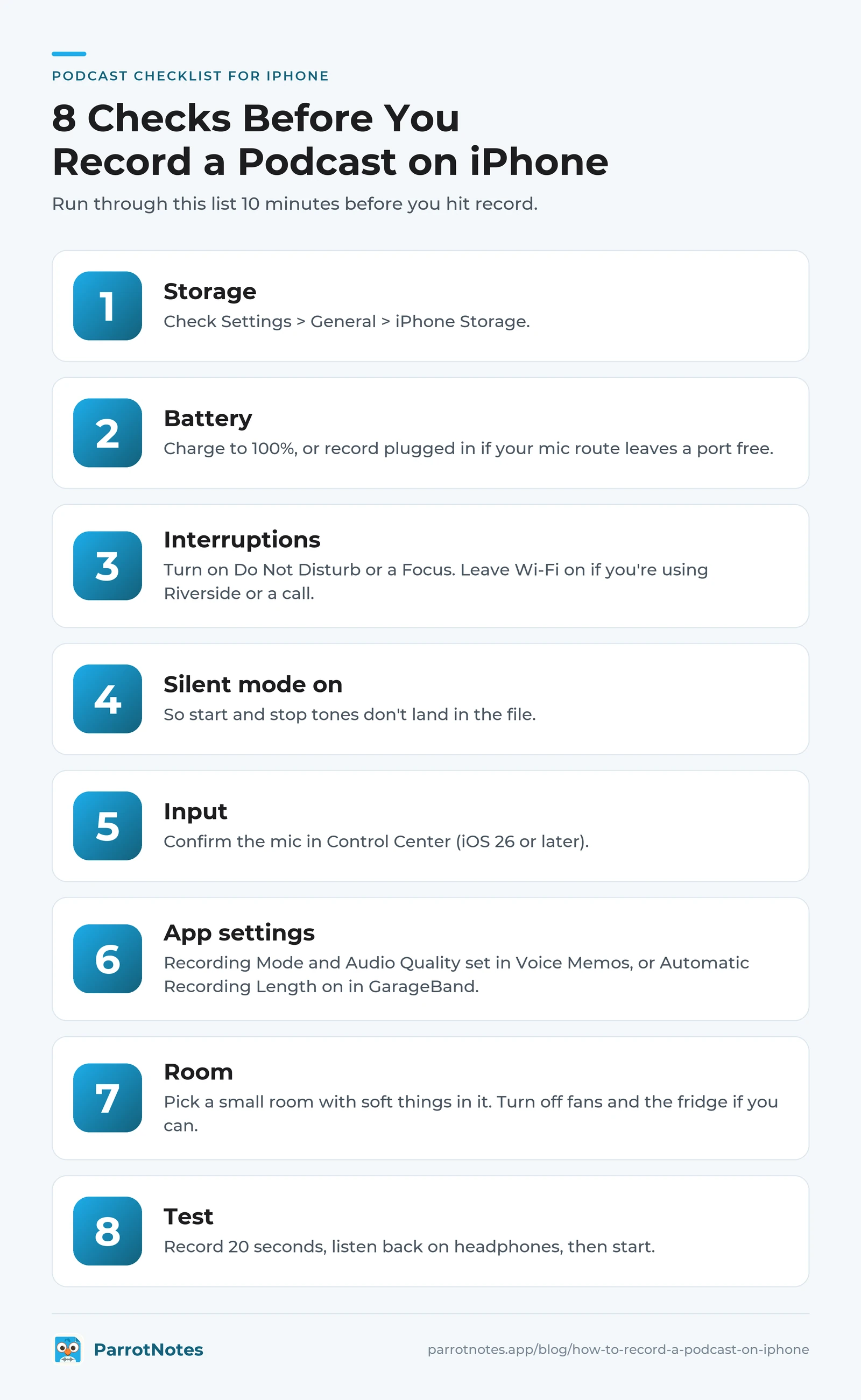
Podcast settings checklist for iPhone
Run through this list 10 minutes before you hit record.
- Storage. Check Settings > General > iPhone Storage. Use the table below.
- Battery. Charge to 100%, or record plugged in if your mic route leaves a port free.
- Interruptions. Turn on Do Not Disturb or a Focus. Airplane mode stops calls too, but leave Wi-Fi on if you're using Riverside or a call.
- Silent mode on, so start and stop tones don't land in the file.
- Input. Confirm the mic in Control Center (iOS 26 or later).
- Recording Mode and Audio Quality set in Voice Memos, or Automatic Recording Length on in GarageBand.
- Room. Pick a small room with soft things in it: curtains, a sofa, a bed. Turn off fans and the fridge if you can.
- Test. Record 20 seconds, listen back on headphones, then start.
How much storage a podcast episode needs
Apple doesn't publish Voice Memos bitrates. These figures use the assumptions in our guide to how long Voice Memos can record: about 64 kbps for Compressed, about 3 MB a minute for Lossless as one published comparison measured, and uncompressed 48 kHz, 16-bit mono as the Lossless worst case.
| Episode length | Compressed | Lossless (reported) | Lossless (worst case, mono) |
|---|---|---|---|
| 30 minutes | about 14 MB | about 90 MB | about 173 MB |
| 60 minutes | about 29 MB | about 180 MB | about 346 MB |
| 90 minutes | about 43 MB | about 270 MB | about 518 MB |
Stereo doubles the worst case. Even then, a 90-minute stereo episode stays under about 1.1 GB, so 2 GB free is plenty for one session. In a double-ender, each phone only stores its own side.
After recording: edit, publish and get a transcript
- Trim and tidy. Voice Memos can trim the start and end. GarageBand and Ferrite can cut mistakes, add an intro and set levels.
- Get the file off the phone. Voice Memos saves M4A files. Our guide to moving voice memos to a computer shows the options, and the free voice memo to MP3 converter helps if your host prefers MP3.
- Publish. Upload the finished file to your podcast host. Spotify for Creators, for example, still accepts finished episodes.
Then come the transcript and show notes. A transcript makes your episode searchable, and it's where your best quotes come from. Our podcast transcription guide covers the format, and podcast show notes covers what goes on the episode page.
This is where ParrotNotes fits. It isn't an editor or a podcast host. It records on your iPhone (or Android) and gives you a transcript, a summary and key points.
Here's how Jess, a solo host, might use it. (Jess is an illustration.) She records her 25-minute episode in Voice Memos. Then she records her 10-minute planning chat with her producer in ParrotNotes, and imports the finished episode file. The summary gives her a first draft of the show notes, and the transcript gives her three quotes for social posts.
The free plan includes 100 minutes of recording a month (up to 30 minutes per recording), an AI summary on every recording and 3 audio or video imports a month. Pro is $19.99 a month, or $14.99 a month billed annually, with 3,000 minutes a month and up to 3 hours per recording. Try ParrotNotes free on your next episode.
Conclusion: recording a podcast on iPhone
You don't need a studio to record a podcast on iPhone. Use Voice Memos for a solo or in-room show, GarageBand (with Automatic Recording Length on) for music and tracks, and Riverside or a two-phone double-ender for a remote guest. Add a mic that fits your port, find a soft, quiet room, and tell every guest they're being recorded.
Record a 10-minute test this week, listen back on headphones, and fix one thing before episode one. When you have your first episode, turn it into a transcript and show notes with ParrotNotes, and plan the next one with the free podcast script template.
Frequently Asked Questions
Can I record a podcast on my iPhone?
Yes. Any recent iPhone can record a podcast with the built-in Voice Memos app, for free. For music, intros or separate tracks, use GarageBand, which Apple also offers free. For a remote guest, Riverside's free plan includes 2 hours of multitrack recording.
What is the best free app to record a podcast on iPhone?
Voice Memos for a simple solo or in-room show, and GarageBand for an edited show with music. Both are free from Apple. Riverside's free plan is the easiest free option for a remote guest, with 2 multitrack hours and a Riverside watermark.
How do I record a podcast on iPhone with GarageBand?
First turn on Automatic Recording Length in the Settings app under GarageBand, because new songs stop after 8 bars by default. Then open the Audio Recorder, set the In level slider so the meter stays out of the red, tap Record and talk. Tap Play to stop.
Do I need a microphone to record a podcast on iPhone?
No, but it helps more than any app. iPhone 15 and later take USB-C mics; iPhone 14 and earlier take Lightning mics or a USB mic through Apple's camera adapter. On iOS 26 or later, choose the mic in Control Center under Input.
Can I record a video podcast on iPhone?
Yes. The Camera app records video, and Riverside records audio and video for each participant. As of November 2026, Riverside's free plan adds a watermark to recordings, and its paid plans start at $24 a month billed annually.
Related Posts
Timekettle Review: Translator Earbuds, the App and What They Cost
Timekettle review from its own store and guides (Nov 2026): which translator earbuds are still sold, real prices, offline packs and the $14.99 app plan.
Sonix AI Review: Automated Transcription Pricing, Languages and Limits
Sonix AI reviewed from Sonix's own pages, checked November 2026: plans from $10 an hour, the 30-minute trial, 54+ languages and limits. Try ParrotNotes free.
oTranscribe Review: The Free Browser Transcription Tool, Pros, Cons and Alternatives
Our oTranscribe review, as of November 2026: what the free browser tool does, its shortcuts, privacy, reported problems and alternatives. Try ParrotNotes free.