
Sales Coaching Software: What to Look For

Sarah Johnson
Product Manager at ParrotNotes with 5+ years of experience in productivity tools and AI technology.
Table of Contents
- 1.What is sales coaching software?
- 2.Why most sales coaching software misses field teams
- 3.8 things to look for in sales coaching software
- 4.A sales coaching software scorecard for field teams
- 5.15 questions to ask on a sales coaching software demo
- 6.Where ParrotNotes fits
- 7.Run a 30-day pilot before you sign anything
- 8.Choose the sales coaching software your reps will use
Picture a regional sales manager. Call her Dana. She has nine field reps spread across three states, and last month she managed two ride-alongs.
So she books a demo of a well-known coaching platform, and for 45 minutes every example on the screen is a recorded Zoom call. Her reps haven't sold over Zoom since spring.
That's the trap when you shop for sales coaching software for a team that sells in person. The demos look sharp. But none of it works unless the tool can hear the conversation in the first place.
Coaching itself isn't in doubt. In Salesforce's State of Sales statistics, 75% of sales reps say they're more likely to hit their targets with a coach or mentor. The hard part for a field manager is evidence. You can't coach a meeting you never saw.
This guide gives you eight things to look for, in the order that matters for a field team. Then you get a 100-point scorecard, 15 questions to ask on a demo, and a 30-day pilot plan you can run before you sign anything.
What is sales coaching software?
Sales coaching software is any tool that helps a manager see how reps sell, and then helps those reps get better. It collects real sales conversations, turns them into something you can review (a transcript, a summary, a score), and gives manager and rep a place to act on it.
That definition covers four different kinds of product. They solve different problems, so it pays to know which one you're looking at before the demo starts.
The four kinds of sales coaching tools
- Conversation intelligence platforms. Gong says it captures "every customer conversation" across "calls, meetings, and emails" on its sales coaching software page. ZoomInfo Chorus AI (you may know it as Chorus) and Salesloft's Conversation Intelligence work the same ground: record, transcribe, and analyze calls at team scale.
- Readiness and coaching platforms. Mindtickle lists coaching forms and templates, AI role-plays, and call coaching. The focus is a structured coaching program, not only recordings.
- AI role-play tools. Second Nature describes its product as "AI role plays and coaching". Reps practice against a simulated buyer. Nothing here hears a real customer.
- In-person coaching apps. Rilla has reps record their conversations so managers can coach through what it calls "virtual ridealongs". Siro calls itself "field sales coaching software", with reps recording in a mobile app. Both name home improvement and home services among their industries.
If your gap is the last one (nothing from the field gets captured at all), you can test phone-based capture this week. Try ParrotNotes free on one rep's phone and see what a recorded customer meeting gives you to coach from.
Why most sales coaching software misses field teams
The big platforms started out as sales call coaching software for inside sales teams. ZoomInfo's own buyer's guide says it plainly: "Chorus, Gong, and Salesloft were architecturally built for inside sales (always-online, VoIP and video recording) and are best suited for that motion."
For a team on the phone all day, the dialer and the video meeting are already digital, so the software listens in for free. But your reps are in a customer's office, a plant, a kitchen, or a truck. There's no dialer and no meeting link, so there's nothing for the software to analyze.
Vendors know this, however, and a few have added mobile recording. Gong's help center explains how to record face-to-face meetings in its mobile app. It also notes that the recordings "are audio only", that quality "may not be optimal" in a noisy environment, and that a permission has to be enabled in each user's profile.
So don't ask a vendor "do you support in-person?" The answer will be yes. Ask them to show you, on a phone, in the demo.
For a field team, the first requirement of any sales coaching platform isn't a coaching feature. It's capture.
8 things to look for in sales coaching software
They're in priority order for a team that sells face to face, and the scorecard below puts weights on them.
1. It captures the conversations your reps really have
Start with a count. Where did your team's customer conversations happen last month: in person, on the phone, or on video? If 70% were face to face, a tool that only joins video calls can coach 30% of the job.
A rep should be able to record a meeting in a customer's office, on a jobsite, or over lunch, from the phone they already carry. No calendar invite, no meeting link, no laptop on the table.
2. Reps use it without being chased
A sales coaching app only works if reps open it. A field rep with a full day of appointments does admin in the car between stops, so every extra step costs you recordings.
Here's a fair test. Hand the app to a new rep and time them. Can they start a recording within 10 seconds while walking in from the parking lot? Does it keep recording with the screen locked and the phone in a pocket?
Adoption beats features. A simple recorder used in four meetings out of five will teach you more than a full platform used in one out of five.
3. It works where your reps work
Field conditions are rough on software. Ask about three things.
First, signal. Can a rep record with no connection and have the transcript arrive once they're back in range?
Second, noise and length. A 90-minute plant tour next to a compressor isn't a quiet conference room.
Third, language. If your reps sell in Spanish and you review in English, you need transcription that handles both, plus translation.
4. It hands the rep something back within minutes
Reps don't record meetings to help their manager. They record when it saves them work. Salesforce reports that sales reps spend 60% of their time on non-selling tasks, and writing up visit notes is part of that load.
So look at what the rep gets after they tap stop. A summary they can paste into the CRM? Action items with the promises they made? A drafted follow-up email before the next stop?
When the tool pays the rep back the same day, adoption takes care of itself. Our guide on how to never miss action items from sales calls shows what that looks like.
5. It gives you evidence to coach from
This is the manager's half of the deal. "How did the meeting go?" gets you the rep's memory. A transcript gets you what the customer said.
Look for a searchable transcript, a summary you can read in two minutes, and a way to ask the recording questions ("what did they say about budget?"). Then check how it reaches you. Can the rep share a meeting with you by link before your one-on-one? Can you pull three meetings on one stuck deal into a deal review?
There's a second payoff. When a rep leaves, the record of every account conversation stays with the company. That makes the handover a reading job, not a guessing game.
6. It fits your sales method
If your team qualifies with BANT, MEDDIC, or SPIN, the tool should organize its notes the same way. A summary that sorts what it heard into budget, authority, need, and timeline is a ready-made coaching sheet. You can see in seconds which question the rep skipped.
Ask whether you can build your own template too. Your call report has its own fields, and the software should fill those in, not the vendor's defaults. If your team is still settling on a method, our BANT qualification guide is a good place to start.
7. It handles consent and data properly
Recording a customer takes permission. Rules on recording conversations differ by state and by country, so make asking a team rule and run your policy past your own counsel.
Give reps one line to use: "Mind if I record this so I don't miss anything? It's only for my notes." If the customer says no, the rep records a two-minute voice debrief in the car instead.
On the vendor side, read the security page before the contract. Look for encryption in transit and at rest, a clear statement about who can access recordings, and a way to delete audio. Accept only the certifications a vendor puts in writing. (Here's how ParrotNotes protects your data, as an example of what that page should cover.)
8. You can see the price and run a pilot
Enterprise platforms rarely publish prices. Gong's pricing page lists no dollar figures as of September 2026. It says licenses are "priced per user", with "a platform fee based on the number of users supported", and the button says "Book a demo".
Quote-based pricing isn't a red flag by itself, but it does mean a procurement cycle, which is heavy for a 10-rep team. Whatever the model, ask for a pilot: a small group, 30 days, no annual commitment until you've seen real recordings from your own territory.
A sales coaching software scorecard for field teams
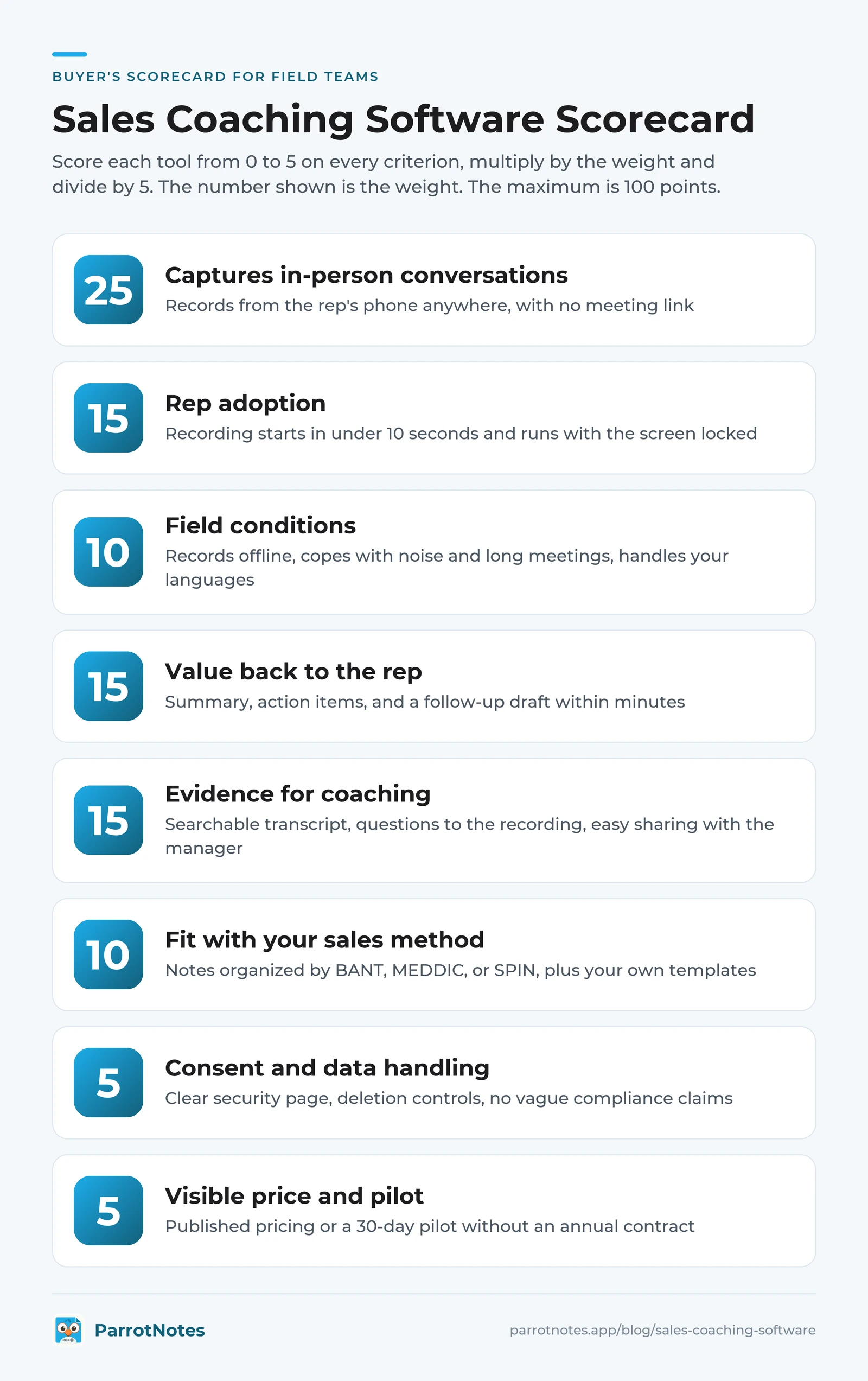
Here's the scorecard. Score each tool from 0 to 5 on every criterion, then multiply by the weight and divide by 5. The maximum is 100 points.
| # | Criterion | Weight | What a 5 looks like |
|---|---|---|---|
| 1 | Captures in-person conversations | 25 | Records from the rep's phone anywhere, with no meeting link |
| 2 | Rep adoption | 15 | Recording starts in under 10 seconds and runs with the screen locked |
| 3 | Field conditions | 10 | Records offline, copes with noise and long meetings, handles your languages |
| 4 | Value back to the rep | 15 | Summary, action items, and a follow-up draft within minutes |
| 5 | Evidence for coaching | 15 | Searchable transcript, questions to the recording, easy sharing with the manager |
| 6 | Fit with your sales method | 10 | Notes organized by BANT, MEDDIC, or SPIN, plus your own templates |
| 7 | Consent and data handling | 5 | Clear security page, deletion controls, no vague compliance claims |
| 8 | Visible price and pilot | 5 | Published pricing or a 30-day pilot without an annual contract |
The weights assume a team that sells mostly face to face. If half of your conversations happen on video, move 10 points from criterion 1 to criterion 5.
A worked example
Take a hypothetical. Luis manages 12 HVAC reps who run in-home appointments, and he's down to two options. Tool A is a video-call coaching platform. Tool B is a phone-based recorder with AI notes.
Tool A scores 1 on capture (5 points), 2 on adoption (6), 2 on field conditions (4), 4 on rep value (12), 5 on coaching evidence (15), 4 on method fit (8), 4 on data (4), and 1 on price (1). That's 55 out of 100.
Tool B scores 5 on capture (25), 5 on adoption (15), 4 on field conditions (8), 4 on rep value (12), 3 on coaching evidence (9), 4 on method fit (8), 4 on data (4), and 5 on price (5). That's 86.
Tool A has the better coaching features. Even so, it loses by 31 points. For Luis's team it would apply those features to almost nothing. That's the point of weighting capture at 25.
15 questions to ask on a sales coaching software demo
Take these into every demo. The first four decide whether the rest matter.
- Can you show me a rep recording an in-person meeting on a phone, right now?
- Does recording keep going with the screen locked or another app open?
- What happens when the rep has no signal?
- Is there a limit on recording length, and how does audio hold up in a noisy room?
- How many taps from unlocking the phone to recording?
- What does the rep receive after the meeting, and how fast?
- Does it draft the follow-up email, or only the notes?
- Can I search across one rep's meetings for a customer name or a competitor?
- Can notes follow our method (BANT, MEDDIC, SPIN) or our own call report template?
- How does a rep share a meeting with me before a one-on-one or a deal review?
- What happens to a rep's recordings and notes when they leave the company?
- Which languages do you transcribe, and can you translate the transcript?
- How does your product help reps ask for consent, and where's your security documentation?
- What's the price for 10 reps, including any platform fee, and what's the minimum contract?
- Can we run a 30-day pilot with three reps before we commit?
Where ParrotNotes fits
ParrotNotes is an AI voice-note app, and it sits at the capture end of this list. It's built for the conversations that happen away from a dialer or a meeting link.
A rep opens the app on the phone they already own (iOS or Android), taps record, and sets the phone on the table. Recording continues with the screen locked. It works without a connection too, and the transcript and AI insights arrive once the phone is back online. After the meeting the rep has a transcript, an AI summary, extracted action items, and a draft follow-up email.
For coaching, three things matter. ParrotNotes includes sales frameworks (BANT, MEDDIC, and SPIN), so insights line up with the method you already coach to. Pro adds custom insight templates, speaker identification, AI coaching nudges (in beta), and multilingual transcription in 99+ languages with translation. And a rep can share any note by link, or export it, so you can read the meeting before your one-on-one.
The price is public. The free plan covers 100 minutes of recording a month (up to 30 minutes per recording), with an AI summary on every recording and 5 AI-powered recordings a month. Pro is $19.99 a month, or $14.99 a month billed annually, with 3,000 minutes a month and recordings up to 3 hours.
Ready to hear what happens in your team's meetings? Download ParrotNotes free, put it on three reps' phones, and run the pilot below. If you're comparing note-takers rep by rep, our roundup of the best AI note-taking apps for sales teams covers five options side by side.
Run a 30-day pilot before you sign anything
A pilot tells you more than any demo, so keep it small.
- Pick three reps. One veteran, one mid-tenure rep, and one new hire.
- Agree on the consent line. Everyone asks before recording, every time.
- Record every customer meeting for 30 days. When a customer declines, the rep records a voice debrief in the car.
- Share two meetings a week. Each rep sends you two before your one-on-one.
- Coach from the record. One thing to keep, one thing to change, tied to something the customer said.
- Score the tool on day 30. Use the scorecard, and count meetings recorded against meetings held.
Here's how that could play out. Priya manages six reps at a beverage distributor and runs the pilot with three of them. By week three she's read 14 meeting summaries. That's more customer conversations than she saw in a full quarter of ride-alongs.
One pattern jumps out. Her newest rep never asks who else signs off on a new product listing. That's one coaching conversation, grounded in three real meetings, and it took her 20 minutes to find.
Illustrations like this aren't proof, and your numbers will differ. The shape is what to watch for: more meetings seen, and coaching tied to what customers said.
Choose the sales coaching software your reps will use
The order matters more than the feature list. Capture first, because software can only coach what it can hear. Then adoption, because reps decide whether anything gets recorded. Then evidence, method fit, consent, and price.
Take the scorecard and the 15 questions into your next demo. Ask to see an in-person meeting recorded on a phone. Then run a 30-day pilot with three reps before anyone signs an annual contract.
If capture is the gap on your team, start there. Download ParrotNotes free and record this week's customer meetings (with permission). By your next round of one-on-ones, you'll be coaching from what customers said, and your search for sales coaching software will start from real evidence.
Frequently Asked Questions
What's the best sales coaching software for field sales teams?
The best sales coaching software for a field team is the one that captures in-person conversations and that reps will use every day. Conversation intelligence platforms were built around recorded calls and video meetings. Score your shortlist with the 100-point scorecard above, and weight in-person capture highest.
How much does sales coaching software cost?
Enterprise platforms mostly quote on request: Gong's pricing page, for example, lists per-user licenses plus a platform fee and no dollar figures. App-based tools publish prices: ParrotNotes has a free plan, and Pro costs $19.99 a month or $14.99 a month billed annually. Ask every vendor for the all-in price for 10 reps and the minimum contract term.
Can sales coaching software record in-person meetings?
Not all of it can. Conversation intelligence tools were designed for calls and online meetings, though Gong's mobile app can record face-to-face meetings as audio only. Rilla and Siro start from in-person sales conversations, and ParrotNotes records any in-person meeting from the rep's phone. Whichever tool you choose, reps should ask permission before they record.
Do I still need ride-alongs if I buy sales coaching tools?
Yes. A ride-along shows you body language, the customer's site, and how a rep handles the day. Recordings show you the other 20 days of the month. Used together, you spend ride-along time on the reps and skills the recordings flagged, not on whoever happens to be nearby.
Related Posts
Stakeholder Mapping for Complex Sales: Template and Example
Stakeholder mapping for complex sales: a fill-in template, a worked example, and 24 questions that reveal who decides. Copy the template and map your deal.
Sales Tools Every Field Rep Should Carry in 2026
Too many apps and no time between visits? See the sales tools a field rep should carry in 2026, run the four-question carry test, and print the checklist.
ParrotNotes vs Otter.ai for Sales Teams (2026)
Honest comparison of ParrotNotes vs Otter.ai for sales teams. See how they stack up on pricing, languages, mobile recording, and CRM integration.