
How to Take Meeting Minutes: A Step-by-Step Guide

Sarah Johnson
Writes about field sales, meeting notes and voice-first workflows at ParrotNotes. Every article is reviewed by the ParrotNotes product team before it goes live.
Table of Contents
- 1.How to take minutes of the meeting, in short
- 2.Before the meeting: set yourself up
- 3.How to take minutes in a meeting: what to record and skip
- 4.Shorthand for taking good meeting minutes faster
- 5.Worked example: from live notes to finished minutes
- 6.After the meeting: write up, check, circulate
- 7.Recording the meeting, with consent, and turning it into minutes
- 8.Taking good meeting minutes properly is a habit
Priya had been secretary of her office's facilities committee for exactly one meeting when the parking motion came up. Someone moved to reserve six spaces for visitors. Someone else amended it to four. Then a third person asked to add "on weekdays only," and the chair called the vote while Priya was still writing the word "visitors." (Priya is an illustration, not a real person, but every new minute-taker has had her afternoon.)
Nobody teaches you how to take minutes of the meeting. You get handed the job because you're organized, or new, or sitting nearest the laptop. Then you find out that writing fast isn't the skill. Knowing what to write, and when to stop writing, is.
This guide covers what to do before, during, and after the meeting; what to record and what to skip; how to catch motions and votes as they happen; a shorthand key; and a worked example that turns ten lines of rough notes into a finished entry. If you need the layout itself, our meeting minutes template has four formats to copy.
And if you'd rather listen than scribble, ParrotNotes can record the room on your phone, with everyone's agreement, so you can check the exact wording afterwards.
How to take minutes of the meeting, in short
- Get the agenda early and turn it into your note page, one heading per item.
- List who's expected, so you only mark changes on the day.
- Agree on recording before the meeting starts, if you plan to record.
- Sit next to the chair, where you can hear motions and ask quick questions.
- For each item, write the outcome: decision, motion and vote, or action with an owner and a date.
- Skip the debate. Record what was done, not what was said.
- Write up within 24 hours, in past tense and third person.
- Send the draft to the chair first, then circulate it marked DRAFT until it's approved.
The rest of this guide explains each step, and the habits that help you take meeting minutes effectively.
Before the meeting: set yourself up
Most good minutes are half written before anyone sits down. Ask the chair for the agenda two or three days ahead, and copy each item into your notes as a heading. Under every heading, leave three blank lines labelled Decision, Vote, and Action. During the meeting you fill in blanks instead of composing from nothing.
Then list the members and expected guests, with initials next to each name. On the day you only tick names and note late arrivals or early exits. Bring the open actions from the last minutes too, so you can write "done", "carried over", or a new date when the chair asks for updates.
Two more things to settle before the start:
- Where you sit. Next to the chair, if you can. You'll hear the motions clearly, and a quiet "Can you repeat that?" won't stop the meeting.
- Whether you'll record. If you want an audio backup, ask the chair to put it to the room at the start. More on that below.
How to take minutes in a meeting: what to record and skip
Here's the test to run on every agenda item: what did the group do? Every item ends in one of four ways. It produced a decision, a motion with a vote, an action for someone, or nothing. Your job is to catch which one, in words precise enough to act on later.
The official Robert's Rules of Order FAQ puts it in one line: "Minutes are a record of what was done at a meeting, not a record of what was said." Even if your team meetings are informal, that rule saves you hours.
Record:
- Decisions, in a full sentence someone could follow without being there
- Motions in their final wording, who moved them, and the result
- Actions, each with one owner and a due date
- Reports received, with one line on what they were
- Arrivals, departures, and anyone who left the room for an item
Skip:
- Who argued for or against, and how strongly
- Jokes, side conversations, and apologies
- Your own opinion of the discussion ("a productive debate")
- Points that were raised and dropped without any outcome
When an item ends and your Decision, Vote, and Action lines are still empty, that's a signal. Either nothing was decided, which you record as "No action taken," or something was decided and you missed it. Ask before the chair moves on.
Catching motions and votes as they happen
Motions are where minute-takers fall behind, because the wording changes while people talk. Don't try to write every version. Write the original motion in shorthand, then just the changes: "AMD: 6 to 4" and "AMD: + weekdays only." When the chair calls the vote, write the motion in its final form and the result.
For the vote, record how it was taken. A show of hands with a count gets the numbers ("Carried 7 to 2"). A voice vote usually gets only the result ("Carried"). If someone abstains or declares a conflict, write their name. For formal bodies with stricter rules, our Robert's Rules minutes template covers what to record for each kind of vote.
Four prompts to use when you lose the thread
You're allowed to speak. A minute-taker who asks one clear question is more useful than one who guesses. These four lines cover nearly every situation:
- "Before the vote, could you read the motion as it stands now?" Use it whenever a motion has been amended.
- "What should I minute for this item?" Use it when a topic ends with no clear outcome.
- "Who's taking that, and by when?" Use it whenever someone says "we should" without a name attached.
- "Can I read back the actions before we close?" Use it in the last five minutes, so disagreements surface in the room, not by email next week.
Shorthand for taking good meeting minutes faster
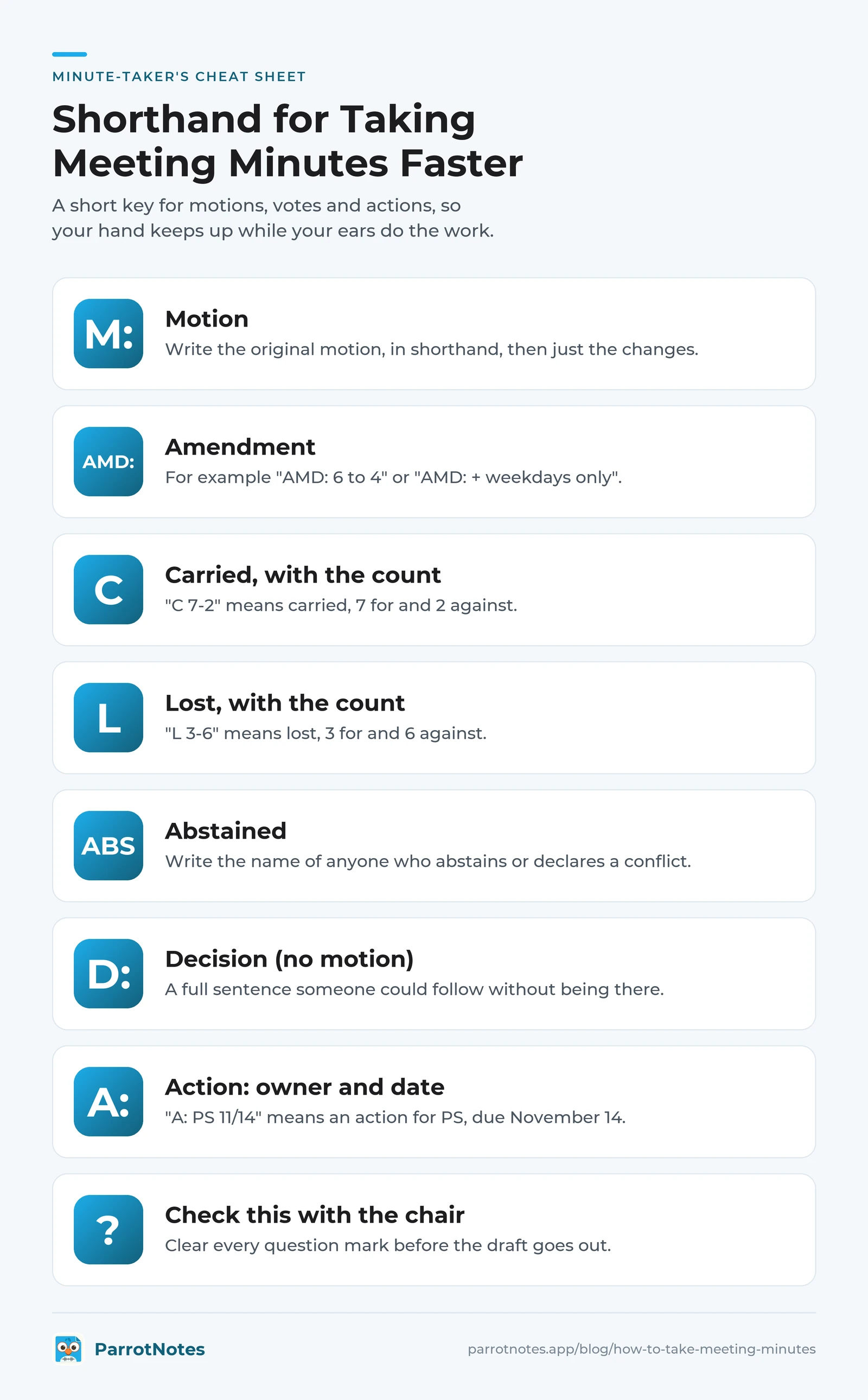
You don't need formal shorthand. You need a dozen symbols you'll use every meeting, so your hand keeps up while your ears do the work. Here's a key you can copy and adapt. Use initials for people (PS for Priya Shah), and write the key at the top of your notes until it sticks.
| Shorthand | Meaning |
|---|---|
| M: | Motion |
| AMD: | Amendment |
| 2nd | Seconded |
| C 7-2 | Carried, 7 for and 2 against |
| L 3-6 | Lost, 3 for and 6 against |
| ABS | Abstained |
| WD | Withdrawn |
| D: | Decision (no motion) |
| A: PS 11/14 | Action for PS, due November 14 |
| NAT | No action taken |
| TBL | Tabled or postponed |
| RCV | Report received |
| ARR / LFT | Arrived / left (with the time) |
| ? | Check this with the chair afterwards |
| * | Exact wording, copy as written |
The last two do the most work. A question mark tells you what to confirm before the draft goes out. An asterisk tells you the words are verbatim, so you don't paraphrase a motion by accident.
Worked example: from live notes to finished minutes
Here's how the parking item from Priya's meeting looks when it's taken with the key. This is an illustration, but the structure is what you'll do every time.
Live notes, as written during the meeting:
4. Visitor parking
M: JR reserve 6 spaces for visitors in lot B
2nd
AMD: TK 6 to 4. C (voice)
AMD: LM + weekdays only. C (voice)
*Reserve 4 spaces in Lot B for visitors on weekdays*
C 8-1  ABS: DW
A: JR signs by 11/7 ?cost
A: PS email all staff after signs up
Finished minutes entry:
4. Visitor parking. J. Ramos moved that spaces in Lot B be reserved for visitors. As amended, the motion read: "That four spaces in Lot B be reserved for visitors on weekdays." Carried 8 to 1. D. Webb abstained. Actions: J. Ramos to have signs installed by November 7, and to report the cost at the next meeting. P. Shah to email all staff once the signs are up.
What was left out, and why:
- The original "six spaces" wording and the two amendments. The final wording is what the group adopted. Formal bodies may want each amendment recorded; check your rules.
- Who seconded. Many groups don't record it. Keep it if your bylaws ask for it.
- Ten minutes of debate about where staff would park instead. It produced no decision, so it's not in the record.
- The question mark next to the cost. Priya asked the chair after the meeting, and the cost became part of J. Ramos's action.
Ten lines of rough notes, two sentences of minutes. That ratio is normal.
After the meeting: write up, check, circulate
Write up within 24 hours, while you can still decode your own shorthand. Use past tense and third person ("The committee agreed"), and keep each entry to what happened. Clear every question mark in your notes first, by asking the chair or the person involved.
Then follow three steps:
- Send the draft to the chair for a factual check. It's their meeting, and they'll spot a wrong number fast.
- Circulate it marked DRAFT to everyone who attended. Put the action list at the top or in a separate table, so people find their tasks without reading the whole thing. Our action items template has a layout for that.
- Bring it for approval at the next meeting. The group approves it, with any corrections, and only then does it become the official record.
Keep the format the same every time: header, attendance, one entry per item, actions, time of close. The meeting minutes template has ready-made versions, and the free meeting minutes generator turns rough bullets into a first draft to check.
Recording the meeting, with consent, and turning it into minutes
A recording takes the pressure off the live part. You still take shorthand notes, but you can check the final wording of a motion later.
Get consent first, every time. Tell the meeting you're recording to help with the minutes, and ask whether anyone objects. Recording laws vary. In California, for example, Penal Code section 632 makes it an offense to record a confidential conversation without the consent of all parties. Our guide to one-party and all-party consent states covers the US rules. This isn't legal advice, so check your own organization's rules too, and pause the recording for anything confidential.
Here's how the workflow looks with ParrotNotes:
- Start recording on your phone and place it in the middle of the table. It keeps recording with the screen locked.
- Take your shorthand notes as usual, marking anything you're unsure of with a question mark.
- Afterwards, open the transcript and search for each question mark's topic, or for words like "moved" and "carried," to confirm the exact wording and the count.
- Start from the AI summary and the action items list, then check every owner and date against the transcript before you write the entry.
Consider Marcus, who minutes a 40-minute weekly operations meeting at a logistics office (another illustration). He used to spend an hour writing up from memory. With a recording, he checks four question marks against the transcript and sends the draft before lunch.
As of October 2026, the free plan includes 100 minutes of recording a month, up to 30 minutes per recording, with an AI summary on every recording. Longer meetings need Pro: up to 3 hours per recording and 3,000 minutes a month, for $19.99 a month or $14.99 a month billed annually. Pro also adds speaker identification and export to docx and PDF. For a full AI workflow, including a prompt and what to check, see our guide to AI meeting minutes.
One rule doesn't change: the recording helps you write the minutes, and the approved minutes are the record.
Taking good meeting minutes properly is a habit
How to take meeting minutes properly comes down to a few habits you repeat every time:
- Prepare the skeleton from the agenda, so you fill blanks instead of writing from scratch.
- Run the "what did we do?" test on every item, and skip the debate.
- Use shorthand for motions, votes, and actions, and flag anything uncertain.
- Speak up when an outcome is unclear. One question beats a wrong record.
- Write up within a day and get the chair's check before anyone else sees it.
After two or three meetings it stops feeling like a scramble. Copy the shorthand key into your next set of notes, and if you want a backup for the moments that move too fast, download ParrotNotes and record your next meeting with the room's agreement.
Frequently Asked Questions
How do you take minutes during a meeting?
Turn the agenda into your note page, with Decision, Vote, and Action lines under each item. During the meeting, write only the outcome of each item: the decision, the final wording of any motion and its result, and each action with one owner and a due date. Skip the discussion, and ask the chair when an outcome isn't clear.
Should meeting minutes record who said what?
Usually not. The Robert's Rules of Order FAQ says minutes are "a record of what was done at a meeting, not a record of what was said." Record decisions, motions, votes, and actions. Note names where they matter, such as who made a motion, who abstained, or who owns an action.
Can ChatGPT or other AI tools create meeting minutes?
They can draft them from a transcript or rough notes, but they can't attend the meeting for you. AI may merge separate decisions or invent a due date. Check every motion, vote count, owner, and date against the transcript before you circulate the draft. The approved minutes are your responsibility, not the tool's.
How soon after a meeting should minutes be sent?
Aim for within 24 hours for the draft to the chair, and within two or three working days for everyone else. The sooner you write up, the easier it is to read your shorthand and fill any gaps. Minutes stay a draft until the group approves them at its next meeting.
Related Posts

What Is a Punch List? How to Run a Punch List Walk
What is a punch list? The meaning, who makes it, what goes on it, a 12-item sample punch list and a faster way to run the walk. Try ParrotNotes free today.

Real Estate Listing Presentation: What to Include and How to Run It
A listing presentation outline you can copy: what to include, how to run the appointment in the seller's home, how to discuss commission and what to note after.

Pipeline Coverage Ratio: How to Calculate It and What Good Looks Like
Pipeline coverage ratio explained: the formula, a worked example, why 3x depends on win rate and cycle length, and how to fix low coverage. Try it free.