
Follow-Up Reminder Email to a Client: Templates for Every Delay

Sarah Johnson
Writes about field sales, meeting notes and voice-first workflows at ParrotNotes. Every article is reviewed by the ParrotNotes product team before it goes live.
Table of Contents
- 1.What a follow-up reminder email to a client needs
- 2.Start from the recap of your last client call
- 3.When to send a follow-up reminder email to a client
- 4.The three-email reminder sequence
- 5.Follow-up reminder email to client templates for every delay
- 6.Subject lines for client reminder emails
- 7.When email stops working
- 8.Send your next reminder from the recap
Thursday's status call ended at 4:50. Giulia, the client's finance lead in Milan, said it twice: "We'll get you the full data export by Monday."
Marco, an independent reporting consultant, has a quarterly report due to her board on the 15th. He can't start it without that export. It's now Wednesday, and his inbox is quiet.
If you just typed "follow up reminder email to client" into Google, you're probably in Marco's spot.
You know this moment. The client isn't ignoring you on purpose. Your request is sitting under 80 other emails, and nobody on their side remembers the exact promise. What Marco needs is a follow up reminder email to the client that's polite, quotes what was agreed, and makes the next step easy.
This guide gives you that email for every delay a client project hits: feedback on a deliverable, sign-off, missing assets, a decision, a change order, and an overdue invoice. You'll get a three-email sequence with full templates, a timing table, subject lines, and what to do when email stops working.
The short version: start from the recap of your last call, ask for one thing, put a date on it, and stop at three emails.
What a follow-up reminder email to a client needs
Every good reminder has the same five parts, and it fits on a phone screen:
- A subject line with the project and the item. "Data export for the Q3 report" beats "Following up."
- The agreement, quoted. "On Thursday's call you mentioned the export would come Monday." This is a reminder of their words, not your complaint.
- Why it matters now. One sentence that ties the delay to a date: "I need it by Friday to keep the board report on the 15th."
- One ask, with a date. Not three questions. One thing they can do in two minutes.
- An easy way out. Offer a smaller step if the full item isn't ready: "If the full file isn't ready, the September tab alone gets me started."
Leave out the guilt ("I've been waiting a week"), the sarcasm ("as per my last email"), and the life story. Short and specific reads as confident.
Start from the recap of your last client call
The strongest line in any reminder is the client's own commitment, with the day they made it. You can only quote it if somebody wrote it down.
That's why the reminder really starts at the end of the call. If you send a recap after every status call, with each next step, owner, and date (our client meeting guide has a recap template), the reminder writes itself. You copy the client's line from the recap and add a date.
Here's how one line travels through Marco's week:
| Where | What it says |
|---|---|
| On the call, Thursday | "We'll get you the full data export by Monday." (Giulia) |
| Recap email, Thursday | Your side: full data export for Q3, Giulia, by Monday |
| First reminder, Wednesday | "On Thursday's call you mentioned the export would come Monday..." |
The hard part is remembering who promised what across five clients and three weeks. Recording the status call helps. Ask first, "Mind if I record so my notes are accurate?", because consent rules differ by state and country (see our guide to one-party consent states; it's general information, not legal advice).
ParrotNotes records on your phone, so nothing joins the client's Teams or Zoom as a bot: put the phone beside your laptop with the call on speaker (how AI meeting notes without a bot work). You get a transcript and an AI summary of every recording, and you can search past notes for one client's name when the reminder needs the exact quote. To draft the recap itself, paste your call notes into our free follow-up email generator. Running status calls every week? Try ParrotNotes free and keep the client's words, not your memory of them.
When to send a follow-up reminder email to a client
Silence after a day or two almost never means "no." In a study of 16 billion emails sent by more than 2 million Yahoo Mail users, more than 90% of replies came within a day, and the median reply took 47 minutes (Kooti et al., 2015). The same study found that people replied to less than 5% of their email on heavy days of about 100 messages. If your client hasn't answered in two business days, your email is probably buried, not refused.
Use the client's own date as the anchor, and work back from the project date the delay puts at risk:
| Situation | First nudge | Second reminder | Final reminder |
|---|---|---|---|
| Client gave a date | Morning after it passes | 2 business days later | 3 to 5 business days later, before your own deadline slips |
| No date was set | 2 to 3 business days after your request | 3 business days later | 1 week later |
| Your deadline is close | 1 business day before their date | The day after their date | The day after that, plus a phone call |
| Overdue invoice | The day after the due date | 7 days after the due date | 14 days after, then a call |
These are starting points, not rules. A client who replies within the hour needs less time between emails; a client waiting on their legal team needs more. For invoices, your contract's payment terms come first.
One habit saves the most time: schedule the second reminder when you send the first. Gmail's Schedule send (on iPhone, tap More, then Schedule send) holds up to 100 scheduled emails, and cancelling one turns it back into a draft (Gmail Help). If the client replies, cancel it.
The three-email reminder sequence
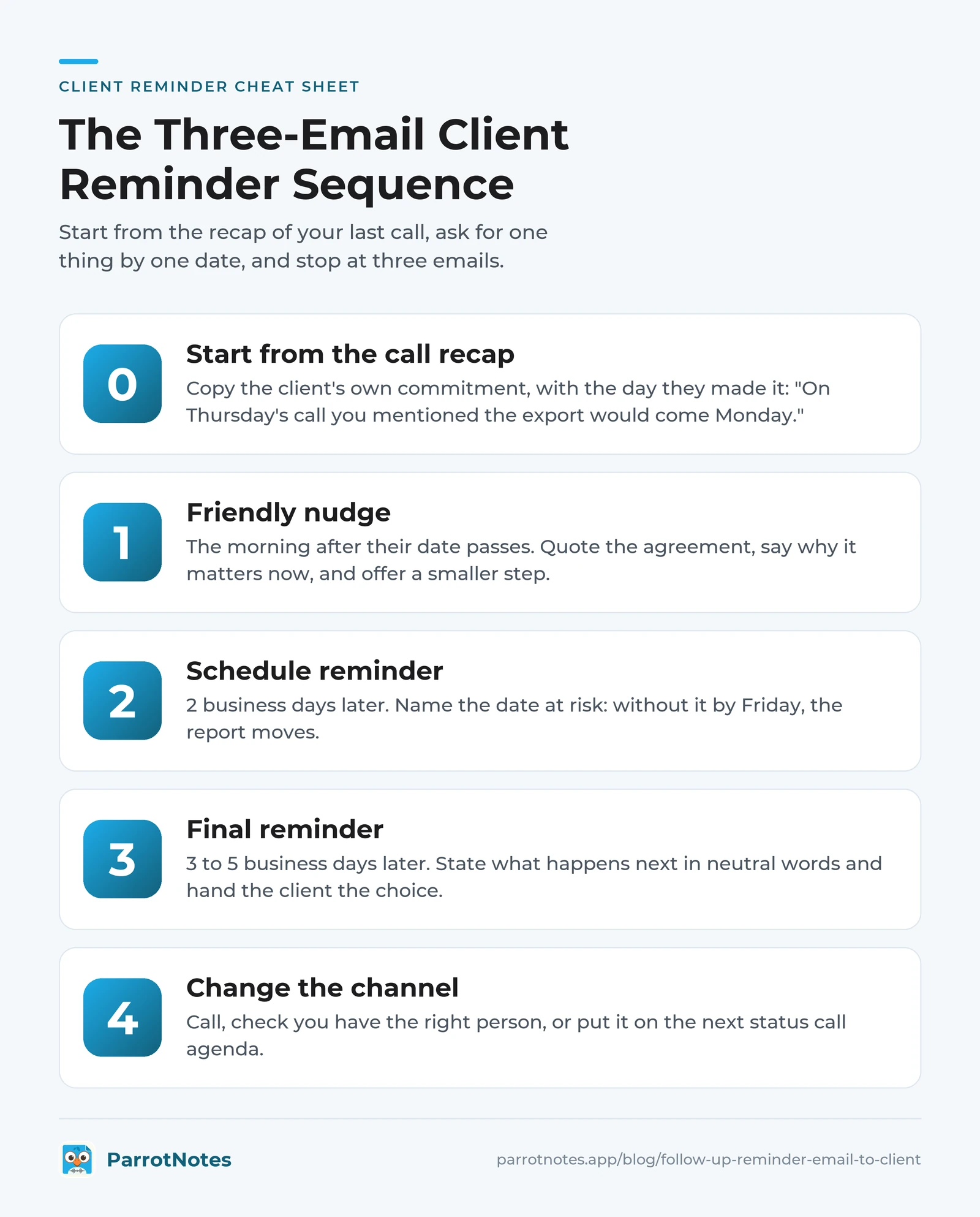
Three emails is enough. After the third, email has stopped working and you need a different channel (more on that below). Each email gets a little shorter and a little more specific about the cost of waiting.
Email 1: the friendly nudge
Subject: [Item] for [project]: quick reminder

Hi [Name],

On [day]'s call you mentioned [item] would come by [date].
Just checking it's still on track.

I need it by [date] to keep [deliverable] on [date].
If the full [item] isn't ready, [smaller step] gets me started.

Thanks,
[You]
Email 2: the schedule reminder
Subject: Still need [item] to keep [deliverable] on [date]

Hi [Name],

Following up on [item] from our [day] call. Without it by [date],
[deliverable] moves from [date] to [new date].

Could you send it, or tell me who on your team can?
I can also hop on a 10-minute call if that's quicker.

Thanks,
[You]
Email 3: the final reminder
Subject: Decision needed: [item] for [project]

Hi [Name],

I haven't been able to get [item] for [project], so I want to
make the next step clear.

If I have it by [date], we keep [deliverable] on [date].
If not, I'll [pause this work / move to the next phase /
proceed with option A] and we'll set a new date on our next call.

Either way is fine. I just don't want it to surprise you.

Thanks,
[You]
The final email isn't a threat. It states what happens next, in neutral words, and hands the client the choice.
Follow-up reminder email to client templates for every delay
The sequence above works for anything. These versions change the subject line, the first nudge, and the line that matters in the later emails for the six delays client projects hit most.
1. Waiting on feedback on a deliverable
Subject: Feedback on [deliverable] by [date]?

Hi [Name],

On [day]'s call we agreed your team would send feedback on
[deliverable] by [date]. Have you had a chance to look?

A short list is plenty. If everything's fine, a "looks good"
lets us move to [next phase].
- Second reminder line: "Without feedback by [date], round two moves to [date]."
- Final reminder line: "If I don't hear by [date], I'll treat this version as approved and start [next phase]. Reply before then if you'd like changes."
Only use "treat as approved" if your contract or statement of work allows it. If you're not sure, say "I'll pause [next phase]" instead.
2. Waiting on approval or sign-off
Subject: Sign-off needed: [deliverable] for [project]

Hi [Name],

[Deliverable] is ready for sign-off (attached, plus the link).
On [day]'s call you mentioned [approver] would sign off by [date].

A reply with "approved" is all I need to [launch / send to print /
start the build] on [date].
- Second reminder line: "Is [approver] the right person, or should I send this to someone else?"
- Final reminder line: "Without sign-off by [date], [launch] moves to [date]."
The second line often unlocks it. Delays at sign-off are usually about the wrong person, not the wrong work.
3. Waiting on missing assets or information
Subject: Still need [assets] for [project]

Hi [Name],

Quick checklist of what's still outstanding from our [day] call:

- [Item 1]: [owner on their side]
- [Item 2]: [owner on their side]

I have everything else. Once these arrive, [deliverable]
is [X] days of work.
- Second reminder line: "Could you send what you have now? I can start with [item 1] and slot [item 2] in later."
- Final reminder line: "I'll pause [deliverable] until these arrive, and we'll reset the date once they do."
A checklist turns a vague chase into a to-do the client can forward. Our action items template has a format you can reuse.
4. Waiting on a decision
Subject: Option A or B for [topic]?

Hi [Name],

On [day]'s call we narrowed [topic] down to two options:

A: [one line]
B: [one line]

Which one should we go with? A one-letter reply works.
I need it by [date] to keep [milestone] on [date].
- Second reminder line: "If it helps, I'd recommend [A] because [one reason]."
- Final reminder line: "If I don't hear by [date], I'll go with [A], as we discussed on the call. Reply before then to switch."
5. Waiting on a signed change order
When a client asks for something outside the agreed scope ("can you also add the Q2 numbers?"), the work shouldn't start until the change is signed. Our agency client meeting guide covers how to handle that request in the meeting itself.
Subject: Change order for [new item]: ready to sign

Hi [Name],

On [day]'s call you asked us to add [new item]. Attached is the
change order: [one-line scope], [price or hours], [new date].

Once it's signed, we start. The original scope stays on track
in the meantime.
- Second reminder line: "Happy to walk through the change order in 10 minutes if anything looks off."
- Final reminder line: "I'll keep [new item] on hold until it's signed and continue with the original scope."
6. Waiting on an overdue invoice
Keep payment reminders polite and factual. They are not the place for penalties you haven't agreed in writing. Check your contract's payment terms, and take proper advice before anything beyond a reminder.
Subject: Invoice [number] for [project]: due [date]

Hi [Name],

A quick reminder that invoice [number] for [amount] was due
on [date]. It's attached again here.

If it's already in your payment run, please ignore this.
If anything's holding it up, let me know and I'll sort it.
- Second reminder line: "Could you let me know when [number] is scheduled for payment, or who in accounts I should contact?"
- Final reminder line: "Invoice [number] is now [X] days overdue. I'd like to settle this before [next phase] begins. Could we talk this week?"
HubSpot's advice to agencies is worth copying here: when a client is late paying again and again, a senior person should talk to them by phone before any more emails go out (HubSpot).
Subject lines for client reminder emails
Your subject line should name the project and the item, so the client can find it later in search. Some that work:
- Data export for the Q3 report: quick reminder
- Feedback on homepage draft by Friday?
- Sign-off needed: spring campaign brief
- Option A or B for the launch date?
- Still need logo files for the Rome event
- Change order for Q2 numbers: ready to sign
- Invoice 1042 for October: due November 15
Avoid "Just checking in," "Following up," and "URGENT." The first two say nothing; the third trains the client to ignore you.
This is also where client reminders differ from sales follow-ups. A prospect who hasn't bought owes you nothing, so a quote follow-up email has to add new value each time. A client has already agreed to the work, so your reminder only needs to quote what they agreed.
When email stops working
Dana leads accounts at a 12-person marketing agency. Her client's brand director had to sign off on a campaign brief before the agency could book a photographer. Dana sent the friendly nudge, then the schedule reminder. Nothing.
Before the final email, she checked the recap from the last status call. The brand director had said, "Run it past Paolo too." Paolo had never been copied on anything. Dana sent the final reminder to both, quoting that line, and Paolo signed off the next morning.
When three emails get no answer, try these in order:
- Change the channel. Call, or ask for 10 minutes at the start of the next status call.
- Check you have the right person. Go back to your recap and look for who else was named.
- Bring in your main contact. If the delay sits with someone else on their team, ask your contact who can unblock it.
- Put it on the status call agenda. Our status meeting guide shows how to keep those updates short.
- Pause the work, as your contract allows. Say so in writing, with the date work restarts once you have what you need.
Send your next reminder from the recap
A good follow up reminder email to a client is short, quotes what was agreed, and asks for one thing by one date. To recap:
- Start every reminder from the client's own words in your last call recap
- Wait about two business days when no date was set, since most replies come within a day
- Send three emails at most: the friendly nudge, the schedule reminder, and the final reminder
- Match the template to the delay: feedback, sign-off, assets, a decision, a change order, or an invoice
- Switch to a call or the status meeting when email stops working
Back in Milan, Marco's first reminder quoted Giulia's line from Thursday's recap. She replied in 20 minutes with the export and an apology; it had been waiting in her drafts.
Your next status call is probably already on the calendar. Record it with the client's permission, send the recap the same day, and download ParrotNotes free so the next reminder starts with the client's exact words.
Frequently Asked Questions
How do you write a follow-up reminder email to a client?
Name the project and the item in the subject line. Open by quoting what the client agreed on your last call, say why it matters now in one sentence, and ask for one thing by a specific date. Offer a smaller step if the full item isn't ready, and keep the whole email short enough to read on a phone.
How long should you wait before sending a reminder email to a client?
If the client gave a date, send the first reminder the morning after it passes. If no date was set, wait two to three business days. Most email replies arrive within a day, so silence after two business days usually means the email is buried, not refused.
How many reminder emails should you send a client?
Three is enough: a friendly nudge, a schedule reminder that names the date at risk, and a final reminder that says what happens next. After that, call the client or raise it on your next status call instead of sending a fourth email.
How do you politely remind a client about an overdue invoice?
Send the invoice again the day after it's due with a short, factual note, and ask the client to ignore it if payment is already scheduled. Follow up at 7 and 14 days, then call. Check your contract's payment terms before mentioning any late fees, and take proper advice before going further.
What should the subject line of a client reminder email say?
Name the project and the exact item, like "Sign-off needed: spring campaign brief" or "Invoice 1042 for October: due November 15." Avoid vague subjects such as "Just checking in" and alarm words like "URGENT," which make the email easier to ignore.
Related Posts
RFQ Email Format: How to Request a Quote and Answer One
RFQ email format for buyers and suppliers: subject lines, a request to copy, and the supplier's acknowledgment, clarifying email and quote reply, with samples.
Production Meeting Agenda and Minutes for Manufacturing Plants
Run a 15-minute production meeting at the board: a timed agenda, a minutes template to copy, and sample minutes showing how open actions carry to the next day.
Open-Ended Questions in Qualitative Research: 40 Examples
40 open-ended questions in qualitative research, grouped by type, with weak-to-strong rewrites and an interview order. Record and quote the answers free.