
Sales Tools Every Field Rep Should Carry in 2026

Sarah Johnson
Product Manager at ParrotNotes with 5+ years of experience in productivity tools and AI technology.
Table of Contents
- 1.Why most sales tools lists don't fit a field rep
- 2.Sales tools for planning the day
- 3.Sales tools for the visit itself
- 4.Tools for windshield time
- 5.End-of-day tools: call reports, expenses, and mileage
- 6.The field rep's carry checklist
- 7.How to keep your sales tools stack small
- 8.Pack lighter, remember more
It's 2:40 PM and Dana is sitting in a customer's parking lot with the engine off. She sells packaging across a three-county territory, and this was her fourth visit of the day.
One of this morning's buyers asked for a revised quote by Friday. Was it the bakery or the co-packer? Her notebook says "rev. quote!!" and nothing else.
Dana doesn't have a shortage of sales tools. Her phone has 11 of them. What she has is a stack chosen for someone who sells from a desk, with two monitors and a headset. None of it helps in the two minutes between shutting the car door and pulling out.
That's the gap this guide fills. Below are the sales tools worth carrying in 2026, sorted by the moments of a field rep's day: planning, the visit, windshield time, and the end-of-day call report. You'll also get a carry checklist you can print and keep in your bag.
Here's the short version of the sales tools a field rep needs:
| Moment of the day | The job | Tool to carry |
|---|---|---|
| Night before | Know the account, plan the drive | CRM mobile app, route planner, LinkedIn Sales Navigator |
| The visit | Capture what's said, close, book the next step | Notebook, ParrotNotes, e-signature, scheduling link |
| Windshield time | Two-minute debrief before you pull out | ParrotNotes |
| End of day | Call report, receipts, mileage | ParrotNotes notes, Expensify, MileIQ |
Why most sales tools lists don't fit a field rep
Search for sales tools and you'll find lists of 8, 15, or 16 products sorted by software category: CRM, sales engagement, conversation intelligence, revenue orchestration. They're written for a team lead choosing a platform, not for a rep with one free hand. Even roundups of field sales apps sort by software category, not by your day.
The numbers explain why that matters. According to Salesforce's State of Sales statistics, sellers use an average of 8 tools to close deals, and 42% of sales reps feel overwhelmed by too many tools. The same page reports that reps spend 60% of their time on non-selling tasks.
A desk seller can absorb an extra tab. You can't. Every tool you add has to work in a parking lot, a plant lobby, or a coffee shop with weak signal. It also has to give back more minutes than it takes.
The carry test: four questions before a tool earns a place
Before anything goes on your phone or in your bag, run it through four questions:
- Does it work with one hand on a phone? If it needs a laptop, it's an office tool. Keep it at the office.
- Can you finish the job in under two minutes? That's the real gap between visits once you subtract driving.
- Does it survive bad signal? Customer sites, basements, and rural routes aren't known for coverage.
- Does it replace something, or add to it? A tool that adds a fifth place to type the same note fails.
Here's one example of a tool that passes. ParrotNotes records a conversation or a dictated debrief on the phone you already own, keeps recording with the screen locked, and turns the audio into a summary and action items. Recording works offline, and transcription and AI run once you have a connection again. You can try ParrotNotes free and test it against the same four questions.
Sales tools for planning the day
The best field days are decided the night before. Three tools cover it: your CRM's mobile app, a route planner, and something for pre-call research.
Your CRM's mobile app
Whatever CRM your company runs, install its mobile app and log in before you need it. You're not doing pipeline analysis in the car. You need three things from it: the account's last activity, open opportunities, and the stakeholders' names.
Check those the evening before, not in the customer's lobby. Walking in knowing that the last call report mentioned a line expansion changes the first five minutes of the meeting.
A route planner
Drive time is the biggest hidden cost in a territory, so sales route planning software earns its place early. For a light day, Google Maps does the job. Google's help page for directions lists a limit of 9 stops per route, final destination included.
If you run denser days or want your accounts on a map, look at a dedicated field sales app, the category that covers route planners and territory management software. Badger Maps says it builds optimized routes with up to 120 stops, runs on iOS and Android, and lets you fill out a check-in form at each visit. Its site lists a 14-day free trial, which is long enough to test it across two full weeks of your territory.
Pre-call research
Ten minutes of research beats an hour of small talk. LinkedIn Sales Navigator sends lead and account alerts when someone you've saved has an update, such as a job or role change. LinkedIn also lists iOS and Android apps, so the check can happen over coffee.
For a field rep, that alert is a reason to visit. A new plant manager at an account you've served for six years is either a risk or an opening, and you want to know before your competitor does.
Sales tools for the visit itself
Inside the meeting, the rule flips. The best sales tools are the ones the customer barely notices.
A notebook and a pen that works
Paper still wins for a quick sketch of a production line or a number you need to circle. Carry a notebook small enough for a jacket pocket and two pens.
Just don't ask it to be your memory. Handwriting done while you're nodding, listening, and thinking about the next question is how "rev. quote!!" happens.
A recorder that turns the meeting into notes
This is where AI tools for sales reps have changed the job. Ask the customer's permission, put your phone on the table, and record the conversation with ParrotNotes. The rules on recording differ by state and country, so ask first, every time, and respect a no.
Consider how this plays out for Marcus, who sells industrial adhesives. On a Tuesday plant walk-through, he asks the operations manager if he can record so he doesn't miss a spec. She agrees.
For the next 25 minutes, Marcus watches the line instead of his notepad, and he spots the manual applicator station that becomes the center of his proposal. Back in the car, he has a transcript, an AI summary, and a list of action items, including the two spec sheets she asked for.
There's no meeting bot to invite and no extra device to charge, because in-person meetings don't have a calendar link. If you're weighing sales call recording software, our comparison of the best AI note-taking apps for sales teams goes deeper. And if your territory crosses languages, ParrotNotes Pro transcribes in 99+ languages and can translate the transcript.
E-signature and scheduling
When a buyer says yes in person, don't let the paperwork wait for Monday. Docusign says signers can complete documents on any device with no account required, and it offers mobile apps for iOS and Android. That means a customer can sign on their own phone before you leave the building.
The same goes for the next meeting. Book it before you stand up. Calendly's free plan includes one event type and one calendar connection, which is enough for a single "30-minute follow-up visit" link you can text from the lobby.
Tools for windshield time
Here's where field reps win or lose the day. Most sales tools are built for the meeting or the desk, and almost none for the two minutes in between. The detail from a visit starts fading the moment you start the car, and by the fourth stop it's blended with the other three.
The fix is a two-minute debrief before you pull out. Stay parked, open ParrotNotes, and talk through what happened: who was in the room, what they care about, what you promised, and the next step with a date. Dictate it parked, not driving. The script is in the checklist below.
By the time you reach the next stop, that ramble is a clean summary with action items pulled out, and ParrotNotes can draft the follow-up email from it. You start from a draft instead of a blank screen at 9:00 PM. If follow-through is where your deals slip, our guide on how to never miss action items from sales calls covers the full routine.
The free plan fits this habit well. You get 100 minutes of recording a month, up to 30 minutes per recording. Every recording gets an AI summary, and 5 AI-powered recordings a month add action items and sales frameworks. At two minutes a debrief, 100 minutes covers about 50 visits.
Want your next debrief written for you? Download ParrotNotes free and dictate it from the driver's seat before you leave your next visit.
End-of-day tools: call reports, expenses, and mileage
The last stretch of the day is admin, and it's where Saturday mornings go to die. Three sales tools shrink it.
Call reports from the day's recordings. If you debriefed after each visit, your call report is already written in pieces. Label each note with the account name, search by keyword when your manager asks about a deal, and paste the summaries into your CRM. If you qualify with a framework, ParrotNotes can structure the notes with BANT, MEDDIC, or SPIN. Our BANT qualification guide shows what to listen for.
Receipts. Expensify scans the details from a photo of a receipt, and its site says it's completely free to use as an individual. Snap the lunch receipt at the table and the shoebox is gone.
Mileage. MileIQ tracks your drives and lets you swipe to classify each one as business or personal. Its free plan includes 40 drives every month. If your company reimburses mileage, or you're a 1099 rep, that log saves you from rebuilding a year of drives from memory.
If your day runs long, ParrotNotes Pro raises the ceiling: 3,000 minutes of recording a month and recordings up to 3 hours. It costs $19.99 a month, or $14.99 a month billed annually. That's the plan for reps who record full meetings, not only debriefs.
The field rep's carry checklist
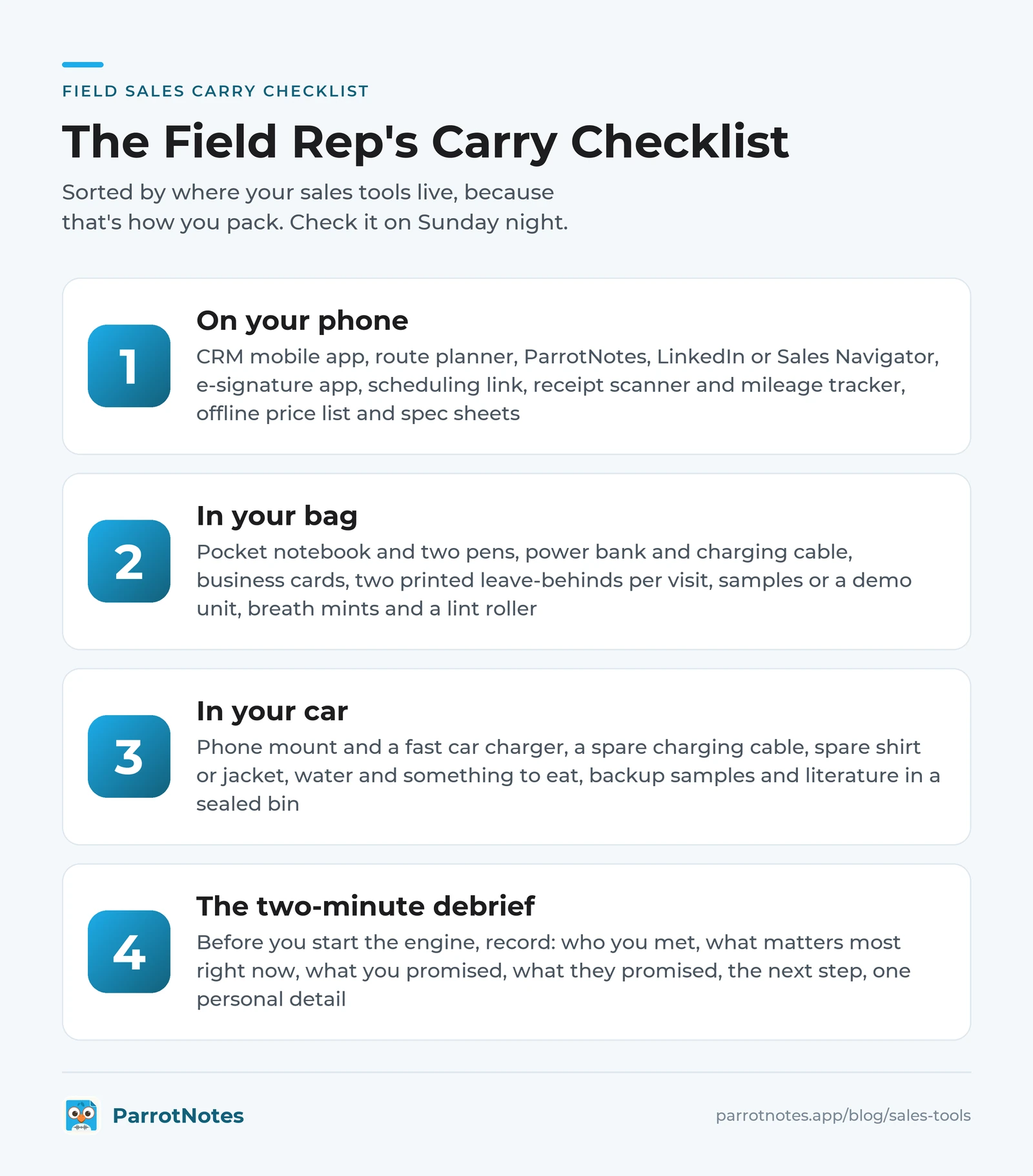
Print this, or screenshot it, and check it on Sunday night. It's sorted by where your sales tools live, because that's how you pack.
On your phone
- CRM mobile app, logged in, with tomorrow's accounts opened once
- Route planner with tomorrow's stops loaded
- ParrotNotes for recording meetings (with permission) and dictating debriefs
- LinkedIn or Sales Navigator for pre-call research
- E-signature app with your standard agreement saved as a template
- One scheduling link for follow-up visits
- Receipt scanner and mileage tracker
- Offline copies of your price list and top three spec sheets
In your bag
- Pocket notebook and two pens
- Power bank and a short charging cable
- Business cards (yes, still)
- Two printed leave-behinds per visit planned
- Samples or a demo unit, checked and clean
- Breath mints and a lint roller
In your car
- Phone mount at eye level and a fast car charger
- A spare charging cable that never leaves the glovebox
- Spare shirt or jacket
- Water and something to eat that isn't a drive-through
- Backup samples and literature in a sealed bin
The two-minute debrief script
Before you start the engine, record yourself answering six prompts:
- Who did I meet, and what's each person's role?
- What did they say matters most right now?
- What did I promise, and by when?
- What did they promise me?
- What's the next step, and is it on the calendar?
- What's one personal detail worth remembering?
Six answers take about two minutes. That recording is your visit report, your follow-up email, and your prep for the next call.
How to keep your sales tools stack small
More sales tools won't fix a tool problem. The average seller already juggles eight, and four in 10 feel buried by them. The better rule for a field rep is one tool per moment of the day, and nothing that fails the carry test.
Take Priya, who covers a territory of 140 accounts selling commercial cleaning equipment. In March she counted 11 sales apps on her phone. For 30 days she kept a tally of which ones she opened in the field, not at her desk.
Five made the cut: CRM, route planner, recorder, e-signature, and expenses. She deleted the other six, and her end-of-day admin dropped from a laptop session at the kitchen table to 20 minutes in the driveway.
You can run the same audit this month:
- List every sales app on your phone.
- Mark each one with the moment it serves: plan, visit, windshield time, or end of day.
- Where two apps serve the same moment, keep the one you opened more.
- Delete anything you didn't open in the field for 30 days.
Your company will mandate a few tools, like the CRM and whatever field sales software the team reports in, and that's fine. The audit is about the ones you chose yourself.
Pack lighter, remember more
The right sales tools for a field rep aren't the ones with the longest feature list. They're the ones that pass the carry test: one hand, two minutes, weak signal, and no duplicate typing.
Plan the night before with your CRM and a route planner. Let a recorder carry the meeting so you can watch the room. Debrief for two minutes before you start the engine, and let the receipts and mileage log themselves. Then print the checklist and cut every app that didn't earn its place.
Remember Dana and her "rev. quote!!" note? With a two-minute debrief after each visit, she'd have the buyer's name, the Friday deadline, and a drafted follow-up email waiting before her next stop.
Of all the sales tools here, start with the habit that pays back fastest. Get ParrotNotes free, record your next debrief before you pull out of the lot, and see what your follow-up looks like when nothing gets lost on the drive.
Frequently Asked Questions
What are sales tools?
Sales tools are the apps, software, and physical gear a salesperson uses to find customers, run meetings, follow up, and report on deals. For a field rep, that means a CRM mobile app, a route planner, a way to capture meeting notes, e-signature, and expense and mileage tracking. A well-packed bag and car count too.
What sales tools does a field sales rep need most?
Start with four: your CRM's mobile app, a route planner, a recorder that turns meetings and dictated debriefs into notes and action items, and an e-signature app. Those cover planning, the visit, windshield time, and closing. Add expense and mileage tracking once the first four are habits.
Are free sales tools good enough for a field rep?
For a solo rep, free tiers go a long way. Google's help page lists a limit of 9 stops per route in Google Maps. Calendly's free plan includes one event type, and MileIQ includes 40 free drives a month. ParrotNotes includes 100 minutes of recording a month with an AI summary on every recording. Upgrade when a limit costs you time.
Is it legal to record a sales meeting?
Recording rules vary by state and by country. The Reporters Committee's recording guide explains that a number of US states require consent from all parties, not only from you. The safe habit is to ask every time, say why ("so I don't miss a spec"), and stop if anyone objects. A dictated debrief in your car, with only you speaking, avoids the question entirely.
How many sales tools should a rep use?
As few as cover the day. Salesforce reports that sellers use an average of 8 tools and that 42% of reps feel overwhelmed by them. A field rep can run a full day on five or six: CRM, route planner, recorder, e-signature, scheduling, and expenses.
Related Posts
Stakeholder Mapping for Complex Sales: Template and Example
Stakeholder mapping for complex sales: a fill-in template, a worked example, and 24 questions that reveal who decides. Copy the template and map your deal.
Sales Coaching Software: What to Look For
Buying sales coaching software for a field team? Use these 8 criteria, a 100-point scorecard, and 15 demo questions to choose a tool your reps will use.

ParrotNotes vs Otter.ai for Sales Teams (2026)
Honest comparison of ParrotNotes vs Otter.ai for sales teams. See how they stack up on pricing, languages, mobile recording, and CRM integration.