
Asynchronous Meetings: When to Skip the Call and How to Run One

Sarah Johnson
Writes about field sales, meeting notes and voice-first workflows at ParrotNotes. Every article is reviewed by the ParrotNotes product team before it goes live.
Table of Contents
Priya runs a team of eight in a regional office. Every Tuesday at 10, they meet for an hour of updates. Six people talk in turn, two people need something from someone, and nobody decides anything. By 11 the team has lost eight working hours, and the two real questions could have been settled in a thread. (Priya is an illustration, not a real customer.)
You've sat in that meeting. You probably also know the fix: make it an asynchronous meeting. The harder part is knowing which meetings can go async, and running them so they don't turn into a pile of unread messages.
This guide covers what an asynchronous meeting is, a six-question test for when to skip the call, a table of ten common office meetings sorted into async, hybrid, or live, and a five-step way to run one, with two templates you can copy.
If you'd rather talk than type your update, ParrotNotes records it on your phone and gives you a transcript and a summary you can share.
What is an asynchronous meeting?
An asynchronous meeting is a meeting where people take part at different times instead of all at once. The organizer shares the context, people respond within a set window, one person makes the call, and a written summary closes it. Nobody has to be in the same room or on the same call.
That's the whole asynchronous meeting meaning (or async meeting meaning, if you use the short form): same goal as a meeting, no shared time slot. A synchronous meeting is the opposite, where everyone is present at the same moment, in a room or on a video call.
An asynchronous meeting example: instead of a 30-minute call to pick a vendor, the team lead posts a one-page brief with three quotes on Monday, asks for comments by Wednesday at noon, and announces the choice on Thursday morning.
| Synchronous meeting | Asynchronous meeting | |
|---|---|---|
| When people take part | All at the same time | Each at a time that suits them |
| Where it happens | Room or video call | Shared doc, thread, or recorded update |
| Best for | Debate, conflict, trust, sensitive news | Updates, reviews, simple decisions |
| Record left behind | Only if someone takes notes | Built in: the brief, replies, and summary |
| Main risk | Wasted hours | Slow replies, no clear decision |
Why bother? Microsoft's Work Trend Index report on the "infinite workday" found that people using Microsoft 365 are interrupted every 2 minutes by a meeting, email, or notification, and that 48% of employees say their work feels chaotic and fragmented. Every meeting you move to async gives back a block of focus time.
Sync or async: a six-question test
Most guides say "not every meeting should be async" and stop there. Here is a test you can run in a minute. Answer each question for the meeting you're planning. Each "yes" is one point toward a live call.
- Will people need to argue it out? Real disagreement, with several rounds of back and forth.
- Is the news personal or sensitive? Reorganizations, performance, someone leaving.
- Does the decision need to happen today? A reply window of a day or two would cost too much.
- Is the group building something from scratch? Brainstorming, planning a new project, a workshop.
- Is trust low or the team new? New members, a recent conflict, or people who've never met.
- Is it a one-on-one or a coaching talk? Tone matters more than content.
What your score means:
- 0 to 1 points: go async. Use the five steps below.
- 2 to 3 points: go hybrid. Share the updates async first, then hold a short live call only for the items that scored.
- 4 to 6 points: meet live. Send a pre-read anyway, so the call starts with the discussion, not the background.
Priya's Tuesday meeting scores zero: no debate, no sensitive news, nothing urgent. The two people with blockers can be settled in a 15-minute hybrid follow-up.
Which office meetings can go async
Here's how ten common office meetings tend to score. Your team may differ, so treat the table as a starting point and run the test anyway.
| Meeting | Verdict | Why |
|---|---|---|
| Weekly status update | Async | Reporting, not discussing |
| Project progress review | Async | Numbers and dates read faster than they're spoken |
| Document or design review | Async | Comments are better written next to the thing |
| Simple decision with clear options | Async | Needs a deadline and an owner, not a room |
| Company or team announcement | Async (with a Q&A thread) | Unless the news is sensitive (question 2) |
| Daily standup | Hybrid | Updates async, a short call for blockers |
| Sprint or month-end retrospective | Hybrid | Collect points async, discuss the top two live |
| Project kickoff | Live | Building from scratch, new group |
| Brainstorming | Live | Ideas build on each other in real time |
| One-on-one | Live | Tone and trust matter most |
For standups, the daily standup meeting guide has a written async format and the point at which a team should switch to it. If you're reviewing your whole calendar rather than one meeting, start with the meeting cadence guide, which gives every recurring meeting a verdict: keep, shrink, go async, merge, or cut.
How to run an asynchronous meeting in five steps
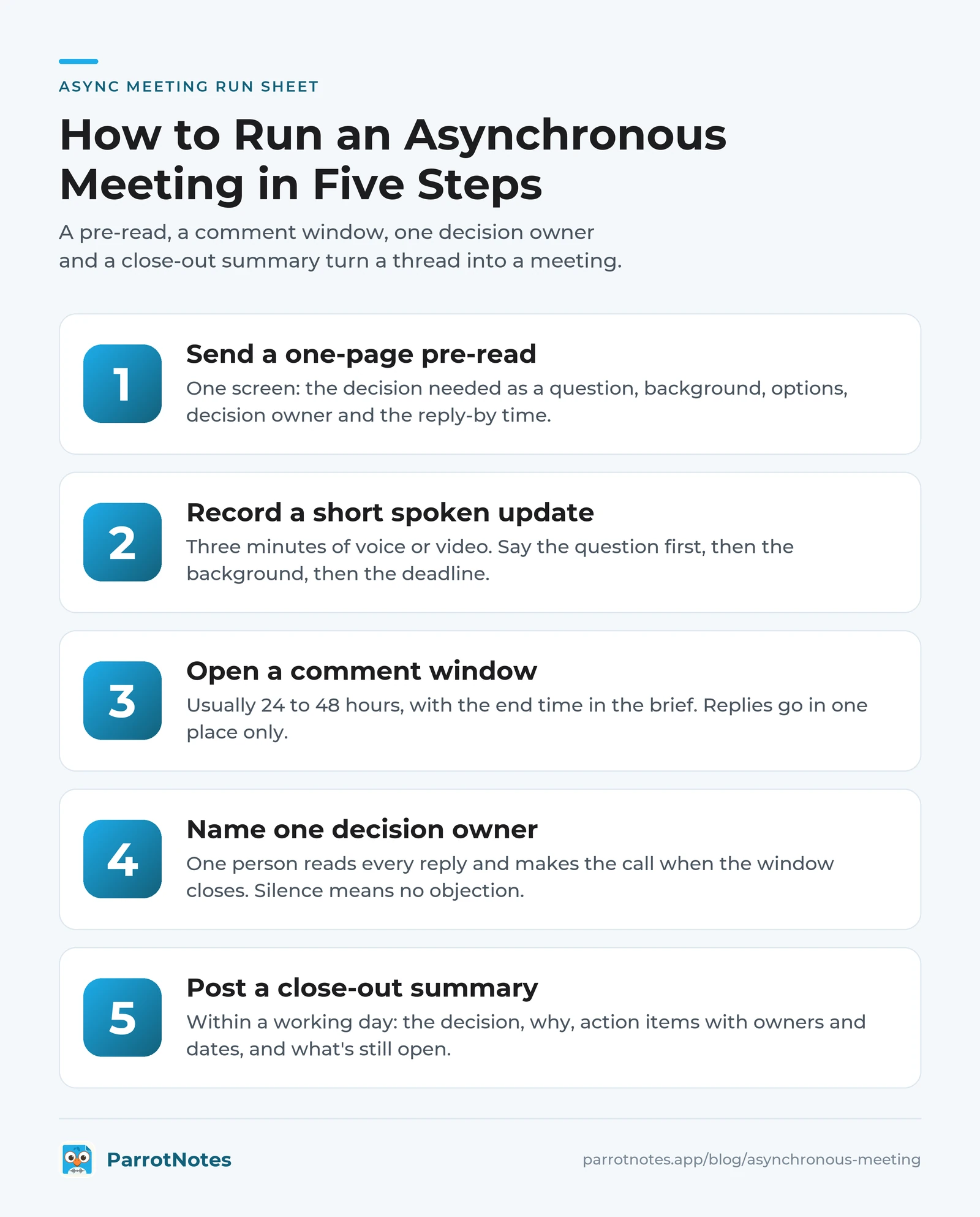
An async meeting fails for one of two reasons: people don't know what's being asked, or nobody closes it. These five steps fix both.
Step 1: Send a one-page pre-read
The pre-read replaces the first 20 minutes of a live meeting, the part where someone explains the background. Keep it to one screen. Copy this async brief:
ASYNC MEETING: [topic]
Decision or input needed: [one sentence, as a question]
Background: [3 to 5 bullet points, links to the files]
Options: A) ...  B) ...  C) ...
Recommended: [option + one line why, or "no recommendation"]
Decision owner: [name]
Reply by: [day, date, time]
How to respond: [reply in this thread / comment on the doc]
What happens next: [owner posts the decision by day, date]
The "decision or input needed" line matters most. "Thoughts on Q1?" gets nothing back. "Should we move the Q1 launch from 3 March to 17 March?" gets answers.
Step 2: Record a short spoken update
Some things are slow to write and quick to say: why a date slipped, what a customer meant, how a plan fits together. A three-minute voice or video update often replaces a page of text, and people can listen at a time that suits them.
Keep it short. Say the question first, give the background, then repeat the question and the deadline. Share the summary and transcript with the recording, so people can skim instead of listening if they prefer.
Step 3: Open a comment window
Give people a fixed window, usually 24 to 48 hours, and put the end time in the brief. Shorter windows punish people in meetings or on leave; longer ones let the topic go stale.
Ask for replies in one place only, the thread or the doc. Set one norm everyone can keep, such as checking open async meetings once a day. Atlassian's guide to running asynchronous meetings makes the same point: async only works when everyone uses the same tools and knows what's expected.
Step 4: Name one decision owner
Async meetings without an owner drift. Name one person in the brief who reads every reply and makes the call when the window closes, even if not everyone agreed. Silence by the deadline counts as "no objection"; say so in the brief.
If the replies show a real split, that's a "yes" on question 1 of the test. The owner can call a 15-minute live meeting for just that point.
Step 5: Post a close-out summary
The summary is what turns a thread into a meeting. Post it in the same place, within a working day of the deadline:
CLOSED: [topic]
Decision: [what was decided, by whom, on what date]
Why: [one or two lines, including the main objection and how it was handled]
Action items: [task, owner, due date]
Still open: [anything parked, with who picks it up]
Add the decision to your team's decision log so it can be found next quarter. For a longer format, the meeting summary template works for both live and async meetings.
Back to Priya. In this illustration, she swaps the Tuesday hour for a Monday brief, a Wednesday noon deadline, and a Thursday close-out. The two blockers go to a 15-minute call with the three people involved. The other five people get their hour back, and the decisions are in writing for the first time.
Where asynchronous meetings go wrong
- Nobody replies. The question is vague or the deadline is missing. Rewrite the first line of the brief as a yes-or-no or A-or-B question.
- The thread never ends. There's no owner or no close-out. Steps 4 and 5 are not optional.
- Everything goes async. The team stops talking. Keep one-on-ones, kickoffs, and hard conversations live, and run the test before you move a meeting.
- Updates are too long. A 15-minute video is a meeting nobody can skim. Keep recorded updates under five minutes and lead with the question.
- People feel left out. Thread replies favor fast typists. A spoken update and a summary give everyone the same context, however they prefer to take it in.
Take Daniel, a facilities manager (another illustration). He moved his monthly building review to async but left out the deadline. Two weeks later, the thread had three replies and no decision.
So he reposted the brief with "Reply by Friday 4 pm" and his name as decision owner. Six of seven people answered by Thursday.
Record your async update with ParrotNotes
ParrotNotes is a recording app for your phone, so it fits step 2 and step 5. It isn't a thread or a video tool; you share its output in the place your team already uses.
Here's how it works as of October 2026:
- Open ParrotNotes and record your update, the same way you'd leave a voice message. There's no meeting bot to invite.
- When you stop, you get a transcript and an automatic summary. The summary comes on every recording, on every plan.
- On an AI-powered recording, ParrotNotes also pulls out action items and can draft an email. The Free plan includes 5 AI-powered recordings a month; Pro includes unlimited.
- Copy the summary into your async brief, or export the note as text or markdown, or share it as a link.
You can also record the 15-minute live follow-up and use its summary as the start of your close-out. Ask the people in the room before you hit record.
The Free plan gives you 100 minutes of recording a month, with each recording up to 30 minutes. That's plenty for short async updates. Pro is $19.99 a month ($14.99 a month billed annually) with 3,000 minutes a month, recordings up to 3 hours, and sharing without ParrotNotes branding. Get ParrotNotes free and record your next update instead of booking a call.
Key takeaways
- An asynchronous meeting has the same goal as a live one: a question, input, a decision. People just take part at different times.
- Score the meeting on six questions. Zero or one "yes" means async, two or three means hybrid, four or more means meet.
- Updates, reviews, and simple decisions go async. Kickoffs, brainstorming, one-on-ones, and sensitive news stay live.
- Every async meeting needs a pre-read, a comment window, one decision owner, and a close-out summary.
- A short spoken update often beats a long written one; share the summary with it.
Pick one recurring meeting this week, run the test, and try the five steps. If it works, use the meeting cost calculator to show your team the hours you gave back. When a meeting does stay live, a short status meeting format keeps it tight.
Frequently Asked Questions
What is an asynchronous meeting?
An asynchronous meeting is a meeting where people take part at different times instead of all together. The organizer shares a brief, people reply within a set window, a named owner decides, and a written summary closes it.
What is the meaning of a synchronous meeting?
A synchronous meeting is one where everyone takes part at the same time, in a room or on a call. It suits debate, brainstorming, sensitive news, and one-on-ones, where tone and quick back and forth matter.
What is an example of an asynchronous meeting?
A team lead posts a one-page brief with three vendor quotes on Monday, asks for comments by Wednesday at noon, and posts the decision and next steps on Thursday. Nobody joins a call, and the decision is in writing.
How long should an async meeting stay open?
Most teams use a 24 to 48 hour comment window. Put the exact end time in the brief, name the person who decides when it closes, and say that no reply by then means no objection.
Can you record an asynchronous meeting update?
Yes. A short voice or video update of three to five minutes often explains more than a page of text. With ParrotNotes you record it on your phone and get a transcript and summary to share with the team.
Related Posts
How to Use Dictation on Windows 11: Shortcut, Commands and Fixes
How to use dictation on Windows 11: press Windows key + H, say punctuation out loud, use Voice Access offline, and fix the microphone when voice typing fails.
Too Many Meetings? How to Cut Them Without Losing Alignment
Too many meetings at work? Audit your calendar in one sitting, give each cut meeting a replacement, and check after two weeks that your team is still aligned.
Sales Voicemail Scripts That Get Callbacks
Copy 10 sales voicemail scripts by situation, from first touch to breakup, each timed, plus greeting scripts for reps and a voicemail-and-email sequence.